

There is a particular phrase that IT leaders at enterprises using Crystal Reports have heard many times: "We'll migrate next quarter."
It has been "next quarter" for years. Not because Crystal Reports is a good fit for modern infrastructure - in most cases it isn't, and everyone knows it. The migration stays on the backlog because the real cost is not switching tools. It is rebuilding templates. Hundreds of them. One at a time.
This post explains why Crystal Reports migration stalls, what makes template rebuilding so expensive, and why AI-assisted report design is the first development in years that meaningfully changes the migration economics.
Why the Pressure to Move Is Real Now
Crystal Reports has been a fixture of enterprise reporting since the 1990s. For many organisations, it became the de facto standard for operational documents - purchase orders, financial statements, compliance reports, HR outputs - built up over a decade or more by developers who are no longer at the company.
Several forces are now making the "next quarter" postponement harder to sustain.
SAP licensing changes. SAP acquired Crystal Reports in 2008. Licensing has been restructured multiple times since, and many organisations report that runtime licensing costs have increased significantly for modern deployment patterns. The perpetual licensing model that made Crystal Reports attractive is no longer the default.
The .NET Framework dependency. Crystal Reports is deeply tied to .NET Framework (not .NET Core or .NET 5+). Any modernisation initiative - moving to .NET 8, containerising applications, migrating to Linux-based infrastructure - runs into Crystal Reports as a hard dependency. The tooling that was supposed to be invisible becomes a blocker.
Cloud migration incompatibility. Crystal Reports requires Windows Server infrastructure. Organisations moving workloads to cloud-native environments, or consolidating onto container platforms, find that Crystal Reports does not travel cleanly. Keeping it running often means maintaining a dedicated Windows VM specifically for report generation - technical debt with ongoing infrastructure cost.
Talent atrophy. The developer population that knows Crystal Reports fluently is shrinking. New graduates don't learn it. Experienced Crystal Reports developers are retiring or moving on. When something breaks or needs modification, finding someone who can confidently work with .rpt files and Crystal syntax is increasingly difficult and expensive.
None of these are new problems. What has changed is the accumulation - organisations that could defer migration five years ago are now finding that multiple pressures are hitting simultaneously.
The Real Problem Is Not the Tool Switch - It Is Template Debt
A common mistake in planning Crystal Reports migrations is treating "tool switch" and "template migration" as the same thing. They are not, and confusing them is how projects get badly scoped.
Switching to a modern reporting platform takes days: set up an environment, configure data connections, onboard the team. That part is straightforward.
Migrating 300 Crystal Reports templates is a different project entirely.
The .rpt file format is proprietary. There is no import pathway - no tool that reads a Crystal Reports file and produces a working template in another platform. For a step-by-step migration roadmap, see Crystal Reports Migration Roadmap. Every template must be rebuilt by a human who understands both what the original report did and how to implement it in the new tool.
This is compounded by what is typically embedded inside Crystal Reports templates:
Crystal formula fields. Crystal Reports has its own formula language - two variants of it (Crystal syntax and Basic syntax). Running total fields, conditional formatting expressions, cross-tab calculations, and date/string manipulation functions written in this syntax have no direct equivalent. They must be analysed and translated.
Grouping and sorting logic. Crystal Reports groups data at the report layer - records are grouped, sorted, and subtotalled inside the .rpt file. In a modern reporting architecture, this logic typically moves into the data layer (SQL queries, views, or API responses). A developer migrating these templates needs to decide what belongs in the query versus what belongs in the template.
Subreports. Crystal Reports subreports are common in complex documents - a main report embedding sub-documents with their own data connections and layout. These need to be understood and reconstructed individually.
Section structure. Crystal Reports uses a fixed section model (Report Header, Page Header, Group Header, Details, Group Footer, Page Footer, Report Footer). Modern template tools organise pages and content differently. There is no one-to-one translation; each template requires a design decision.
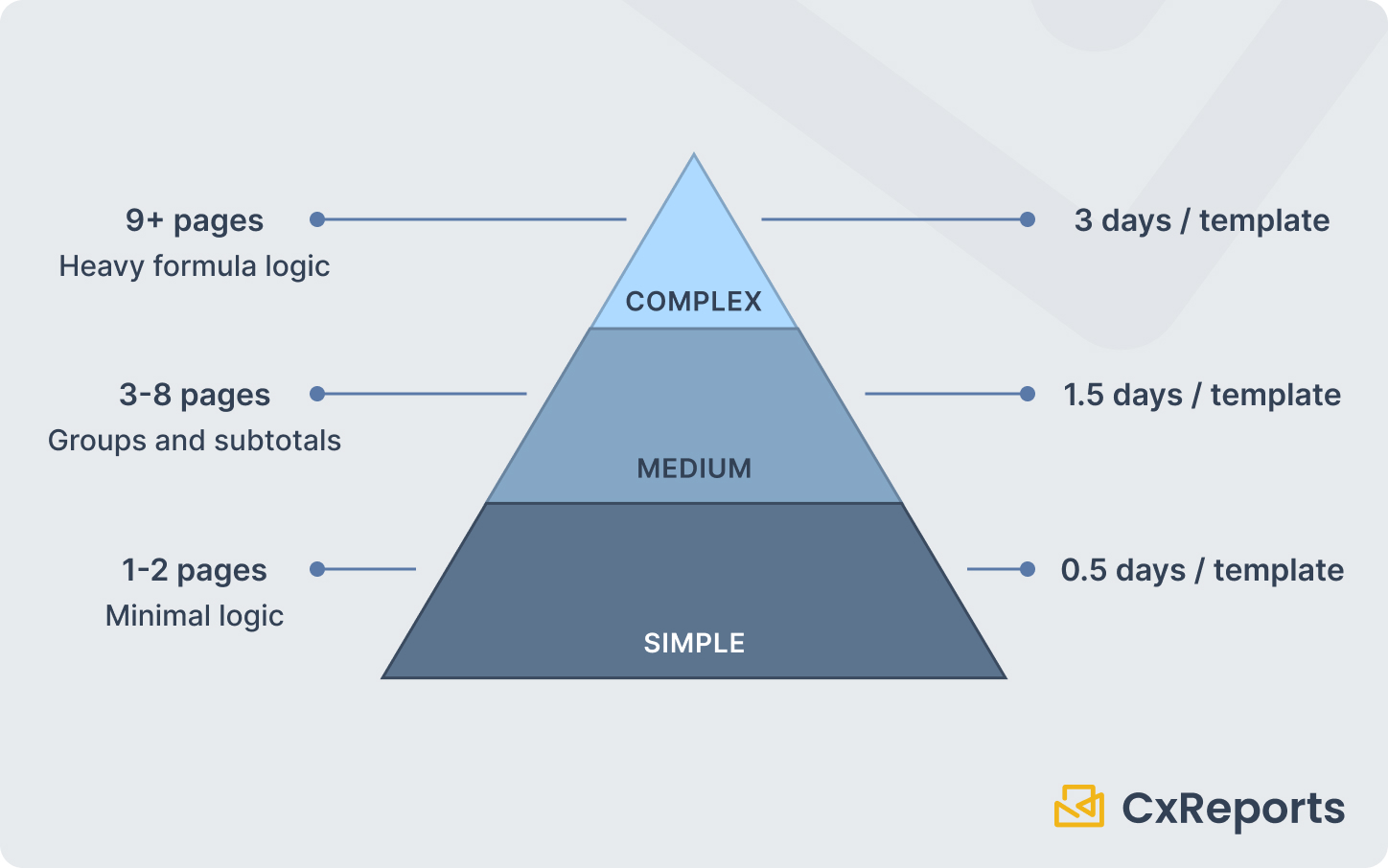
The practical result: a complex Crystal Reports template takes one to two days to analyse, translate, and validate. An organisation with 300 reports is looking at roughly 300–600 developer-days of effort. At a realistic throughput of one or two templates per developer per day, that is a 12–18-month project - assuming dedicated focus, which is rarely available.
This is why the migration stays on the backlog. It is not inertia or fear of change. It is a rational cost calculation. The project is too expensive, too risky, and too disruptive relative to the value delivered.
How AI-Assisted Design Changes the Economics
The traditional template migration workflow looks like this: a developer opens the Crystal Reports designer, studies what the existing report does section by section, then opens the new tool and builds the equivalent from scratch. The Crystal Reports template is a reference document. All the actual construction happens manually.
AI-assisted report design changes the starting position of that workflow.
Instead of building from zero, the developer describes the report - its purpose, its sections, the data it should display, the layout it should follow - and an AI assistant interprets that description and generates a working template structure as a starting point. In CxReports, the description can include the old report itself: export the Crystal report to PDF, attach it in the assistant chat, and ask the assistant to rebuild it. The developer's role shifts from construction to validation: reviewing what the AI produced, mapping data sources, correcting any misinterpretations, and refining the output until it matches the original report's intent.
This is not a magic transformation. Complex business logic still requires a skilled developer. Data source connections need to be established and tested. Output must be validated against the original Crystal Reports data, not just visually compared. The developer cannot walk away after prompting.
But the economics change meaningfully. A task that previously started with an empty canvas - build this 8-page financial statement from scratch - now starts with a populated canvas that the developer refines. The ratio of construction time to review-and-validation time shifts. Templates that previously took two days may take one. Templates that previously took one day may take an afternoon.
At migration scale, that shift compounds. Across 300 templates, cutting average rebuild time by 40% does not sound dramatic in isolation. Translated to developer-days, it is the difference between a 12-month project and a 7-month project - or between needing four developers and needing two.
How Crystal Reports Concepts Map to CxReports
CxReports is a modern reporting platform with a visual editor, data source integration, parameterisation, theming, and batch generation. Its concepts map to Crystal Reports with reasonable directness, which makes it a natural migration target for Crystal Reports users.
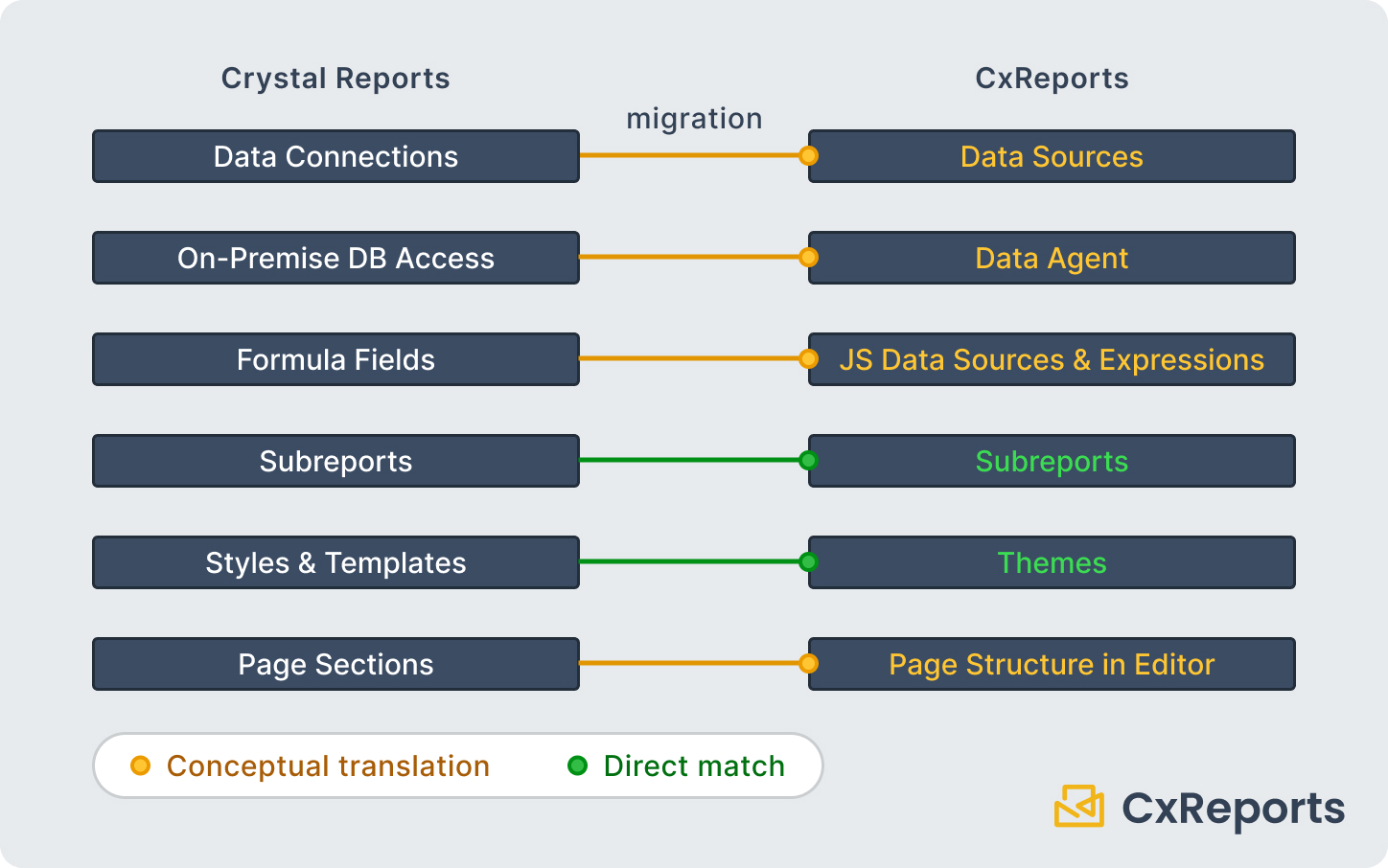
Data connections. Crystal Reports connects directly to SQL databases, ODBC sources, and some APIs. CxReports supports SQL databases, MongoDB, REST APIs, JSON/CSV, and JavaScript-computed data sources. For organisations migrating to CxReports Cloud who need to reach on-premise databases, the Data Agent establishes a secure connection between the on-premise database and the cloud platform - no need to expose the database to the public internet.
Formula translation. Crystal Reports formula fields that perform calculations - running totals, conditional values, string manipulation - have no direct equivalent. In CxReports, these calculations are handled through JavaScript data sources, which run in the context of the report and have access to all data and parameter values. Most Crystal Reports formulas translate to straightforward JavaScript with some rethinking.
Grouping, sorting, and subtotals. Crystal Reports handles a lot of grouping logic inside the .rpt file. In CxReports, this typically moves into the SQL query or the data source layer - grouping by department, sorting by date, calculating subtotals happen in the query that feeds the template. This is generally a cleaner architecture, but it requires the migration developer to consciously make that transition rather than reproduce the Crystal Reports approach.
Subreports. Crystal Reports subreports map directly to CxReports Subreports - self-contained report units with their own data sources and parameters that embed within a parent report. The concept is the same; the implementation details differ.
Styles and themes. Crystal Reports has a "Crystal Reports Templates" feature for applying consistent styles. CxReports Themes cover the same ground - defining colour palettes, typography, table styles, and custom CSS - and can be applied to any report or switched without changing template structure.
Page sections. Crystal Reports' fixed section model (Report Header, Page Header, Group Header n, Details, Group Footer n, Page Footer, Report Footer) does not translate one-to-one. CxReports organises content around pages and components within pages, with repeating elements, page templates, and conditional page visibility. A developer migrating Crystal Reports sections needs to think in terms of what the section was doing conceptually - not try to replicate the Crystal Reports section hierarchy directly.
A Practical Migration Playbook
The biggest mistake in Crystal Reports migrations is attempting a full parallel rebuild: keep running Crystal Reports in production while migrating everything simultaneously over 12–18 months. This approach generates scope creep, loses business priority, and often collapses partway through.
A phased approach works better.
Start with inventory, not migration. Before rebuilding anything, catalogue what you have. For each Crystal Reports template, document: who uses it, how often, what data it connects to, and roughly how complex it is. This typically takes two to three weeks for a mid-sized organisation and is almost always revealing. Fifteen percent of templates account for eighty percent of usage. Forty percent of templates may not be in active use at all.
Prioritise by business value, not by complexity. The natural instinct is to migrate simple reports first and save complex ones for later. This is backwards. Simple reports are fast to migrate, but they also carry low risk if left in Crystal Reports temporarily. High-usage, business-critical reports justify the investment in migrating early - they also generate the visible wins that keep the project funded.
Pilot with five to ten medium-complexity reports. Before committing to full migration, run a structured pilot. Pick reports that represent different template patterns - a financial summary, an operational report with grouping, a multi-page document with subreports. Build these in CxReports using the AI-assisted workflow, validate output against Crystal Reports, and measure actual rebuild time. The pilot gives you a credible estimate for the full project and surfaces the translation patterns that will repeat across the portfolio.
Run old and new in parallel during cutover. For critical reports, run both Crystal Reports and CxReports against the same data for at least one reporting cycle before switching users. Numerical discrepancies that survive visual review are caught by parallel-run comparison. Once the outputs match across a full production cycle, you can retire the Crystal Reports template with confidence.
Retire actively, not passively. For every Crystal Reports template that has been successfully migrated and validated, turn off the Crystal Reports version. If you leave both running indefinitely, the migration never officially completes - and you end up maintaining two systems.
Getting Started
| Crystal Reports concept | CxReports equivalent |
|---|---|
| Data connection (SQL, ODBC) | Data source (SQL, API, JSON/CSV) |
| On-premise DB from cloud | Data Agent (secure tunnel) |
| Formula fields and running totals | JavaScript data source |
| Grouping, sorting, subtotals | SQL query + repeating sections in template |
| Subreports | Subreports (same concept, native feature) |
| Styles and templates | Themes (colours, typography, custom CSS) |
| Page sections (Header/Details/Footer) | Page structure in visual editor |
Documentation:
If you are planning a Crystal Reports migration and want to see the AI-assisted template workflow in action, book a demo with the CxReports team. Bring a representative Crystal Reports template - we can walk through the migration approach live.