

The scheduled job is the default answer for period-end batch reporting. Set it to run at 2:00am on the first of the month. Or at midnight on quarter close. Or at 6:00am after the expected data feed window. The logic feels sound: pick a time when data should be ready, and automate from there.
The problem is that "should be ready" and "is ready" are not the same thing - and in regulated batch reporting, running against incomplete data is not a recoverable situation you can quietly patch. It is a compliance event that requires a documented rerun, an explanation for any downstream discrepancies, and in some cases, a formal notification to affected recipients.
This article explains why the fixed-time scheduling model carries systematic risk for period-end batch runs, what the data-ready flag pattern looks like in practice, and why it produces better outcomes on every dimension that matters: report accuracy, operational cost, and the quality of the audit trail.
Why Period-End Data Is Almost Never Available at a Fixed Time
Period-end data for batch reporting is inherently late - not because systems are unreliable, but because confirming data for a period requires a series of steps that each take a variable amount of time.
For a financial institution running quarterly investor statements, the sequence typically looks like this. Custodian feeds close at different times for different asset classes. Corporate actions that were applied provisionally during the quarter need to be confirmed final. Performance calculations depend on closing prices that are not available until exchange close plus a processing window. Reconciliation processes compare positions across systems and may surface exceptions that need manual resolution before the data is considered clean.
None of these steps has a guaranteed completion time. A corporate action confirmation that usually arrives at 4:00pm might arrive at 6:30pm if the custodian's operations team is handling a complex event. A reconciliation exception that usually takes 20 minutes to clear might take two hours if the source of the discrepancy is non-obvious.
The result: the time at which period-end data is genuinely ready varies, run-to-run and quarter-to-quarter. A fixed-time job scheduled for 2:00am assumes this variability doesn't exist. When the assumption is wrong, the job runs on incomplete data - and the batch reports that come out of it are wrong.
What Actually Happens When a Fixed-Time Job Fires Too Early
The failure mode is not always immediately visible. If the data is 95% complete when the job runs, most reports look correct. The five accounts with missing positions generate either an error or - worse - a statement showing incorrect holdings. If errors surface cleanly, they can be identified and the accounts can be manually regenerated and redistributed. If they surface as incorrect data in otherwise well-formed PDFs, they may not be caught until a recipient queries their statement.
The operational cost compounds quickly:
The rerun. Once the data issue is identified, the batch needs to be rerun against corrected data. This means another generation job, another consolidated review cycle, and another distribution. For a batch of 50,000 statements, this is not a minor overhead.
The duplicate distribution problem. If some or all of the incorrect statements were already distributed before the error was caught, the bank now needs to manage supersession. Customers who received an incorrect statement need to receive a corrected version. The original incorrect version needs to be flagged. The audit record for the run needs to capture both events.
The audit trail damage. A run that was triggered at 2:00am on data that was not confirmed until 3:15am creates an audit record that does not reflect accurate sequencing. If a regulator asks why the statement was generated before the data was confirmed ready, the honest answer is "because the scheduler fired at a fixed time." That answer does not reflect well on the institution's data governance practices.
Contrast this with the data-ready trigger pattern, where the audit record reads: "Statement run triggered at 03:17 following data confirmation by [name] at 03:15 on 01 April 2026. Batch generated against confirmed snapshot version Q1-2026-v1." This is a materially stronger compliance record.
What a Data-Ready Flag Actually Is
A data-ready flag is an explicit signal that period-end data has been reviewed, reconciled, and confirmed - emitted by a person or system with the authority to make that confirmation.
It is not a technical concept. It is an operational one. The flag exists because someone in the organisation has to be accountable for saying: the data for this period is correct, complete, and frozen. The batch may now run. The flag is the mechanism by which that accountability is made explicit and traceable.
In practice, data-ready flags are implemented in several ways depending on the organisation's operational architecture:
Manual sign-off in a workflow system. A data operations manager or reconciliation team lead reviews the period-end data, confirms the reconciliation is clean, and presses an "Approve data for reporting" button in a workflow platform. That button press is the trigger. The workflow system records who approved, at what time, against which version of the data. The report generation job receives the signal and starts.
Automated status from an upstream platform. An investment management system, a portfolio accounting platform, or a fund administration system exposes a "data status" indicator for each period. When reconciliation completes and positions are locked, the status transitions to "confirmed." The reporting layer listens for this transition - either by polling or via a webhook-style notification - and uses it as the generation trigger.
A data snapshot publication event. In architectures where the period-end data is frozen into a snapshot before reporting begins - saving a JSON file to a document store, writing a versioned dataset to a database, or publishing a confirmed data package - the publication of that snapshot is the trigger. The reporting job is keyed to the snapshot identifier, not to a clock time.
All three patterns have the same essential property: the report generation job cannot start until the data has been explicitly confirmed by a process that creates an auditable record.
Three Dimensions Where Data-Ready Beats Fixed-Time
Report correctness
The most fundamental: reports generated against confirmed data are correct by design. The confirmation step is specifically the step where someone has verified that the positions balance, the valuations are final, and the data is complete. Running the batch after confirmation rather than before eliminates the category of error caused by incomplete input data.
Audit trail quality
The audit trail for a data-ready triggered run has a different character than a fixed-time triggered run. It includes not just "the job ran at time X" but "the job ran because data was confirmed at time X by person Y against data version Z." This is meaningful in two contexts:
In a regulatory inquiry, this chain of custody - from data confirmation through generation to distribution - demonstrates that the bank's reporting process has explicit human accountability at the data sign-off step, not just at the report review step. For the full audit trail requirements around report generation and delivery, see Compliance-Ready Reporting.
In an internal incident investigation (if, for example, a statement contained an error despite the data confirmation), the audit trail identifies exactly which data version the statement was generated against, making root cause analysis tractable.
Operational cost
Every rerun costs time, people, and credibility. The consolidated review cycle must be repeated. Distribution must be remanaged. If statements were already sent, customer communications are required. The data-ready trigger pattern does not eliminate the possibility of errors - data can be confirmed incorrectly - but it eliminates the specific, avoidable category of errors caused by running against data that was not yet ready.
For organisations running quarterly batches, the marginal cost of one avoidable rerun per year is not trivial. For organisations running monthly or more frequent cycles, the compounding effect of systematic early-trigger failures is significant.
The Hybrid Reality: Some Reports Run on Time, Others Run on Data
Not all reports in a bank's report library carry the same data dependency. Internal management reports, which draw from systems with near-real-time data feeds, may genuinely be fine on a fixed schedule. Daily transaction summaries, which are always behind by one day by design, run on a fixed schedule by nature.
The data-ready trigger pattern is specifically appropriate for batch reports where:
- The data for the period requires explicit confirmation before it is considered complete
- The output has regulatory or contractual standing that makes correctness non-negotiable
- A rerun carries material operational cost or compliance risk
- The audit trail for the run needs to demonstrate that the data was confirmed before generation was triggered
Quarterly investor statements, regulatory filings, period-end fund valuations, and year-end tax documents are in this category. For a monthly production cycle with a data review gate before distribution, see Model Portfolio and Fund Fact Sheet Automation. Daily internal summaries and operational dashboards usually are not.
A mature reporting operation typically uses both patterns: fixed-time scheduling for reports that genuinely don't require explicit data confirmation, and data-ready triggers for batch runs where data quality accountability matters.
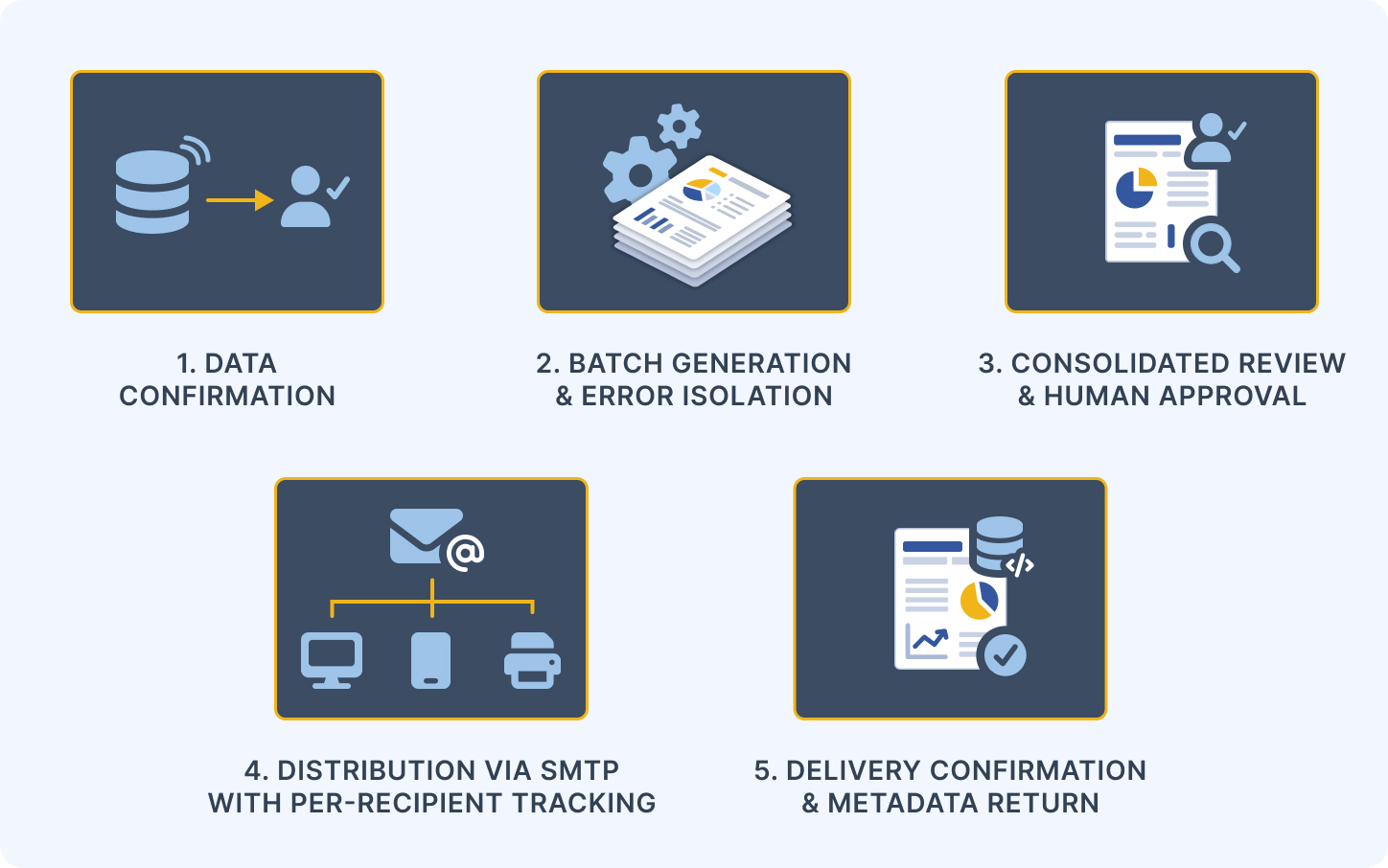
How CxReports Supports Data-Ready Triggered Scheduling
CxReports provides the generation and distribution infrastructure; the data-ready trigger is a scheduling pattern that sits at the point where the upstream operational process hands off to the report generation layer.
Built-in time-based scheduling. CxReports' email job scheduling supports daily, weekly, monthly, and custom cadences. This covers the fixed-schedule use cases - recurring operational reports, weekly summaries, daily distribution runs where the data is always available by a reliable time.
API-triggered generation for data-ready workflows. For batch runs where generation should be triggered by a data-readiness event rather than a clock, the CxReports API allows an upstream system to trigger a run of a configured job (POST /api/v1/ws/{workspaceId}/jobs/{jobIdOrCode}/runs), passing the relevant parameters (period, account scope, data version reference) at the point when data is confirmed ready, and then poll the run's status. The upstream workflow system - whether it is an investment management platform, a fund accounting tool, a workflow engine, or a custom reconciliation system - controls the trigger timing. CxReports handles the generation, assembly, and distribution once the trigger fires.
Parameter-driven generation for data version traceability. When a data-ready trigger fires, the CxReports report parameters can carry the data version reference or snapshot identifier that was used for the run, so the generated documents reflect the confirmed data version. The upstream system that makes the call should record which identifier it passed, who or what triggered the run, and the job run ID it received back. That record is the traceability link between the output documents and the confirmed data.
Job run history as part of the audit record. Each job run in CxReports records its start time, per-entry status, the PDFs produced, and the delivery status of each email. In a data-ready triggered workflow, the run's start time reflects when the API call was made, which is after the upstream data confirmation. Combined with the calling system's own record, this produces the audit trail structure described earlier: "generated at [time] using parameters [period=Q1-2026, snapshot=v1]."
Delivery follows generation unless you hold it. By default, a job's deliveries fire as soon as its documents are generated. If the batch should be reviewed first, enable Hold deliveries for review on the job, so entries wait for approval before any email is sent.
The division of responsibility is intentional. CxReports does not own the data confirmation step - that belongs to the organisation's data and reconciliation processes. What CxReports provides is reliable generation and distribution once the trigger fires, with a run history showing what was produced and delivered.
Getting Started with CxReports
| Scheduling requirement | CxReports capability |
|---|---|
| Fixed-schedule reports (daily, weekly, monthly) | Built-in email job scheduling with configurable cadence |
| Data-ready triggered batch runs | Job run via the API (POST /api/v1/ws/{workspaceId}/jobs/{jobIdOrCode}/runs) |
| Data version traceability | Report parameters passed at trigger time, recorded by the calling system |
| Run evidence | Job run history (start time, per-entry status, PDFs, delivery status) |
| Review before distribution | Hold deliveries for review on the job |
| Parameter-driven period and scope | Report parameters (Date, Lookup, Text types) |
| Batch distribution to data-driven recipient list | Email jobs with data source as recipient list |
Documentation:
If you are designing a period-end batch reporting workflow and want to see how the API trigger pattern integrates with an upstream data confirmation process, book a demo.