

Regulatory reporting deadlines are fixed. Everything else changes.
Tax rates change. Submission formats change. The definition of a reportable transaction changes. New jurisdictions come into scope. The list of required disclosures grows. And each of these changes arrives on its own schedule - not timed to your next reporting cycle, not coordinated with the others, and not negotiable.
The result is a pattern that finance and compliance teams recognise immediately: a reporting process that works until something changes, and then stops working under deadline pressure. The team patches the issue, the deadline passes, and the underlying fragility is carried forward to the next cycle.
This post covers what makes regulatory reporting automation durable under change: evidence-ready workflows that hold up under scrutiny, change control for templates and rules, the operating model that keeps it predictable, and a practical automation path that starts with what works and scales to what is needed.
The Deadline Tax
Manual regulatory reporting processes carry an invisible cost: the time and attention consumed every time something changes. Call it the deadline tax.
The deadline tax accumulates because the knowledge required to produce the report is distributed - scattered across spreadsheets, template files, configuration documents, and the heads of the people who have done it before. When a regulatory requirement changes, the team needs to find every place where that requirement is encoded, update each one, verify that the output is still correct, and do all of this before the next filing deadline.
At low complexity, this is manageable. Two reporting cycles, three jurisdictions, one reporting format - a small team with good documentation can absorb the change cost. At higher complexity, the math changes: twenty reporting cycles, eight jurisdictions, quarterly plus ad-hoc submissions, and a team that turns over. The same patches and workarounds that were manageable at small scale become unmaintainable. Changes made in one place introduce inconsistencies in another. The team spends more time maintaining the reporting process than improving it.
The automation path is not simply "generate reports programmatically." It is designing the reporting process so that the points of change are explicit, isolated, and controlled - so that a regulatory requirement change touches exactly the right component and nothing else.
Evidence-Ready Workflows
Regulatory reports are not just documents. They are evidence. In an examination, an inquiry, or an internal audit, the question is not only "what did you report?" - it is "how do you know it was correct, and what was your process?"
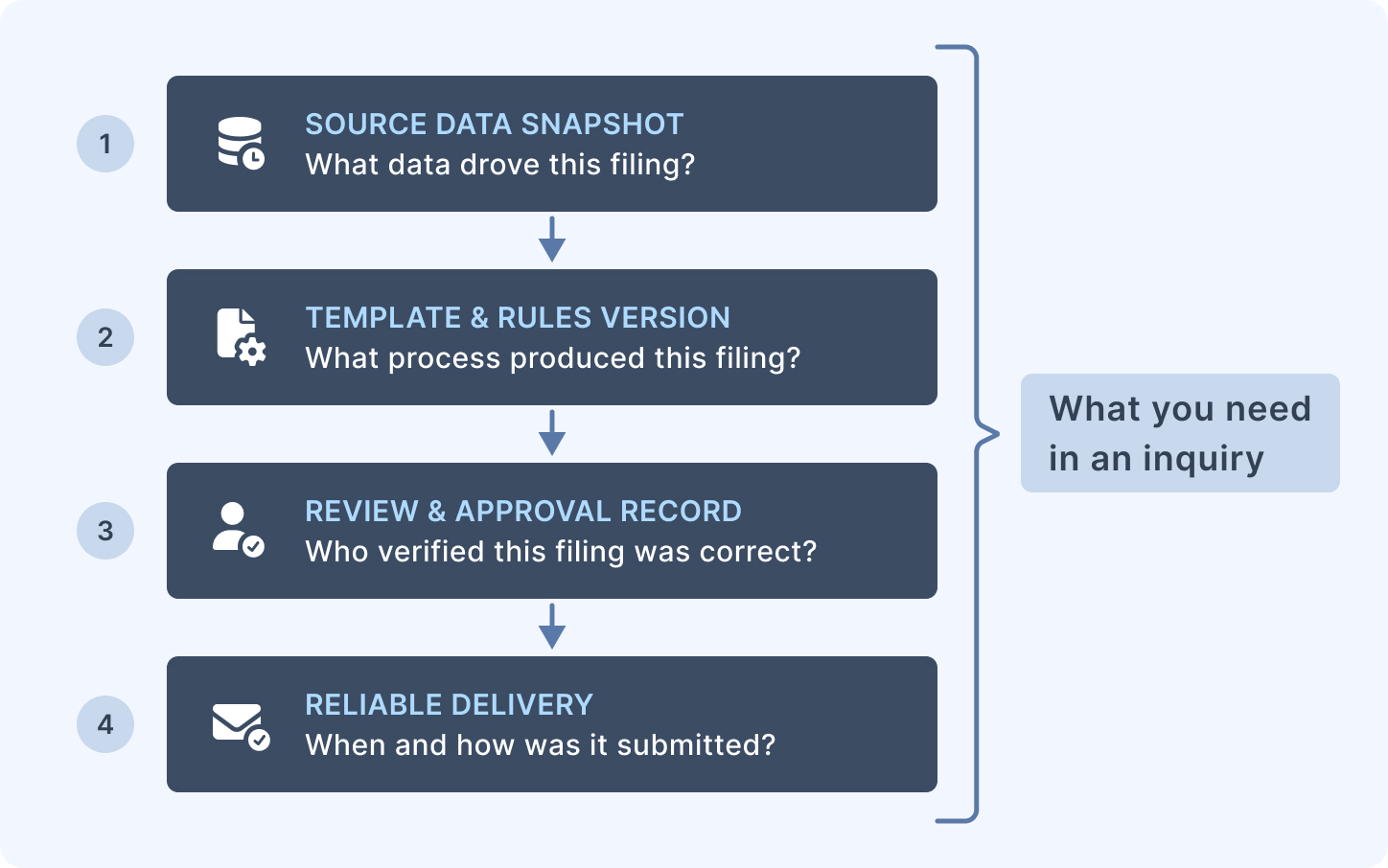
An evidence-ready workflow captures and preserves four things:
The inputs. The data that was used to generate the report. Not just the output PDF - the source data, the time it was extracted, and the version of the data snapshot used. If the figures in a regulatory report are later questioned, you need to be able to reconstruct exactly what data drove them.
The template and rules version. Which version of the report template was used for this filing? Which version of the business rules that prepared the data? If a rule was changed between two filings and figures changed as a result, you need to be able to demonstrate that the change was intentional and approved - not accidental.
The approvals. Who reviewed the report before submission? Who signed off that the figures were correct? An automated process that generates and submits a report without a human review step is not an evidence-ready workflow - it is an automated liability. Automation should accelerate the generation and formatting steps; the review and approval step should remain explicit and traceable.
Delivery confirmation. When was the report submitted, to which authority, through which channel, and with what confirmation or reference number? For a full breakdown of delivery evidence levels and what each proves, see Delivery Tracking for Regulatory Documents. A delivered report without a delivery record is not evidence of delivery.
These four elements together constitute the evidence package for a filing. Organisations that can produce this package for every filing are in a materially different position in a regulatory inquiry than those who cannot.
Change Control for Templates and Rules
Uncontrolled changes to the reporting process are one of the most common sources of regulatory reporting failures. A template edited under deadline pressure, a business rule updated by the wrong person, a change tested in production - any of these can introduce an error that persists across multiple filing cycles before it is detected.
Change control for regulatory reporting has three components.
Separate environments. Template development and testing should happen in an environment that is isolated from the production reporting process. A change that breaks the development template should not affect the next filing. Once a change has been tested and approved, it is promoted to production. This separation makes it possible to test changes without risking production filings, and it makes the boundary between "in progress" and "approved" explicit.
Defined approval gates. A template change should not go live without a named approver confirming it is correct. The approval record - who approved, what they approved, when - is part of the change record. For significant regulatory changes, this may involve both the technical team (does the template produce the right output?) and the compliance or finance function (does the output satisfy the regulatory requirement?). Both sign-off steps should be captured.
A change log. Every change to a template or a business rule that affects regulatory output should be recorded: what changed, why, who made the change, who approved it, and when it went live. For how shared templates propagate changes across a large report library, see Shared Templates in Banking. The change log is not a bureaucratic overhead - it is the evidence that your process is controlled. In an examination, a regulator asking "why did your figure change between Q2 and Q3?" expects an answer that refers to a documented, approved change. "Someone updated the template" is not that answer.
Rollback is a related concern. If a change introduces an error after the approval gate, you need a path back to the previous approved version that is faster than redoing the approval process from scratch. The fastest path is maintaining the previous approved template as a recoverable artefact - not overwritten by the new version.
Operating Model: Roles, Checklists, and Audit Preparation
Regulatory reporting automation is not just a technical process - it is an operating model. The technical automation handles generation; the operating model ensures it is used correctly.
Roles. Not everyone involved in the regulatory reporting process needs the same access. The analyst who prepares source data does not need edit access to report templates. The reviewer who approves the output before submission does not need access to the underlying data sources. The compliance officer who archives the evidence package does not need access to template configuration. Defining roles explicitly - with least-privilege access to match each function - reduces the risk of accidental changes and creates a clear accountability structure.
Pre-submission checklist. Every regulatory filing should run through a documented checklist before submission: data snapshot taken and verified; correct template version confirmed; parameters verified for this filing period and jurisdiction; output reviewed against prior filing for unexplained movements; approval recorded. The checklist is not optional - it is the last control before the report leaves the organisation. Automated generation does not eliminate the checklist; it makes the checklist shorter and more reliable, because the generation step is no longer a source of error.
Audit preparation. Audit preparation is much faster when the evidence package is assembled at filing time rather than retrospectively. An organisation that archives the evidence package at the point of each filing - inputs, template version, approval record, delivery confirmation - can respond to an audit request by retrieving a package rather than reconstructing one. Reconstruction under audit pressure is slow, stressful, and prone to gaps. Assembly at filing time is a ten-minute step that pays for itself the first time you need it.
A Practical Automation Path
Regulatory reporting automation does not need to be implemented all at once. A staged approach that starts with clear wins and expands incrementally is more reliable than a large-scale transformation project.
Stage 1: Automate generation, keep approvals manual. Replace manually constructed report documents with an automated generation step. The output is a reproducible PDF produced from a template and a defined data input. Approvals and submission remain manual. This single step eliminates the most common sources of formatting inconsistency and reduces the time the team spends constructing the document - freeing it for review and verification.
Stage 2: Add structured evidence capture. Define what evidence is required for each filing and put processes in place to archive it systematically. This does not require new software; it requires a defined folder structure, a naming convention, and a habit of archiving at submission time.
Stage 3: Formalise change control. Define the environments, approval gates, and change log processes. Promote templates through a defined lifecycle from development to approval to production. This step is a process investment - it takes time to implement but substantially reduces the risk and effort cost of future changes.
Stage 4 (scale-up): Integrate with your broader compliance workflow. Connect the report generation step to your existing compliance system, workflow tool, or GRC platform. Automate the evidence package assembly. Add automated reconciliation to verify that the output figures match the approved source data.
Most organisations are well-served by Stages 1–3. Stage 4 is appropriate when the volume of filings or the complexity of the workflow justifies the integration investment.
How This Maps to CxReports
CxReports is the generation layer in this architecture - the component responsible for producing consistent, reproducible regulatory report output from defined templates and structured data.
Template design and parameterisation. Regulatory report templates in CxReports are built visually, without code. Report Parameters control variant-specific sections: which jurisdiction's disclosure text renders, which filing period label appears, whether a supplementary schedule is included. A single base template can serve multiple regulatory variants through parameter-driven conditional sections - reducing the number of templates that need to be maintained and kept in sync.
Environment separation via Workspaces. Workspaces in CxReports are independent, isolated environments. A development workspace holds templates under active change; a production workspace holds approved templates used for live filings. Promoting a template from development to production is a deliberate step. The separation ensures that in-progress work cannot affect production filings.
Access control via Roles. CxReports supports custom roles with granular permissions across Reports, Templates, and Themes. A read-only role for reviewers who need to see the report but not edit the template; a template editor role for the team responsible for layout changes; full access only for administrators who manage the workspace configuration. The role structure maps to the operating model described above.
Scheduled and API-triggered generation. Recurring regulatory filings - quarterly submissions, monthly reconciliation reports, annual returns - can be delivered through scheduled Email Jobs configured in CxReports. For submissions that depend on an external approval step before generation, the REST API enables your compliance workflow to trigger generation programmatically at the point the approval is confirmed.
Review before release. A job can hold deliveries for review, so generated filings wait for a reviewer to approve or reject them before anything is sent. For a long run, Generate consolidated review document stitches the outputs into one PDF for checking.
What your organisation provides. Formal sign-off by a named approver or committee, the change log, and the evidence package are processes your organisation builds around CxReports' generation capability. CxReports produces the output reliably and repeatably; your organisation's process ensures that output is produced at the right time, reviewed by the right people, and archived in a way that supports examination.
Getting Started
| Regulatory reporting requirement | CxReports primitive |
|---|---|
| Report variants by jurisdiction / filing type | Report Parameters controlling section visibility |
| Isolated development and production environments | Workspaces (independent, no cross-contamination) |
| Access control: editors vs. reviewers vs. read-only | Custom Roles (levels per category, e.g. Reports: No Access / Read / Write / Full Access; Jobs: No Access / Full Access) |
| Consistent formatting across filings | Themes (typography, colours, table styling) |
| Recurring scheduled filing delivery | Email Jobs with schedule |
| Review before release | Hold deliveries for review, consolidated review document |
| Approval-triggered generation | REST API (GET .../reports/{reportTypeCode}/pdf) |
Documentation:
To discuss how CxReports fits into your regulatory reporting workflow, talk to the team.