

The first invoice generator takes about a day to build. A string template, some data binding, an HTML-to-PDF conversion, and you have something that works. It generates a PDF, it looks like an invoice, and the team ships it.
Eighteen months later, that same "day's work" is a six-file tangle nobody wants to touch. A request to add a discount line breaks three things. A new client wants their logo in the header. Tax handling for a new country means another conditional block. The design team updates the brand and someone has to find every hardcoded color value.
This is the invoice generator trap: a pattern that works perfectly for one invoice type, one currency, one client - and becomes increasingly painful as the business scales.
Why invoice generation gets complicated
The problem isn't technical incompetence. It's the natural consequence of mixing concerns that should be separated.
Most invoice implementations conflate three distinct responsibilities:
Business logic. Tax rules, discount calculations, currency handling, rounding, determining which line items appear, applying customer-specific pricing. This is your application's job - it knows the business rules, the customer context, the regulatory requirements. For the correctness requirements at scale - rounding, idempotency, internationalisation - see Invoice Generation at Scale.
Layout and presentation. How the invoice looks: the header with the company logo, the "Bill To" section, the line items table, the totals block, the payment instructions, any conditional sections (credit note, partial payment, multi-currency notice). This is a design problem - and it changes on a completely different timeline than business logic.
Delivery. Getting the PDF to the right place: the customer's email, a customer portal, an internal system, cloud storage. This is an operations concern with its own failure modes, retry requirements, and audit needs.
When these three things live in the same template, the same class, or the same function, changes to one break the others. Adding a new payment method forces a layout change. Rebranding touches the same file as tax rate logic. Debugging a formatting issue means wading through discount calculation code.
The solution isn't to write better spaghetti - it's to stop mixing the concerns in the first place.
What scalable invoice automation looks like
The architecture that avoids the trap is straightforward.
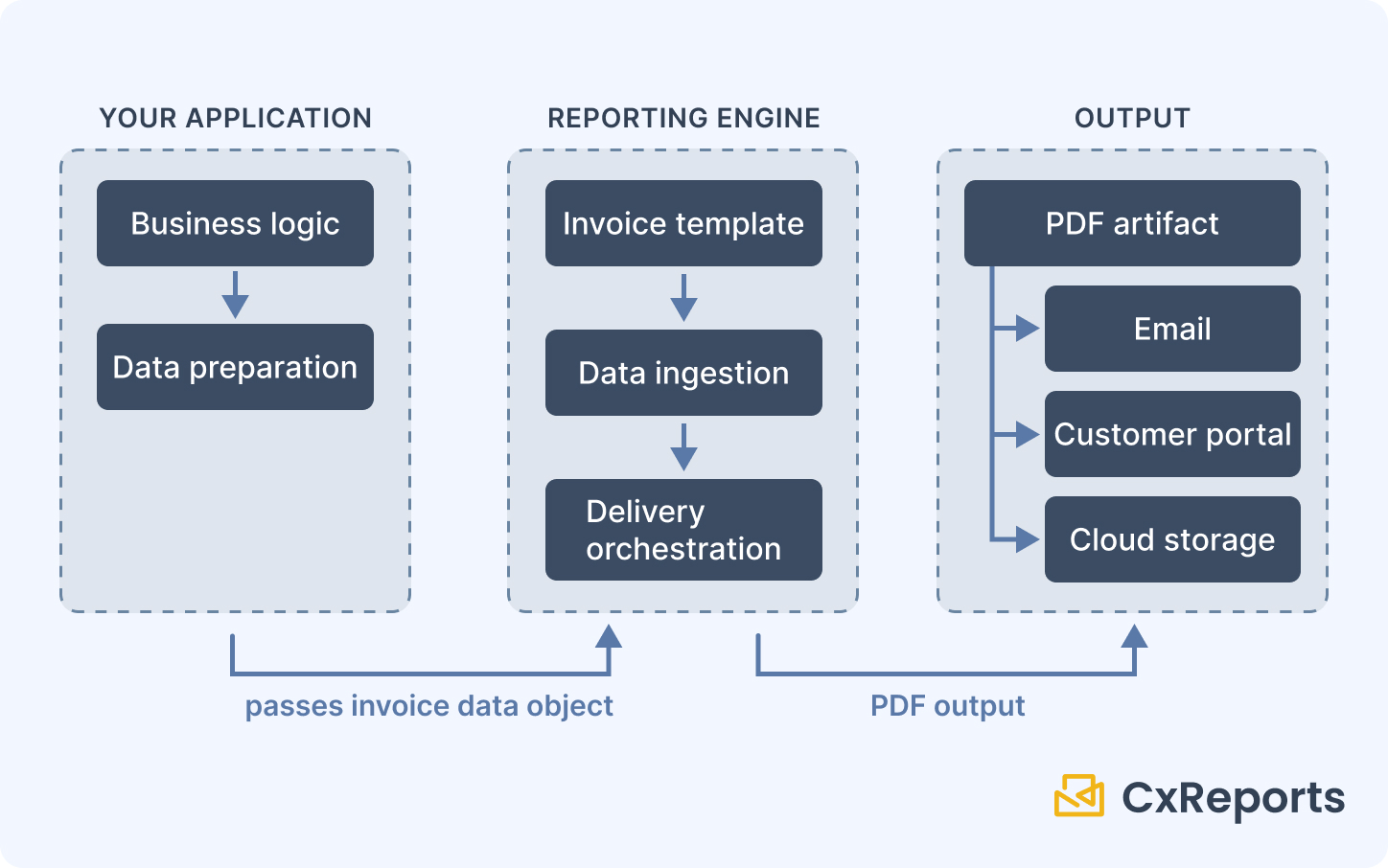
Your application handles all data correctness. Before anything goes near a template, your application computes the right values: subtotals, tax amounts, discounts, rounding (to the correct number of decimal places for the currency), and the complete set of line items. The template receives finished numbers and does not recalculate them.
This boundary matters. Tax calculation logic varies by country, product type, customer status, and effective date. Currency rounding has rules that differ by region. Discounts may compound or stack in ways that are specific to your pricing model. None of this belongs in a template. Your application holds that logic; the invoice generator consumes the output.
A template handles layout, not logic. The template defines where things appear, what they look like, and how they're organised. Conditional sections - show the "Credit Note" banner only if the document type is CN; show payment instructions only for outstanding invoices - are driven by parameters your application passes in, not business logic embedded in the template itself.
A well-designed invoice template has explicit, independently maintainable sections:
- Header (company branding, address)
- Recipient details (bill-to information)
- Invoice metadata (number, date issued, due date, payment terms)
- Line items table (description, quantity, unit price, line total)
- Totals block (subtotal, tax, discount, total due)
- Conditional sections (payment instructions, credit note notice, notes)
- Footer (legal language, contact information)
Rebranding touches the header and footer. A new document type adds or activates a conditional section. A new field in the line items table updates only the line items block. Changes are local and predictable.
Delivery is a separate step. The generation step produces a PDF artifact. What happens to that artifact - where it's sent, when, to whom - is orchestrated separately. Email delivery, storage, customer portal upload: these happen after generation, driven by your application's delivery logic.
Where templates go wrong even with the right separation
Even with the correct architectural separation, templates themselves can become unmaintainable if they're designed carelessly.
Hardcoded values. Company names, addresses, colors, and legal text written directly into the template mean every change requires opening and editing the template. Values that change should come from data or from a configurable theme - not be embedded.
Conditional logic inside templates. If your template evaluates business conditions internally - "show the tax line only if the tax rate is non-zero" - then business rule changes require template changes. Conditional sections should be driven by parameters passed in from the application, not inferred from raw data inside the template.
One monolithic template for all variants. A single template that handles standard invoices, credit notes, proforma invoices, and receipts with internal branching becomes unwieldy. Shared structure should be modular and reused; variant-specific sections should be cleanly separated.
Presentation-specific data preparation in the application. The inverse problem: application code that formats strings for the template ("$1,234.56" instead of 1234.56), or that structures data to match the current template layout. This makes the application brittle against template changes - a layout update ripples into application code.
How this maps to CxReports
CxReports is a visual document engine built around the separation described above. The template defines layout; your application provides finished data; the API delivers the PDF.
Visual template design - not code
Invoice templates in CxReports are built in a visual editor - no HTML-to-PDF conversion pipeline, no templating language, no CSS-in-code. The layout is drag-and-drop: Flow containers for section arrangement, Text components for dynamic field references, Data Tables for line items, Key Value Grids for metadata blocks like invoice details or payment terms.
The line items table binds directly to a data source - a JSON array, a SQL query, or an API call. Column formatting (currency precision, date format, decimal places) is configured per column in the editor. When the number of items varies across invoices, the table expands accordingly; the template doesn't need to know how many rows there will be.
Data binding: your numbers, not the engine's calculations
Data reaches the template through a JSON payload passed in the API call, a connected SQL query, or an API data source. You pass in the finished invoice object - pre-calculated totals, resolved line items, formatted addresses. CxReports renders it; the template does not recalculate it. CxReports can compute values in JavaScript data sources or data transformations if you choose, but for tax and rounding the safer boundary is to keep that logic in your application.
A typical generation request passes a data object structured to match the data sources defined in the template:
{
  "invoice": {
    "invoiceNumber": "INV-2025-0042",
    "dateIssued": "2025-03-01",
    "dueDate": "2025-03-31",
    "recipient": {
      "name": "Acme GmbH",
      "address": "Musterstraße 12, 10115 Berlin"
    },
    "items": [
      {
        "description": "Platform licence (annual)",
        "qty": 1,
        "unitPrice": 4900.0,
        "total": 4900.0
      },
      {
        "description": "Overage - API calls",
        "qty": 12,
        "unitPrice": 25.0,
        "total": 300.0
      }
    ],
    "subtotal": 5200.0,
    "taxAmount": 988.0,
    "total": 6188.0
  }
}
Your application assembles this object. The template renders it. Tax logic, rounding decisions, and currency rules stay in your application, not in the template.
Conditional sections via parameters
Invoice variants - credit notes, pro forma invoices, receipts - are handled through report parameters rather than separate templates. A documentType parameter passed with each generation request controls which sections render. The template contains the sections; the parameter controls visibility.
This keeps variants minimal: one base invoice template with parameterised sections, rather than five near-identical templates drifting apart over time as one gets updated and the others don't. For a healthcare billing example of the same one-template approach, see Patient Billing Statements at Scale.
Branding via themes - not hardcoded values
Visual consistency is managed through Themes in CxReports. Colors, typography, table styling, chart appearance, and custom CSS are defined in a theme and applied to the template. A change of brand colors or fonts is a theme edit. Logos and header content live in the page template, so a full rebrand usually means a theme edit plus a template edit, each made once. For SaaS platforms serving multiple clients with different branding requirements, different themes can be applied to the same template to produce client-branded invoices without duplicating the template structure. For a client billing example where several firms share one statement structure with their own branding, see Law Firm Billing and Client Statements at Scale.
Reusable sections via subreports
For platforms where an invoice is one section of a larger document pack - a monthly statement that includes a summary page followed by one invoice per transaction - CxReports supports subreports: independent document modules that can be embedded in a parent report and repeated per data row. An invoice subreport, repeated for each transaction returned by a query, produces a multi-invoice pack from a single template definition.
Delivery via API and scheduled jobs
PDF generation is triggered through a REST API call. Your application calls the generation endpoint, passes the data object, and receives the PDF. Delivery - emailing it, storing it, pushing it to a portal - is handled by your application's orchestration layer after generation.
For use cases where invoices are sent on a recurring schedule rather than triggered per-event (monthly billing, annual renewals), CxReports also supports scheduled jobs with direct email delivery, removing the need to build a separate scheduling layer for those scenarios.
Getting started with CxReports
| Invoice automation requirement | CxReports primitive |
|---|---|
| Visual invoice template (no coding) | Template editor - drag-and-drop with Flow, Text, Data Table, Key Value Grid |
| Line items table (variable row count) | Data Table bound to JSON array or SQL query |
| Dynamic field binding | Text components with {$data.source.field} references |
| Conditional sections (credit note, payment terms) | Report parameters controlling section visibility |
| Consistent branding / client-specific branding | Themes (typography, colors, table styles, custom CSS) |
| Reusable invoice in multi-invoice pack | Subreports (repeated per data row) |
| API-triggered PDF generation | REST API with JSON data payload |
| Scheduled / recurring invoice delivery | Jobs with scheduling and email delivery |
Documentation: docs.cx-reports.com
Invoice tutorial: docs.cx-reports.com/reports/tutorial-invoice
Report parameters: docs.cx-reports.com/reports/parameters
Themes: docs.cx-reports.com/reports/themes
To see invoice generation with your own data and branding, request a demo.