

Report generation in banking is not a feature that lives in one system. It is a service that every other system calls.
The compliance platform needs to generate regulatory filings when a submission window opens. The CRM triggers a client letter when an account status changes. The investment management system requests portfolio statements at period-end. The client portal generates on-demand documents when an investor clicks "Download Statement." The onboarding workflow creates a KYC summary at the end of an application journey.
None of these systems want to own report generation. They want to call it — pass the relevant parameters, receive confirmation that the report was generated and delivered, and move on. The reporting infrastructure is a shared service; these upstream systems are its consumers.
This framing — reports as a service — changes how you design the integration. You are not building a reporting feature inside each system. You are designing an API contract that every system in your banking platform can consume reliably: consistent parameter interfaces, predictable response structures, delivery status feedback, and error handling that the calling system can act on.
This article covers what that contract requires, where the design decisions create meaningful risk if they are made incorrectly, and how to structure the integration between your banking workflow systems and a report generation platform.
Why Banking Report Generation Is Workflow-Embedded
Report generation in most software contexts is interactive: a user opens a reporting tool, configures the parameters, and downloads the output. In banking, the dominant pattern is the opposite: report generation is triggered programmatically by upstream systems, runs without user interaction, and delivers output to defined recipients through defined channels.
The reasons follow from the operational structure of banking:
Regulatory cadence drives automated generation. Regulatory submissions — MiFID transaction reports, EMIR trade repository submissions, PRIIP KID documents, periodic client communications required under COBS — follow calendar cycles or event triggers. These cannot wait for a person to log into a reporting tool and press a button. They need to be triggered automatically when the upstream condition is met: period end, trade confirmation, regulatory deadline.
Volume eliminates interactive workflows. A bank generating quarterly statements for 150,000 account holders cannot have an operations team manually triggering each one. Batch generation is triggered programmatically: the statement run starts, the reporting service receives the list of accounts with their parameters, generates the documents, and delivers them. The operations team's interaction is at the review and approval gate — not at the trigger.
Multiple systems share the same reporting capability. The compliance platform, the client portal, the CRM, the onboarding system, and the operations back-office are all separate systems with separate development and operations teams. None of them should own a separate report generation implementation. A shared reporting service, callable via API, is the architecture that prevents report generation logic from being duplicated and diverging across systems.
The API Integration Contract
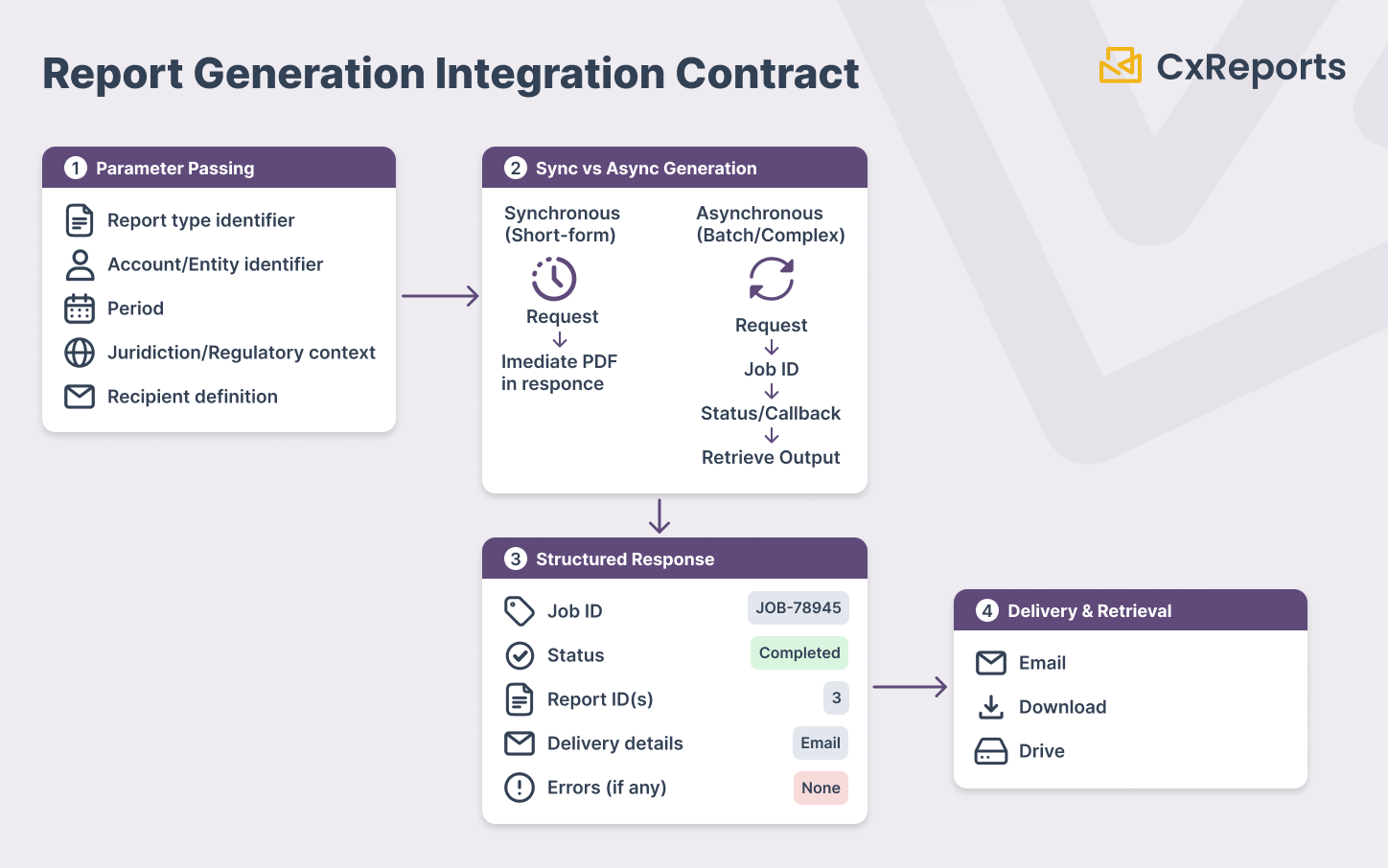
The integration contract between an upstream banking system and a report generation service has five components that must be explicitly designed. Leaving any of them to convention or assumption creates fragility that surfaces in production at the worst possible time.
Parameter passing
Every report generation request carries a set of parameters that define what report to generate and for whom. In a banking context, the parameter set is typically:
- Report type identifier — which template and layout to use
- Account or entity identifier — the account number, portfolio ID, or legal entity identifier the report covers
- Period — the reporting period (date range, quarter, regulatory reporting period)
- Jurisdiction or regulatory context — where relevant, which regulatory regime the document should conform to
- Recipient definition — where to deliver the output and to whom
These parameters must be typed and validated at the API boundary. A report generation request with an invalid period format, a non-existent account identifier, or a missing recipient definition should fail fast with a structured error — not silently generate an empty or incorrect report. Validation at the boundary is the contract; silent failure downstream is a compliance risk.
Synchronous vs asynchronous generation
Short-form documents — a one-page confirmation letter, a trade summary, a simple account notification — can be generated synchronously: the calling system sends the request, waits, and receives the PDF in the response. This is appropriate when generation is consistently fast and the calling system can block on the result.
Batch generation and complex multi-page documents require an asynchronous pattern: the calling system sends the generation request, receives a job identifier, and polls a status endpoint (or receives a callback) when generation is complete. The batch statement run that generates 50,000 documents cannot be a synchronous call. The calling system must be designed to handle the async pattern — submit, track, retrieve — rather than expecting an immediate synchronous response.
The rule is simple: design for asynchronous from the beginning, and treat synchronous as an optimisation for specific short-form use cases. Retrofitting async into a system designed for sync is more disruptive than accommodating sync within a system designed for async.
Structured response format
The response from a report generation API call must be structured enough for the upstream system to act on it programmatically. A response that returns only success or failure — a boolean or an HTTP status code — provides insufficient information for banking workflows.
A well-structured response carries:
- Generation status — whether the report was generated successfully
- Output artifact identifier — a reference to the generated document (file path, storage reference, or internal ID) that can be used to retrieve or audit the output
- Parameter echo — the parameters used for generation, for the upstream system's audit record
- Timestamp — when generation completed, for the upstream system's compliance log
- Error detail — if generation failed, structured information about why: which parameter was invalid, which data dependency was unresolvable, whether the failure is retryable
This structure allows the upstream system to log a complete record of the generation request and outcome without making secondary API calls to retrieve the information.
Delivery status as a first-class output
In many API designs, the report generation service is considered to have completed its job when it generates the PDF. For banking workflows, this is the wrong boundary.
An upstream compliance system that triggers regulatory document generation and receives only "generation succeeded" has incomplete information. It does not know whether the document was delivered to the intended recipient. For regulatory documents with mandatory delivery requirements — investor communications, regulatory submissions, mandatory disclosures — "generated" and "delivered" are different compliance states.
The report generation service's API response should include delivery status per recipient: whether the document was accepted for delivery, whether delivery was confirmed, and if delivery failed, a structured reason. This shifts the delivery confirmation responsibility to the reporting service, where it belongs, rather than requiring the calling system to maintain a separate delivery tracking mechanism.
For batch generation, this means the response includes a per-account delivery status table — a structured record of which accounts received their document successfully and which had delivery failures requiring follow-up. The upstream workflow system receives this as structured data it can act on: escalate failures, trigger retry logic, or route exceptions to a manual handling queue.
Error handling contracts
Errors in report generation within banking workflows are not the same category of event as errors in an interactive application. When a user's report fails to load in a UI, they see an error message and try again. When a compliance system's batch generation job fails, the error may affect thousands of accounts, require a documented rerun, and potentially constitute a compliance event.
The error handling contract must be explicit:
Structured error codes. Not HTTP status codes alone — domain-specific error codes that the calling system can parse programmatically. The difference between "data not available for the requested period," "account identifier not found," "template version incompatible with parameter set," and "generation infrastructure timeout" requires different handling logic in the upstream system. Generic errors require human investigation; structured errors can be handled automatically.
Retryability classification. Every error should carry a machine-readable indication of whether it is retryable. A timeout error is retryable with backoff. A missing data error is not retryable until the data issue is resolved. A parameter validation error is not retryable without fixing the parameter. Upstream systems need this signal to implement appropriate retry logic rather than either retrying everything (creating duplicate generation risk) or retrying nothing (creating gaps in report delivery).
Partial batch results. For batch generation jobs, a single failed account should not abort the run. The API should return partial results: a success record for each account that generated successfully, and a failure record for each account that did not — both in the same structured response. The upstream system can proceed with distributing the successful accounts while routing the failed accounts to a remediation process.
Authentication and Authorisation: Scoping What the Calling System Can Request
In a banking platform, multiple upstream systems call the report generation API using different credentials. The compliance system, the CRM, the portal, and the batch operations platform each have their own integration credentials. The authentication and authorisation design must ensure that each calling system can request only the reports it is entitled to generate.
This has a specific implication for banking: the system credential used for API calls should be scoped to the workspace and report types that system is authorised to access. A CRM integration credential that can access the compliance workspace — or that can request regulatory filing generation — is over-privileged. A credential scoped to exactly the reports and workspace the CRM is authorised to request is the correct design.
The practical rule is credential-per-integration: each upstream system has its own API credential, scoped to the minimum workspace and report-type access it requires. Shared credentials across systems create audit ambiguity — when an API log shows a report was generated using a shared credential, the identity of the calling system is unknown. Per-integration credentials make the caller traceable.
The same principle applies to the parameter scope: the calling system's credential should not allow it to generate reports for accounts it is not authorised to access. If the CRM integration's scope is restricted to the accounts within its workspace, a malformed request that passes an out-of-scope account identifier should be rejected at the authorisation layer, not silently excluded from the output.
How This Maps to CxReports
CxReports exposes a REST API that banking workflow systems can call to trigger report generation, retrieve outputs, and push runtime data — using Bearer token authentication with Personal Access Tokens (PATs) as the credential model.
Triggering PDF generation via API. The GET /api/v1/ws/{workspaceId}/reports/{id}/pdf endpoint triggers report generation and returns the PDF output directly to the calling system. For report-type-based generation, the GET /api/v1/ws/{workspaceId}/reports/{reportTypeCode}/pdf endpoint resolves the default report for that type and generates it. These endpoints generate and return the document — they do not send it. There is no single endpoint that generates a report and delivers it via email in one call. Receiving the PDF is the calling system's responsibility; it decides what to do with it from there.
Email delivery via API-triggered jobs. When the workflow requires email delivery rather than receiving a PDF directly, CxReports handles this through jobs. A job defines the report, the recipient configuration, and the delivery channel. Jobs can be triggered via API request, not only on a fixed schedule — making it possible for an upstream banking system to fire a delivery job programmatically when the business condition is met, rather than waiting for a scheduled window. This is the correct pattern for workflows like "send a confirmation letter when this transaction is processed" or "deliver the statement when the end-of-period flag is raised."
Pushing runtime data for generation. The POST /api/v1/ws/{workspaceId}/temporary-data endpoint allows an upstream system to push a data object that the report uses during generation. This is the pattern for report generation where the calling system is the data source: the CRM pushes the client record, the compliance system pushes the transaction data, the investment platform pushes the portfolio snapshot — and the report generation request that follows uses the pushed data as its input. This decouples the reporting service from needing a direct database connection to every upstream system.
PATs for per-integration credentials. Personal Access Tokens in CxReports are user-scoped: a PAT authenticates as the user it was created for and inherits that user's workspace permissions. For banking workflow integrations, the pattern is to create a dedicated service user per integration — a "Compliance System" user, a "CRM Integration" user, a "Portal Service" user — each with workspace roles scoped to the reports and workspaces that integration is authorised to access. The PAT for each integration is stored in the calling system's secrets management infrastructure. API calls using that PAT are traceable to the integration they belong to in the generation logs.
Workspace-scoped access control. The workspace structure in CxReports is the boundary for report generation authorisation. An integration credential for a specific workspace can only trigger generation of reports within that workspace. Separate workspaces for compliance reporting, client communications, and internal operations reports means that each integration's credential scope is structurally enforced — not just a policy.
Temporary data for runtime parameter passing. For banking reports where the account-specific data is not held in a database directly accessible to CxReports, the temporary data pattern is the primary integration mechanism: the upstream system assembles the data for each account, pushes it to the temporary data endpoint, and triggers generation with a reference to the pushed data. The report generation service uses the temporary data as its input without requiring a direct connection to the upstream system's data store.
Getting Started with CxReports
| Integration requirement | CxReports mechanism | Integration design |
|---|---|---|
| Programmatic PDF generation (calling system receives the file) | GET /api/v1/ws/{workspaceId}/reports/{id}/pdf |
Generates and returns the PDF to the caller; no email sending — calling system handles delivery |
| Report type-based generation | GET /api/v1/ws/{workspaceId}/reports/{reportTypeCode}/pdf |
Calling system references report type code; CxReports resolves the correct report |
| Email delivery triggered by upstream system | API-triggered job | Configure job with recipient definition and delivery channel; trigger via API when the business event occurs — not limited to fixed schedules |
| Push runtime data from upstream system | POST /api/v1/ws/{workspaceId}/temporary-data |
Upstream system pushes account/period data before triggering generation; report uses pushed data as input |
| Per-integration credentials | Personal Access Tokens (PATs) scoped to service users | Create one service user per integration; scope workspace roles to minimum required access; store PAT in secrets manager |
| Workspace-level access boundary | Workspace-per-integration-scope | Separate workspaces for compliance, client communications, and internal reports; each PAT restricted to its workspace |
| Iframe/browser-based generation | Nonce tokens (POST /api/v1/nonce-tokens) |
For portal use cases: generate nonce server-side using PAT; pass to browser for single-use iframe authentication |
For API reference, authentication documentation, and official client packages, see the CxReports documentation. To discuss integrating CxReports into your banking workflow architecture, get in touch.