

Reporting systems sit at an uncomfortable intersection. They need to be accessible - finance staff generate statements, operations teams pull daily reports, developers integrate generation into applications - but the data inside those reports is often the most sensitive information an organisation holds. Financial results, customer records, employee data, regulatory submissions.
Getting the security architecture right isn't about adding locks to everything. It's about making sure access is granted deliberately, credentials are protected at every layer, and the deployment model matches what your organisation can actually govern. This article covers the four pillars of enterprise reporting security and maps each one to what CxReports provides.
The real failure modes
Before architecture, it's worth being specific about how reporting security actually fails. The failure modes are rarely sophisticated attacks. They're almost always one of four things:
Overly broad access. A user who needs to view reports also has permission to modify templates and data sources. Someone leaves the organisation; their access isn't revoked. A shared login makes it impossible to trace who did what.
Credentials in the wrong place. A database connection string stored in plain text in a config file. An API key embedded in client-side code. A long-lived token reused across environments and never rotated.
Insecure data paths. A report that pulls from an on-premise database but the reporting engine runs in the cloud, exposing the database to an inbound connection or storing credentials in a vendor-managed system. Data in transit without encryption.
Deployment assumptions. Assuming the cloud provider's default configuration is secure. Running HTTP in internal environments that aren't as isolated as assumed. Not knowing which components have access to which databases.
The security architecture that addresses these isn't novel. It's the standard combination of least-privilege access control, encrypted credentials, auditable identity, and explicit deployment security. What changes when you're deploying a reporting platform is where each of these needs to be configured.
Identity and access: who can do what
The two-tier user model
CxReports separates system administration from workspace access into two distinct tiers.
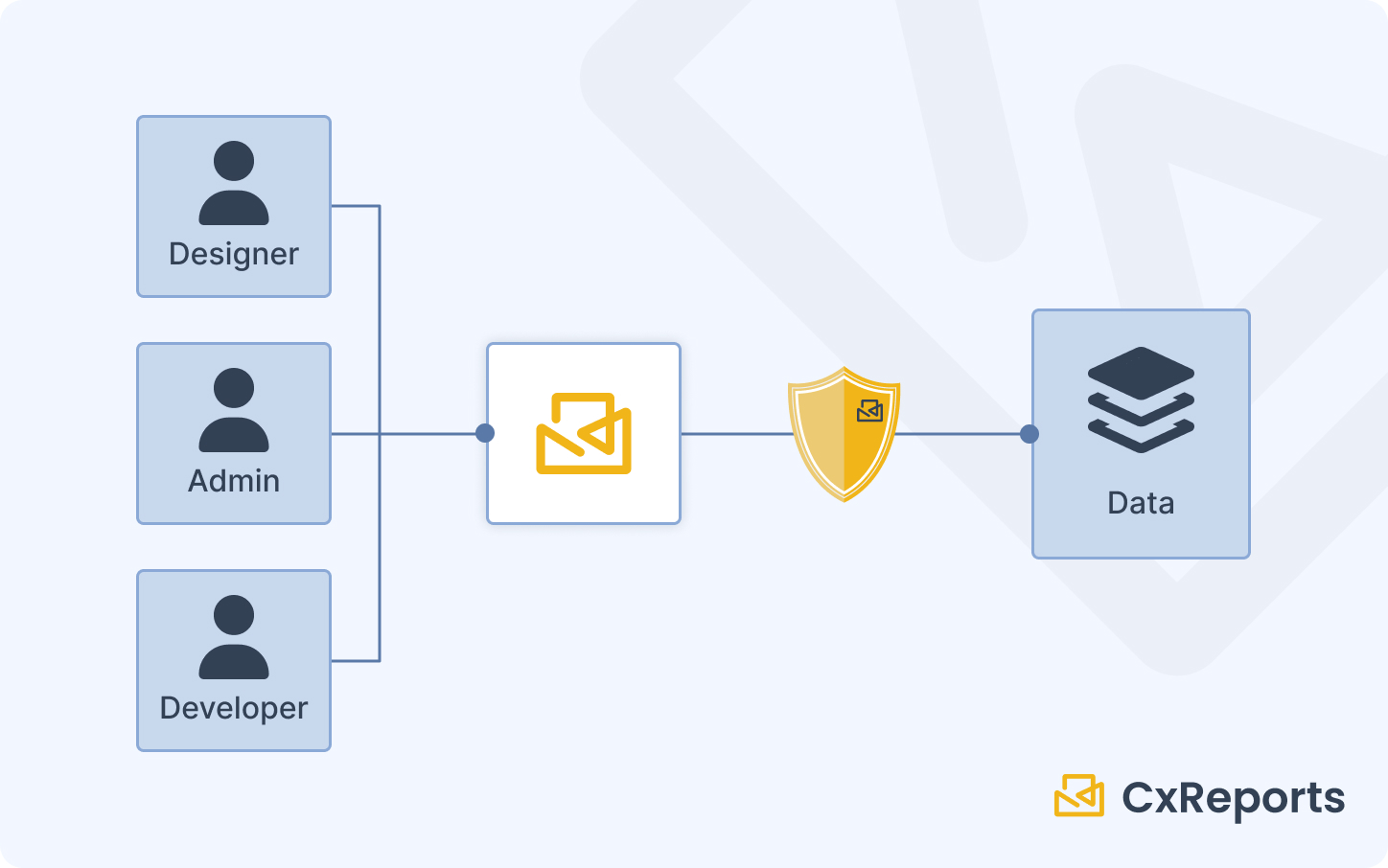
The root user manages the system at the top level: creating users, creating workspaces, and controlling which users are added to which workspaces. Root-level access does not automatically grant access to any workspace's reports or templates - it's strictly administrative. This separation means the person who administers the system doesn't necessarily have access to the business data inside it.
Workspace users are added explicitly to individual workspaces and assigned a role within each. A user added to the Finance workspace is not automatically in the HR workspace. Access is per-workspace and per-role, not system-wide.
This two-tier model enables the separation of duties that regulated environments require: system administrators manage access without seeing report content; business users access reports without touching system configuration.
Custom roles and granular permissions
Within each workspace, CxReports supports custom role definitions. Each role is configured with No Access, Read, or Full Access for three capability areas: Reports, Templates, and Themes.
A typical separation of duties configuration:
| Role | Reports | Templates | Themes | Suited for |
|---|---|---|---|---|
| Viewer | Read | No Access | No Access | Executives, approvers who generate and view reports |
| Operator | Full Access | No Access | No Access | Operations staff who run and schedule reports |
| Designer | Full Access | Full Access | Full Access | Analysts and developers who build and maintain templates |
| Administrator | Full Access | Full Access | Full Access | Workspace administrators only |
The key distinction between Operator and Designer: operators can generate and schedule reports using existing templates, but cannot modify those templates. Template changes go through a designer or administrator. This is the reporting equivalent of separation of duties: the people who run production reports can't change the definitions those reports run against.
The principle of least privilege applies directly: assign the minimum role necessary for the function. Executives reviewing board reports don't need Designer access. Operations staff running scheduled deliveries don't need to touch templates. Roles should be reviewed periodically - departures and role changes are the most common source of accumulated excess access.
Single Sign-On integration
CxReports supports external login via Google and Microsoft identity providers, configured at the application level. When enabled, users authenticate through the identity provider rather than with CxReports-managed credentials. This integrates CxReports into an organisation's existing SSO infrastructure: access provisioning, deprovisioning, and MFA enforcement follow the organisation's central identity policy rather than being managed separately in the reporting tool.
For organisations on different identity providers, the raw-password login can be disabled entirely (PasswordLogin: { "Enabled": false }) to enforce SSO as the only authentication path. Domains can be restricted to allow only accounts from specified domains, preventing external sign-ins.
API authentication: PATs and nonce tokens
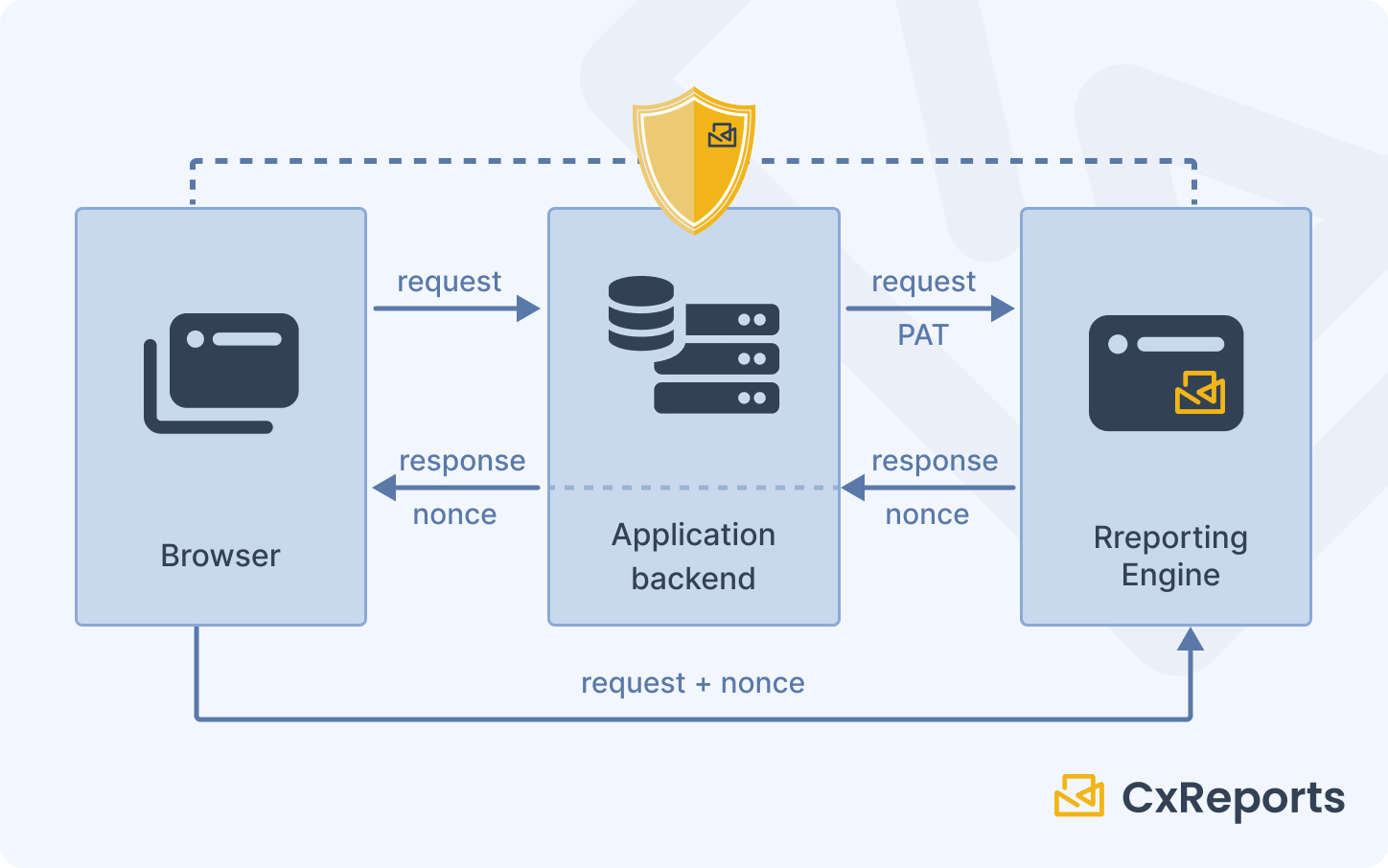
Programmatic access to CxReports - for server-side report generation, automation, and embedding - uses two distinct token types, each suited to a specific security context.
Personal Access Tokens (PATs) are long-lived credentials used for server-side API calls. They authenticate as a specific user and inherit that user's workspace permissions. PATs belong in server-side environments: environment variables, secrets managers, deployment configuration. They must never appear in client-side code, browser storage, or URLs. The security implication is direct: treat a PAT like a password. Rotate it periodically, revoke it immediately if a system is decommissioned, and use different tokens for different environments.
Nonce tokens are single-use, short-lived tokens created server-side and passed to the browser for iframe authentication. A nonce is valid for one request only - on first use it converts to a session cookie, and subsequent requests within the iframe use that cookie. This model means the browser never holds a long-lived credential. Even if a nonce is intercepted before use, it's invalidated after a short window. Nonces are how you embed report previews in client applications without exposing credentials client-side.
Data protection: encryption and credentials
Encryption at rest
CxReports encrypts sensitive data stored in its database using a configurable key and vector specified in the application configuration. This covers database connection strings, API credentials, and other sensitive configuration values stored within CxReports. The key and vector are set by the deploying organisation - CxReports does not manage or have access to them in on-premise deployments.
For on-premise deployments, this means:
- The encryption key lives in your environment configuration, not in the application binary or a vendor system
- If the database is accessed directly (bypassing the application), stored credentials remain encrypted
- Different environments (dev, staging, production) should use different keys
In practice: configure the encryption key and vector as environment variables or via a secrets manager rather than hardcoding them in the configuration file. Treat them with the same care as the application's database password.
HTTPS enforcement
CxReports includes a ForceHttps configuration setting that redirects HTTP requests to HTTPS. This is the minimum for any deployment handling sensitive data - it ensures that authentication tokens, session cookies, and report content are encrypted in transit. The setting is automatic when Google or Microsoft login is enabled (the OAuth redirect flow requires HTTPS), but should be explicitly enabled for all production deployments regardless of authentication method.
Mixed-content scenarios - where the application runs over HTTPS but makes HTTP requests to internal services - should be audited carefully. Browsers block mixed content; internal network assumptions are often less reliable than they appear.
Database connection security
Database connection strings in CxReports are stored encrypted (covered by the application's encryption configuration above). When configuring a database connection, only the minimum-required database user permissions should be used - typically read-only access to the specific schemas the reports need. The database user configured in CxReports does not need write access, administrative access, or access to schemas outside the reporting scope.
For multi-database environments, a separate database user per reporting workspace reduces blast radius: if one workspace's credentials are compromised, the exposure is limited to that workspace's data scope.
Multi-tenant isolation
Workspace as the isolation boundary
Workspaces in CxReports are independent sandboxes. Reports, templates, data sources, and users within a workspace are accessible only through that workspace. A user in one workspace cannot see or access another workspace's content, even if they're on the same CxReports installation.
For multi-tenant applications - where a reporting platform serves multiple customers or business units - the standard pattern is one workspace per tenant. Each tenant's templates, data connections, and reports are isolated. The root user can administer all workspaces; tenant users can only access their assigned workspace.
Row-level data filtering
Workspace isolation controls which users can access which templates and reports. It doesn't filter the underlying data those reports pull from databases. Data filtering - ensuring a user sees only records relevant to them - is implemented in the data source layer, typically through parameterised SQL queries that include a tenant ID or user-scope filter.
This is a distinction worth being explicit about: CxReports isolates access to report definitions and generation capabilities at the workspace level. What data those reports show is governed by how data sources and queries are constructed. If two tenants share a database, the separation between their data is in your queries, not automatically in the platform. The standard practice is to include a mandatory filter parameter in every data source query and pass the tenant context as a report parameter - ensuring the report can only return data within the allowed scope.
Preconfigured data sources and restricted access
For environments where report authors should not be able to modify data source definitions - preventing them from changing which database a report reads from, or altering query scope - workspace administrators control which database connections are available and how they're configured. Designers and operators work with the data sources the administrator has set up; they don't have access to modify the underlying connection settings unless they're assigned workspace administrator access.
Deployment security
On-premise: maximum control
On-premise deployment means CxReports runs on infrastructure you own and operate. The application, its database, and its encryption keys are all within your perimeter. This model is required for organisations with strict data residency requirements or policies prohibiting sensitive data from reaching third-party infrastructure.
In an on-premise deployment, network isolation is your responsibility: the server running CxReports should be accessible to users and systems that need it, and not exposed to the public internet unless specifically intended. Firewall rules, reverse proxy configuration, and network segmentation are all standard infrastructure concerns that apply to CxReports as they would to any server application.
CxReports is distributed as a Docker container, which simplifies deployment consistency and environment management. Docker also enables network-level isolation at the container level: the CxReports container can be restricted in which network interfaces it listens on and which external services it can reach.
Cloud deployment: managed service with built-in HTTPS
The CxReports cloud deployment is a fully managed service operated by the CxReports team in EU, US, and AU data centres. HTTPS is enforced, the infrastructure is maintained, and updates are applied automatically. For organisations without the infrastructure capacity for on-premise deployment, this model provides the security baseline without the operational overhead.
Cloud deployment raises a specific question for organisations handling sensitive data: does your data governance policy permit sending report data to a third-party managed service? For many organisations the answer is yes - cloud SaaS is standard. For regulated industries with strict data residency requirements, the on-premise option exists specifically for this case.
The Data Agent: hybrid access without inbound exposure
For organisations using the CxReports cloud service but with databases behind a firewall, the Data Agent provides a hybrid connectivity model. The agent runs on-premise (as a Docker container or Windows service), establishes an outbound websocket connection to the CxReports cloud instance, and executes database queries locally. The cloud service never has an inbound connection to your database; your database never needs to accept connections from the internet.
The security model of the Data Agent:
- Outbound only: the agent initiates the connection, so no inbound firewall rules are required
- Explicit registration: the agent must be registered in CxReports using its public key before it will accept instructions
- Controlled connection strings: the
AllowServerProvidedConnectionStrings: falseconfiguration setting prevents the CxReports server from specifying which database the agent connects to - connection strings are defined only in the agent's local configuration, which the server cannot override
This last point is important: with AllowServerProvidedConnectionStrings disabled, a compromised CxReports instance cannot redirect the agent to connect to a different database. The agent only connects to the databases its local configuration allows.
How this maps to CxReports
| Security requirement | CxReports primitive | Your responsibility |
|---|---|---|
| Least-privilege access | Custom workspace roles (No Access / Read / Full Access per capability) | Role design, periodic access review |
| Separation of duties | Root user vs. workspace admin vs. workspace user tiers | User assignment, role assignment |
| SSO / centrally managed identity | Google Login, Microsoft Login (appsettings) | Identity provider configuration |
| API access security | Personal Access Tokens (PATs) | Secrets management, rotation policy |
| Iframe embedding security | Nonce tokens (single-use, server-side generated) | Server-side nonce generation in your application |
| Credential encryption at rest | Encryption key + vector (appsettings) | Key management, environment separation |
| Data in transit | ForceHttps setting | Reverse proxy / TLS certificate |
| Database connection security | Connection strings stored encrypted | Minimum-privilege database users |
| Tenant data isolation | Workspace-per-tenant | Parameterised queries for row-level filtering |
| On-premise deployment | Docker-based self-hosted installation | Infrastructure and network security |
| Hybrid cloud + on-premise data access | Data Agent (outbound websocket, explicit registration) | Agent deployment, AllowServerProvidedConnectionStrings: false |
Documentation: docs.cx-reports.com
Data Agent setup: docs.cx-reports.com/administration/integration/data-agent
API and authentication: docs.cx-reports.com/administration/integration/api
For the audit trail and compliance requirements that sit alongside these security controls, see Compliance-Ready Reporting.
To discuss security requirements for your specific deployment, get in touch.