

Adding a language to your reports is not the same as localising them.
Translation — replacing English text with German, French, or Japanese equivalents — is the visible part of localisation. It is also the part that product teams typically treat as the whole job. Translate the labels, translate the headers, translate the boilerplate, done.
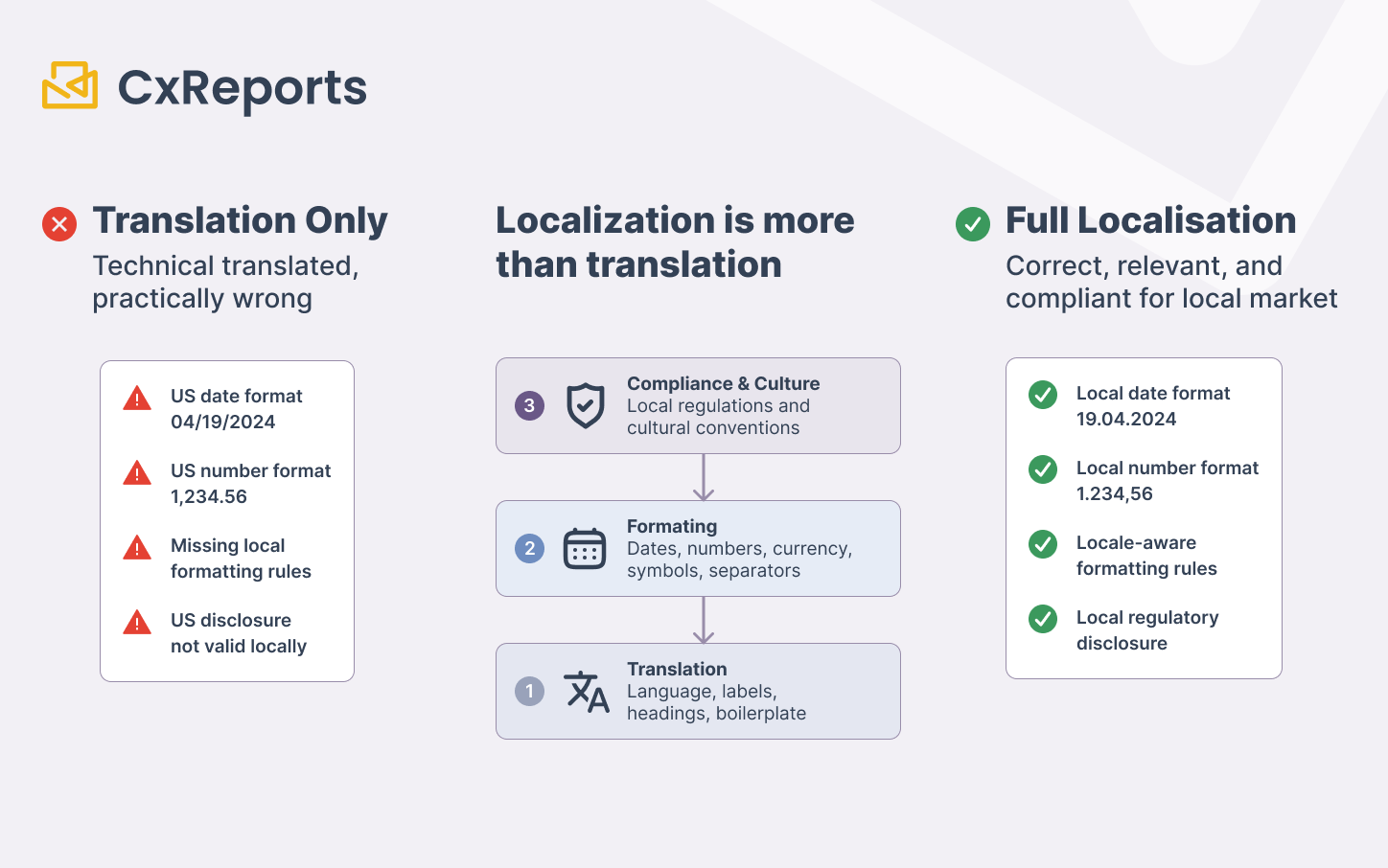
The reports that come back from this process are technically translated and practically wrong. The date shown to a German user reads 04/19/2024 in the American format. The number shown to a French user uses a dot as the thousands separator instead of a space and a comma as the decimal. The investor statement sent to a client in Japan uses the currency symbol in the position that is standard for US dollars. The disclosure paragraph that was written for a US regulatory context has been translated word-for-word into German — but the German equivalent of that disclosure is a different clause, not a translation.
These are not edge cases. They are the predictable consequences of treating localisation as translation, and they are present in the reports of most organisations that have expanded internationally without rebuilding their reporting infrastructure around locale-awareness.
This article covers the four layers of report localisation that templates must handle, where AI meaningfully reduces the effort at each layer, and what still requires human judgment.
The Four Layers of Report Localisation
Localisation for report templates operates at four distinct levels. They are not interchangeable, and failing at any one of them produces a report that is wrong for its intended locale even if the others are handled correctly.
Layer 1: Text and translation. The visible labels, headings, body text, and boilerplate that need to appear in the target language. This is what most people mean when they say "localise the report." It is necessary but not sufficient.
Layer 2: Format conventions. How dates, numbers, percentages, and currency values are displayed. These are not translation problems — "19 avril 2024" is correctly translated French, but a French reader expects "19/04/2024" as a date format. A German reader expects a period as the thousands separator and a comma as the decimal. A Swiss French reader expects different number formatting than a French French reader. These conventions are determined by locale, not by language alone, and they are invisible until they are wrong.
Layer 3: Layout and reading direction. For languages that read right-to-left — Arabic, Hebrew, Persian — a template designed with a left-to-right reading assumption is not just visually awkward; its information hierarchy is inverted. Tables read in the wrong direction. Column labels and data relationships are reversed. Adjusting text alignment alone does not address this; the structural layout of elements on the page needs to reflect the reading direction of the target language.
Layer 4: Regulatory and cultural conventions. Legal disclosures, regulatory statements, risk warnings, and culturally specific formatting expectations that are not interchangeable across jurisdictions. A disclosure that is legally compliant in the UK is not necessarily the equivalent disclosure in Germany, even if the underlying subject matter is the same. A date shown as "Q1 2025" conveys a clear period to most European readers but may require a different period convention for Japanese or Chinese reporting contexts.
AI assistance is highly effective at Layers 1 and 2, useful as a starting point for Layer 3, and a tool for first drafts only at Layer 4. The distinction matters because treating AI as a complete solution for all four layers is where localisation projects create compliance exposure.
Where AI Solves the Problem: Layers 1 and 2
Translation at volume
For report templates with hundreds of text elements — labels, column headers, section titles, instructional boilerplate, tooltip text — manual translation is a coordination problem as much as a language problem. Each string needs to be extracted, sent to a translator, verified, and re-integrated into the template in the correct position. For a template library supporting ten report types across eight languages, this is a significant sustained operational effort.
AI translation changes the economics of this process in one specific way: the per-string cost of translation drops to near zero. A template with three hundred translatable strings, previously requiring a translator engagement for each target language, can have those three hundred strings translated in seconds once the source language is finalised.
This does not eliminate the human review step — AI translation of regulatory and domain-specific text requires verification, particularly for financial and legal terminology. But it eliminates the mechanical translation step, which is the bulk of the effort for straightforward label and interface text.
Format conventions as configuration
Date and number format conventions are not translation problems. They are configuration problems. The question is not what language these values should be in — it is what locale rules should govern how they are displayed.
This is important because it changes where in the template workflow localisation happens. If date and number formats are hardcoded in the template — the date field is configured to display in MM/DD/YYYY regardless of the report's target locale — then producing a German report requires a separate template with different format configurations. If format conventions are driven by the report's language setting, a single template generates correctly formatted output for each locale at generation time.
AI can be used at the template design stage to set up locale-aware format configurations — defining which fields should adapt to the language setting and what the fallback format should be for any locale not explicitly covered. This is the design-time decision that eliminates per-locale template duplication: build locale-awareness into the template structure once, and the template produces correctly formatted output for each language without needing a separate variant.
Structuring Templates for Localisation: The Design-Time Decisions
A localisation-ready template is built differently from a template that is localised after the fact. The key structural decisions happen at design time, before any translation work begins.
Use translation keys, not hardcoded text. Every text element that will vary by locale should reference a translation key rather than containing the text directly. A heading that reads "Portfolio Summary" in the English template should reference $dict.portfolioSummary, with the English value "Portfolio Summary" stored in the dictionary and other language values populated for each target locale. When a new language is added, the dictionary is updated; the template is unchanged.
This is a meaningful upfront discipline that pays compounding returns. A template with hardcoded text in twelve languages has twelve places to update for every structural change. A template with translation keys has one structural definition and twelve dictionary entries.
Separate format configuration from content. Date fields, number fields, currency fields, and percentage fields should be configured to respond to the report's language setting rather than using fixed format strings. The template specifies that a field is a date — the locale determines how that date is displayed. This is the configuration equivalent of translation keys for text: one format specification, multiple locale outputs.
Design for the widest content first. Translated text is almost always a different length than the source text. German text tends to be longer than English. Chinese tends to be shorter. A layout that is carefully optimised for English string lengths will have clipped text in German and excessive whitespace in Chinese. Design layout constraints with the widest expected translation in mind — typically by testing against the known longest-text locale during the review phase.
For RTL layouts, plan the structure explicitly. Right-to-left reading direction is not a styling change. It requires deliberate layout decisions about element positioning, table column order, and reading flow. These decisions are best made explicitly at template design time rather than applied retroactively. AI can assist with applying RTL-appropriate styling — text alignment, mirrored padding, directional adjustments — but the structural intent (which elements should lead, which should follow) is a design decision that requires human input.
AI-Assisted Translation Workflow
The most effective integration of AI in multilingual template work follows a consistent pattern: design the template in the primary language with translation-key structure, then use AI to generate the initial translations for all target languages, then apply human review at the layer where accuracy is critical.
The workflow looks like this in practice:
Step 1: Finalise source language content. Complete the template in the primary language with all translation keys defined and sourced. Every key that will vary by locale should have a clear, accurate source value before translation begins. Translating from provisional or still-evolving source text wastes translation effort.
Step 2: AI translate to target languages. Use the translation key library to generate initial translations across all target languages simultaneously. AI translation handles high-volume label and interface text reliably. The output is a starting point for each language, not a finished deliverable.
Step 3: Human review for Layer 4 content. Regulatory language, compliance disclosures, jurisdiction-specific legal statements, and technical financial terminology require review by someone with domain knowledge in the target language and jurisdiction. This is not optional. A machine-translated regulatory disclosure in a German investor statement may be grammatically correct and legally wrong.
Step 4: Test format output per locale. Generate test reports for each target locale against representative data and verify that dates, numbers, currencies, and percentages display correctly for each locale's conventions. Format errors are often invisible in the translation step and only appear when values are populated.
Step 5: Maintain a localisation-aware prompt library. For ongoing template work — adding new sections, modifying existing content, expanding to additional languages — a documented prompt library captures the conventions used in each locale. Prompt patterns that reliably produce correctly structured RTL-adjusted layouts, that apply the right currency format for a given region, or that generate translation keys in the expected format should be documented and reused rather than recreated each time.
What Stays with the Human Reviewer
AI translation and format configuration reduce the volume of localisation work dramatically. They do not reduce the responsibility for localisation accuracy. Several categories of content require human review regardless of how AI is used in the workflow.
Regulatory and legal terminology. Financial regulatory terminology varies significantly by jurisdiction — not just in language but in meaning. "Capital adequacy" has specific regulatory definitions that differ between EU and US contexts. A disclosure clause required by the FCA has a specific form that is not equivalent to the BaFin equivalent, even when both address the same regulatory obligation. Machine translation of these terms produces plausible-sounding text that may be technically incorrect in ways that create compliance exposure.
Cultural and professional formatting expectations. Beyond format conventions, different cultures have different expectations for the tone, structure, and visual presentation of financial documents. The level of formality, the use of salutations, the convention for presenting hierarchy and authority in document structure — these are not covered by translation or format configuration. They require reviewers with genuine familiarity with the target market.
Context-specific terminology. Financial products, asset classes, and operational concepts often have accepted local-market terms that are different from the literal translation of the source language term. A translator who produces a grammatically correct translation may produce one that industry practitioners in the target market would not use. Domain-fluent human reviewers are the quality gate for this layer.
How This Works in CxReports
CxReports implements localisation through a dedicated Language and Dictionary system that directly supports the design patterns described above.
Languages and locale-driven formatting. Languages in CxReports are defined by IETF language tags — the standardised codes that specify locale conventions for date and number formatting. Each language added to a workspace tells CxReports how to format dates, numbers, and currencies when a report is generated in that language. Switching a report from English (en-US) to German (de-DE) changes the date separator from slashes to dots, applies the German thousands and decimal separator conventions, and adjusts month names in date display — automatically, as a consequence of the language setting, not through template modifications. This is the format convention layer handled at the platform level.
Dictionaries for translation key management. CxReports' dictionary system maps directly to the translation-key design pattern. Text elements in a report reference dictionary keys using $dict.key notation. Each dictionary entry holds the text value for each language configured in the workspace. The template references the key; the language setting at generation time determines which value is used. Public dictionaries can be shared across multiple reports, so common terms — portfolio, statement, balance, total — are defined and maintained in one place rather than duplicated across every report that uses them.
AI translation for dictionary population. CxReports includes built-in AI translation for dictionaries, configured at the workspace level using an AI integration (OpenAI models). Once the source language values are finalised, AI translation populates the dictionary entries for all selected target languages in a single operation — translating the entire dictionary rather than working string by string. This is the mechanism that makes high-volume multilingual template work tractable: the source dictionary defines the content; AI translation generates the language variants; human review focuses on the terminology and regulatory content that requires domain knowledge.
Getting Started with CxReports
| Localisation requirement | CxReports mechanism | Workflow step |
|---|---|---|
| Locale-specific date and number formatting | Languages (IETF language tags per workspace) | Add each target language with its IETF code; date/number formats apply automatically at report generation |
| Translatable text in templates | Dictionaries ($dict.key notation in report elements) |
Define all variable text as dictionary keys; store source language values in the dictionary |
| Bulk translation across languages | AI Translation Integration (OpenAI — configured in Workspace Configuration > Connections) | Finalise source language dictionary; run AI translation to populate all target language entries |
| Shared terminology across report types | Public dictionaries (reusable across all reports in the workspace) | Create public dictionaries for common financial terms; attach to all reports that use them |
| Regulatory and legal content | Human review — not AI-automated | Route jurisdiction-specific disclosures, compliance clauses, and legal terminology to domain-fluent reviewers after AI translation |
| Per-locale format output verification | Test report generation against representative data | Generate sample output in each target language; verify date, number, currency, and percentage display against locale conventions |
For documentation on Languages, Dictionaries, and AI Integrations, see the CxReports documentation. To discuss multilingual reporting requirements for your organisation, get in touch.# Localisation at Scale: Using AI to Adapt Report Templates for Multiple Languages and Regions
Adding a language to your reports is not the same as localising them.
Translation — replacing English text with German, French, or Japanese equivalents — is the visible part of localisation. It is also the part that product teams typically treat as the whole job. Translate the labels, translate the headers, translate the boilerplate, done.
The reports that come back from this process are technically translated and practically wrong. The date shown to a German user reads 04/19/2024 in the American format. The number shown to a French user uses a dot as the thousands separator instead of a space and a comma as the decimal. The investor statement sent to a client in Japan uses the currency symbol in the position that is standard for US dollars. The disclosure paragraph that was written for a US regulatory context has been translated word-for-word into German — but the German equivalent of that disclosure is a different clause, not a translation.
These are not edge cases. They are the predictable consequences of treating localisation as translation, and they are present in the reports of most organisations that have expanded internationally without rebuilding their reporting infrastructure around locale-awareness.
This article covers the four layers of report localisation that templates must handle, where AI meaningfully reduces the effort at each layer, and what still requires human judgment.
The Four Layers of Report Localisation
Localisation for report templates operates at four distinct levels. They are not interchangeable, and failing at any one of them produces a report that is wrong for its intended locale even if the others are handled correctly.
Layer 1: Text and translation. The visible labels, headings, body text, and boilerplate that need to appear in the target language. This is what most people mean when they say "localise the report." It is necessary but not sufficient.
Layer 2: Format conventions. How dates, numbers, percentages, and currency values are displayed. These are not translation problems — "19 avril 2024" is correctly translated French, but a French reader expects "19/04/2024" as a date format. A German reader expects a period as the thousands separator and a comma as the decimal. A Swiss French reader expects different number formatting than a French French reader. These conventions are determined by locale, not by language alone, and they are invisible until they are wrong.
Layer 3: Layout and reading direction. For languages that read right-to-left — Arabic, Hebrew, Persian — a template designed with a left-to-right reading assumption is not just visually awkward; its information hierarchy is inverted. Tables read in the wrong direction. Column labels and data relationships are reversed. Adjusting text alignment alone does not address this; the structural layout of elements on the page needs to reflect the reading direction of the target language.
Layer 4: Regulatory and cultural conventions. Legal disclosures, regulatory statements, risk warnings, and culturally specific formatting expectations that are not interchangeable across jurisdictions. A disclosure that is legally compliant in the UK is not necessarily the equivalent disclosure in Germany, even if the underlying subject matter is the same. A date shown as "Q1 2025" conveys a clear period to most European readers but may require a different period convention for Japanese or Chinese reporting contexts.
AI assistance is highly effective at Layers 1 and 2, useful as a starting point for Layer 3, and a tool for first drafts only at Layer 4. The distinction matters because treating AI as a complete solution for all four layers is where localisation projects create compliance exposure.
Where AI Solves the Problem: Layers 1 and 2
Translation at volume
For report templates with hundreds of text elements — labels, column headers, section titles, instructional boilerplate, tooltip text — manual translation is a coordination problem as much as a language problem. Each string needs to be extracted, sent to a translator, verified, and re-integrated into the template in the correct position. For a template library supporting ten report types across eight languages, this is a significant sustained operational effort.
AI translation changes the economics of this process in one specific way: the per-string cost of translation drops to near zero. A template with three hundred translatable strings, previously requiring a translator engagement for each target language, can have those three hundred strings translated in seconds once the source language is finalised.
This does not eliminate the human review step — AI translation of regulatory and domain-specific text requires verification, particularly for financial and legal terminology. But it eliminates the mechanical translation step, which is the bulk of the effort for straightforward label and interface text.
Format conventions as configuration
Date and number format conventions are not translation problems. They are configuration problems. The question is not what language these values should be in — it is what locale rules should govern how they are displayed.
This is important because it changes where in the template workflow localisation happens. If date and number formats are hardcoded in the template — the date field is configured to display in MM/DD/YYYY regardless of the report's target locale — then producing a German report requires a separate template with different format configurations. If format conventions are driven by the report's language setting, a single template generates correctly formatted output for each locale at generation time.
AI can be used at the template design stage to set up locale-aware format configurations — defining which fields should adapt to the language setting and what the fallback format should be for any locale not explicitly covered. This is the design-time decision that eliminates per-locale template duplication: build locale-awareness into the template structure once, and the template produces correctly formatted output for each language without needing a separate variant.
Structuring Templates for Localisation: The Design-Time Decisions
A localisation-ready template is built differently from a template that is localised after the fact. The key structural decisions happen at design time, before any translation work begins.
Use translation keys, not hardcoded text. Every text element that will vary by locale should reference a translation key rather than containing the text directly. A heading that reads "Portfolio Summary" in the English template should reference $dict.portfolioSummary, with the English value "Portfolio Summary" stored in the dictionary and other language values populated for each target locale. When a new language is added, the dictionary is updated; the template is unchanged.
This is a meaningful upfront discipline that pays compounding returns. A template with hardcoded text in twelve languages has twelve places to update for every structural change. A template with translation keys has one structural definition and twelve dictionary entries.
Separate format configuration from content. Date fields, number fields, currency fields, and percentage fields should be configured to respond to the report's language setting rather than using fixed format strings. The template specifies that a field is a date — the locale determines how that date is displayed. This is the configuration equivalent of translation keys for text: one format specification, multiple locale outputs.
Design for the widest content first. Translated text is almost always a different length than the source text. German text tends to be longer than English. Chinese tends to be shorter. A layout that is carefully optimised for English string lengths will have clipped text in German and excessive whitespace in Chinese. Design layout constraints with the widest expected translation in mind — typically by testing against the known longest-text locale during the review phase.
For RTL layouts, plan the structure explicitly. Right-to-left reading direction is not a styling change. It requires deliberate layout decisions about element positioning, table column order, and reading flow. These decisions are best made explicitly at template design time rather than applied retroactively. AI can assist with applying RTL-appropriate styling — text alignment, mirrored padding, directional adjustments — but the structural intent (which elements should lead, which should follow) is a design decision that requires human input.
AI-Assisted Translation Workflow
The most effective integration of AI in multilingual template work follows a consistent pattern: design the template in the primary language with translation-key structure, then use AI to generate the initial translations for all target languages, then apply human review at the layer where accuracy is critical.
The workflow looks like this in practice:
Step 1: Finalise source language content. Complete the template in the primary language with all translation keys defined and sourced. Every key that will vary by locale should have a clear, accurate source value before translation begins. Translating from provisional or still-evolving source text wastes translation effort.
Step 2: AI translate to target languages. Use the translation key library to generate initial translations across all target languages simultaneously. AI translation handles high-volume label and interface text reliably. The output is a starting point for each language, not a finished deliverable.
Step 3: Human review for Layer 4 content. Regulatory language, compliance disclosures, jurisdiction-specific legal statements, and technical financial terminology require review by someone with domain knowledge in the target language and jurisdiction. This is not optional. A machine-translated regulatory disclosure in a German investor statement may be grammatically correct and legally wrong.
Step 4: Test format output per locale. Generate test reports for each target locale against representative data and verify that dates, numbers, currencies, and percentages display correctly for each locale's conventions. Format errors are often invisible in the translation step and only appear when values are populated.
Step 5: Maintain a localisation-aware prompt library. For ongoing template work — adding new sections, modifying existing content, expanding to additional languages — a documented prompt library captures the conventions used in each locale. Prompt patterns that reliably produce correctly structured RTL-adjusted layouts, that apply the right currency format for a given region, or that generate translation keys in the expected format should be documented and reused rather than recreated each time.
What Stays with the Human Reviewer
AI translation and format configuration reduce the volume of localisation work dramatically. They do not reduce the responsibility for localisation accuracy. Several categories of content require human review regardless of how AI is used in the workflow.
Regulatory and legal terminology. Financial regulatory terminology varies significantly by jurisdiction — not just in language but in meaning. "Capital adequacy" has specific regulatory definitions that differ between EU and US contexts. A disclosure clause required by the FCA has a specific form that is not equivalent to the BaFin equivalent, even when both address the same regulatory obligation. Machine translation of these terms produces plausible-sounding text that may be technically incorrect in ways that create compliance exposure.
Cultural and professional formatting expectations. Beyond format conventions, different cultures have different expectations for the tone, structure, and visual presentation of financial documents. The level of formality, the use of salutations, the convention for presenting hierarchy and authority in document structure — these are not covered by translation or format configuration. They require reviewers with genuine familiarity with the target market.
Context-specific terminology. Financial products, asset classes, and operational concepts often have accepted local-market terms that are different from the literal translation of the source language term. A translator who produces a grammatically correct translation may produce one that industry practitioners in the target market would not use. Domain-fluent human reviewers are the quality gate for this layer.
How This Works in CxReports
CxReports implements localisation through a dedicated Language and Dictionary system that directly supports the design patterns described above.
Languages and locale-driven formatting. Languages in CxReports are defined by IETF language tags — the standardised codes that specify locale conventions for date and number formatting. Each language added to a workspace tells CxReports how to format dates, numbers, and currencies when a report is generated in that language. Switching a report from English (en-US) to German (de-DE) changes the date separator from slashes to dots, applies the German thousands and decimal separator conventions, and adjusts month names in date display — automatically, as a consequence of the language setting, not through template modifications. This is the format convention layer handled at the platform level.
Dictionaries for translation key management. CxReports' dictionary system maps directly to the translation-key design pattern. Text elements in a report reference dictionary keys using $dict.key notation. Each dictionary entry holds the text value for each language configured in the workspace. The template references the key; the language setting at generation time determines which value is used. Public dictionaries can be shared across multiple reports, so common terms — portfolio, statement, balance, total — are defined and maintained in one place rather than duplicated across every report that uses them.
AI translation for dictionary population. CxReports includes built-in AI translation for dictionaries, configured at the workspace level using an AI integration (OpenAI models). Once the source language values are finalised, AI translation populates the dictionary entries for all selected target languages in a single operation — translating the entire dictionary rather than working string by string. This is the mechanism that makes high-volume multilingual template work tractable: the source dictionary defines the content; AI translation generates the language variants; human review focuses on the terminology and regulatory content that requires domain knowledge.
Getting Started with CxReports
| Localisation requirement | CxReports mechanism | Workflow step |
|---|---|---|
| Locale-specific date and number formatting | Languages (IETF language tags per workspace) | Add each target language with its IETF code; date/number formats apply automatically at report generation |
| Translatable text in templates | Dictionaries ($dict.key notation in report elements) |
Define all variable text as dictionary keys; store source language values in the dictionary |
| Bulk translation across languages | AI Translation Integration (OpenAI — configured in Workspace Configuration > Connections) | Finalise source language dictionary; run AI translation to populate all target language entries |
| Shared terminology across report types | Public dictionaries (reusable across all reports in the workspace) | Create public dictionaries for common financial terms; attach to all reports that use them |
| Regulatory and legal content | Human review — not AI-automated | Route jurisdiction-specific disclosures, compliance clauses, and legal terminology to domain-fluent reviewers after AI translation |
| Per-locale format output verification | Test report generation against representative data | Generate sample output in each target language; verify date, number, currency, and percentage display against locale conventions |
For documentation on Languages, Dictionaries, and AI Integrations, see the CxReports documentation. To discuss multilingual reporting requirements for your organisation, get in touch.