

At fifty templates, consistency is a design discipline. At five hundred, it is a systems problem.
With a library of fifty report templates, a small team can review each new addition against the approved standard before it is published. The typography matches. The heading hierarchy follows the convention. The colour values are from the approved palette. The table borders are the right weight. The footer uses the approved boilerplate. The naming follows the agreed taxonomy. Consistency is maintained through review, and review is feasible because the library is small enough to hold in someone's head.
Scale that library to five hundred templates, add four or five report designers working in parallel across different workspaces, span a timeline of three years, and consistency breaks down. Not because anyone deliberately abandoned the standard, but because no single person has time to review every template against the full library of approved precedents.
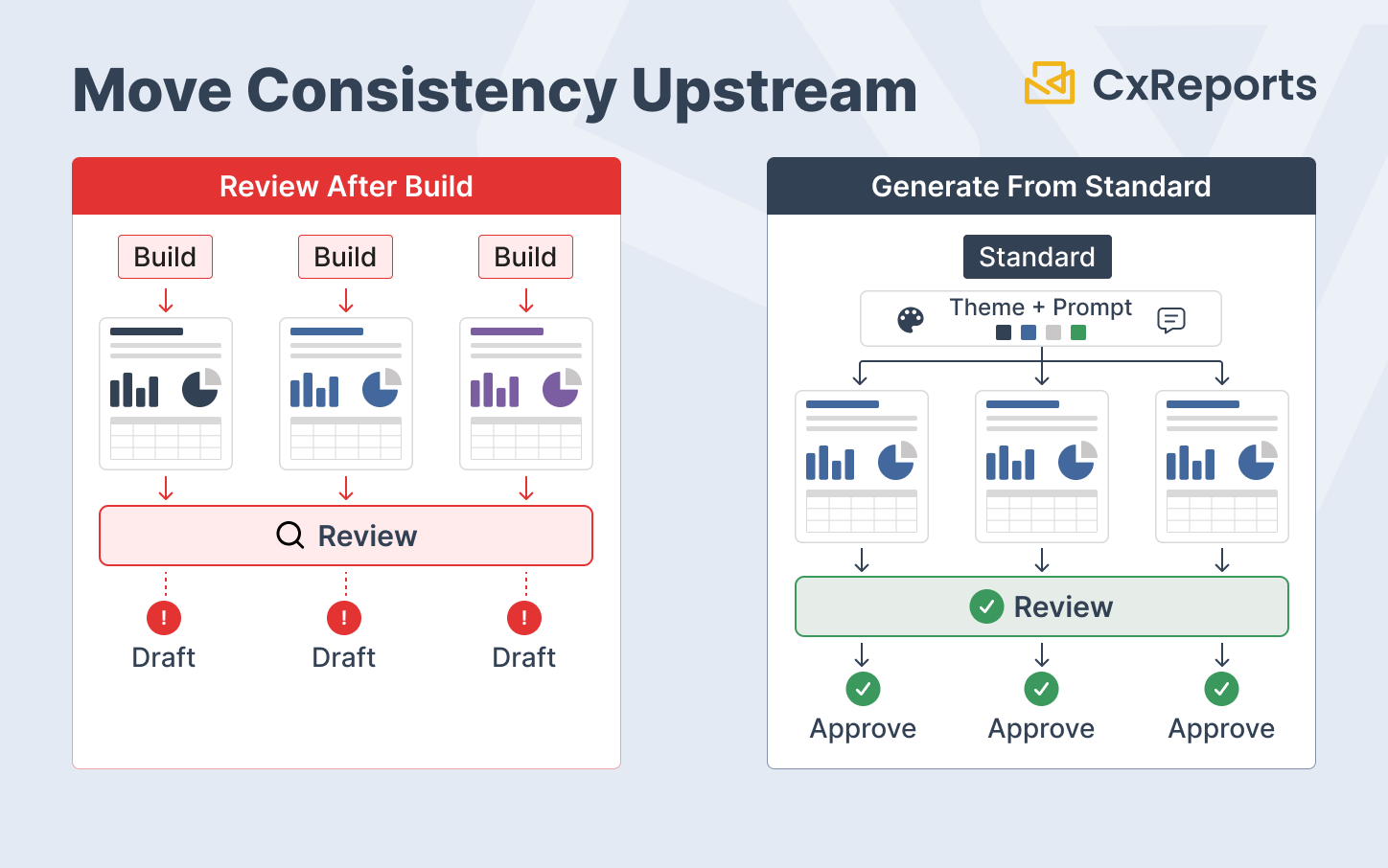
New templates are built from the one that looks closest, inheriting its correct elements and its deviations equally. Deviations compound. The library that looked coherent at fifty looks fragmented at five hundred.
AI helps with this problem, but not by replacing governance. The scalable approach is stronger than "generate faster, review faster." It is to combine platform-enforced standards with AI-assisted generation guidance:
- themes enforce the visual standard
- prompts guide structure, naming, and layout conventions
- workspaces and roles define ownership boundaries
- exports and reviews preserve a record of what changed
The result is not consistency by memory. It is consistency by system design.
How Consistency Degrades at Scale
Understanding exactly how consistency breaks down in large template libraries makes it easier to see where AI intervention is useful - and where platform controls are more important.
Drift. Drift is gradual, unintentional deviation from a standard that no one intended to abandon. A designer adds a table and sets the border weight at 0.75pt rather than 0.5pt because it looked right at the zoom level they were working at. No one catches it because no one is reviewing for that level of detail. Six months later, a different designer sees that table as the reference and uses 0.75pt. Now two conventions exist. Neither is the standard; neither is wrong in an obvious way. The library has drifted.
Divergence. Divergence is stronger than drift. It happens when two teams or designers develop parallel conventions without coordinating. The finance report family uses bold section headers with a grey background row. The operations report family uses italic section headers with no background. Both were internally consistent when they were created, but they represent different approaches to the same design problem. As the library grows, users encounter both conventions and produce new templates that blend or alternate between them.
Debt accumulation. Every template that deviates from the current standard is operational debt. For the governance process that keeps shared components from diverging, see Shared Templates in Banking. It will need to be corrected if a brand update propagates through the library, it will look inconsistent alongside newer templates, and it creates ambiguity for designers who look at the existing library as reference. Debt accumulates passively. It does not require anyone to make a mistake, only to keep producing templates at business speed without a mechanism that keeps the standard explicit.
What AI Should Do - and What It Should Not
AI does not enforce consistency by itself. A prompt is guidance, not a hard control. If visual standards must be enforced across hundreds of templates, those standards should live in the platform layer wherever possible.
The right division of responsibility is:
Platform themes enforce visual consistency. Typography, colour values, table styling, heading formats, spacing defaults, and reusable CSS should be defined once in the theme. Designers should use the shared theme instead of applying one-off local styling in each template. When templates rely on the theme, a theme update can propagate consistently across the library.
AI assists with structural consistency. The AI assistant is useful for applying repeatable instructions: section hierarchy, report family structure, naming conventions, footer composition, table layout choices, and rules for when a section should appear. These conventions are harder to capture fully in a theme, but they can be expressed clearly in a reusable prompt.
Human review remains responsible for intent. Data binding, business meaning, regulatory wording, document purpose, and stakeholder approval still require human judgment. AI can produce a strong starting point, but it should not be treated as the final authority on whether a template is correct.
This distinction matters. If the article's claim is "AI enforces consistency," the argument is too broad. The stronger claim is: themes enforce the visual standard, while AI helps generate templates that follow the approved structural and naming standard from the beginning.
The Master Style Reference Prompt
The mechanism that makes AI-assisted consistency scalable is the master style reference prompt: a reusable prompt component that is included in every template generation instruction.
In a platform like CxReports, this prompt should not duplicate everything that belongs in the theme. The theme should carry the hard visual standards. The prompt should tell the AI how to use those standards and how to apply conventions the theme does not fully express.
A practical master style reference prompt might look like this:
Master Style Reference - Report Template Library

Theme:
- Use the theme assigned to this report.
- Do not apply one-off colours, fonts, or table border styles unless explicitly requested.
- Use theme-defined heading, table, and footer styles.

Structure:
- Use a clear hierarchy: cover, summary, detail sections, appendix if needed.
- Keep section names consistent across the document family.
- Use the approved table pattern for repeated line-item data.
- Use conditional sections only where the input data or parameter rules require them.

Footer:
- Headers and footers come from the approved template.
- Do not add footer-like content to report pages.
- Do not introduce new disclosure wording without approval.

Naming convention:
- Format: [department]-[document-type]-[variant]-[version]
- Example: finance-portfolio-summary-quarterly-v1

Review requirements:
- Flag any assumption about data fields, calculations, or conditional display rules.
- Keep generated output aligned with the approved theme and document family pattern.
When a designer needs to create a new template, they start with the master style reference and then describe the new template's specific purpose and structure. The AI assistant generates a template that follows the current convention before the designer begins detailed review.
The specification is maintained as a living document. When the organisation updates its naming convention, footer wording, section hierarchy, or review rules, the master style reference is updated once and used in subsequent generation prompts.
In CxReports, the natural home for this reference is an AI Skill: a reusable instruction the assistant loads on its own. A Global skill applies across the workspace, and a Report skill applies to one report, so designers do not need to paste the reference into every conversation and everyone works from the same current version.
For brand changes, the primary update should happen in the theme, not only in the prompt. A prompt can say "use the approved theme," but the theme is what actually carries the typography, colours, table styles, and reusable CSS. That is the difference between instruction and enforcement.
Taxonomy and Organisation at Scale
Consistency is not only visual. A library of five hundred templates with inconsistent naming, unclear categorisation, and no structural organisation is difficult to maintain and difficult to use. Designers cannot find the right reference template, operations teams cannot locate the correct report variant, and governance becomes impossible because no one can see the full picture of what exists.
AI can help apply and maintain a naming taxonomy, but the workflow should be described carefully.
Auditing existing naming against the convention. For libraries with accumulated naming inconsistency, export or list the current template names, provide the approved convention, and use a general-purpose AI tool outside CxReports to identify likely deviations. This can surface reports that use unsupported abbreviations, omit required prefixes, or name variants inconsistently relative to their siblings. The library owner still reviews the findings before remediation.
Naming new templates. Naming and placing a new report is a designer step: the designer creates the report with a name that follows the convention, for example [department]-[document-type]-[variant]-[version], before the assistant starts building its content. Keeping the convention in the master style reference means the assistant uses the same terms for section names and elements inside the report.
Maintaining categorisation as the library grows. Where a new template belongs (which workspace, which report type) remains the library owner's decision. A general-purpose AI tool can help draft a recommendation from a description of the template's purpose and audience, but that work happens outside the CxReports assistant.
When to Refactor with AI vs Leave Stable Templates Untouched
Not every template in a large library needs to be brought into alignment with the current standard. Refactoring templates has a cost: testing, stakeholder sign-off, re-deployment, and the risk of introducing regressions into reports that are currently working correctly. The decision of when to refactor and when to leave a stable template untouched is a governance question, not just a design question.
A practical framework:
Refactor when:
- The template is distributed to external recipients and its deviation from the current standard is visible and significant
- The template is frequently modified and is likely to be used as a reference by designers creating new templates
- A brand update requires the template to be modified anyway
- The template is part of a document family where sibling templates have already been brought into alignment
Leave stable when:
- The template is rarely used, internal-only, and its deviation is minor
- The template is effectively read-only and is not used as a reference for new templates
- The refactor would require stakeholder re-approval with significant lead time, and the value of alignment does not justify that cost
- The template is approaching end-of-life and will be decommissioned soon
AI-assisted refactoring reduces the execution time of alignment work. It does not eliminate the governance cost. Someone still needs to decide whether the change is worth making, validate that the output is correct, and approve the revised template for production use.
How This Maps to CxReports
CxReports provides the platform-level mechanisms that support library consistency at scale, while the AI assistant accelerates per-template execution.
Themes as the visual consistency layer. In CxReports, a theme carries a visual definition: typography, colour palette, table styling, heading formats, and custom CSS. A workspace can hold several themes, and each report is assigned one in its Report Settings; the assistant can read that theme when it styles elements, but assigning it is a designer step. A correctly configured theme is the platform-level control for the visual standard. Theme changes propagate cleanly when templates rely on shared theme definitions rather than one-off local overrides.
AI assistant for structural generation. For structural elements on report pages - section hierarchy, layout configuration, table setup, and consistent section naming - the AI assistant applies instructions from the master style reference, ideally stored as an AI Skill. Headers and footers are defined in templates, which the designer maintains in the Template Editor. For a framework to measure the actual time savings from this approach, see Measuring the Impact of AI-Assisted Report Design. The theme handles visual styling; the prompt handles generation guidance that is not fully captured in the theme.
Workspace organisation for ownership boundaries. CxReports workspaces provide the organisational structure for large template libraries. A workspace per business function, document family, region, or client-facing domain creates a navigable taxonomy. Workspace-level roles control who can create and modify templates within each area, preventing uncoordinated additions.
Data Export for configuration snapshots. The Data Export function in CxReports exports shared configuration such as themes, parameters, page types, and report types as JSON. For large libraries, periodic exports capture the state of the standards that drive consistency. When a brand update or theme change is made, pre- and post-update exports document exactly what changed.
The operating model is simple:
- Theme = platform control
- AI prompt = generation guidance
- Workspace and roles = ownership boundary
- Data Export = configuration snapshot
That is the CxReports version of scaling a report library from fifty templates to five hundred without relying on memory, manual review, or copied precedent alone.
Getting Started with CxReports
| Library consistency requirement | CxReports mechanism | Implementation approach |
|---|---|---|
| Enforce visual consistency across templates | Themes | Define typography, colours, table styling, heading formats, and reusable CSS in the approved workspace theme |
| Generate new templates aligned to the standard | AI assistant + master style reference stored as an AI Skill | Maintain reusable generation instructions for structure, section naming, and review rules |
| Avoid local visual drift | Theme usage discipline | Keep templates dependent on shared theme definitions rather than one-off local overrides |
| Organise a large library by function or document family | Workspace separation | Create one workspace per business function, report family, region, or ownership boundary |
| Control who creates and modifies templates | Workspace roles | Restrict template editing rights to designated owners in each workspace |
| Snapshot shared configuration for change tracking | Data Export | Export before and after significant theme, parameter, page type, or report type changes |
| Audit naming consistency across an existing library | Exported or listed template names + AI review outside CxReports | Provide the naming convention and current template list to a general AI tool; owner reviews the likely deviations |
For documentation on themes, workspaces, roles, and Data Export, see the CxReports documentation. To discuss template library management for your organisation's scale, get in touch.