

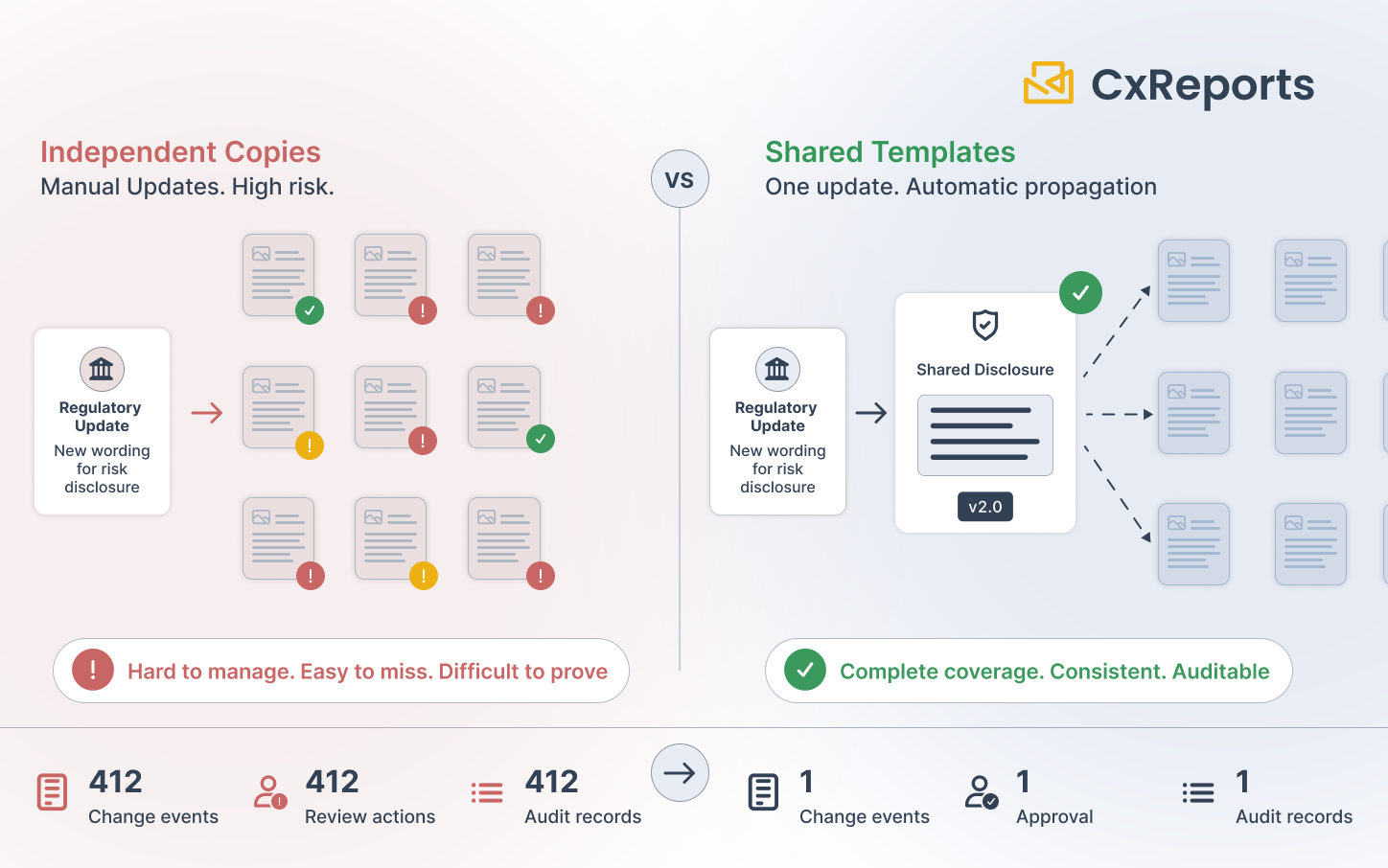
A regulator updates the required wording for a risk disclosure that appears in every investor-facing document your bank produces. The change is one sentence. The number of reports that carry that sentence is four hundred and twelve.
You have three weeks to comply.
If your reporting infrastructure treats each of those four hundred and twelve reports as an independent document — and most do — then your compliance team has three weeks to open each one, find the disclosure section, edit the text, verify the edit, and document the change. For four hundred and twelve reports. With an audit trail that proves every single one was updated.
This is not a hypothetical. It is the routine operational reality of disclosure management at any bank that has accumulated a substantial report library. And it is the problem that shared template architecture is specifically designed to solve — and that governance process around shared templates is specifically designed to make safe.
How Banks Accumulate the Problem
No bank sets out to create four hundred and twelve independent copies of the same disclosure text. It happens through ordinary growth.
A template is built for quarterly equity statements. A version is built for fixed income. Another for multi-asset portfolios. Each client segment gets a variant. Each jurisdiction gets a variant. Products launched in different years got different template generations. Seasonal report types got their own. Over five years, a report library that started as a dozen templates becomes a catalogue of hundreds, most of which share a structural common core: the same header layout, the same footer boilerplate, the same risk warning text, the same disclosure paragraphs that regulatory requirements mandate across every investor communication.
The structural similarity is real. But if each of those variants was built by copying and modifying a previous version rather than by inheriting from a shared component, then the similarity is cosmetic. Underneath, each document is independent. A change to the shared content is not a change to one thing — it is four hundred and twelve separate changes that need to be coordinated, tracked, and evidenced.
The operational cost of this architecture becomes visible the moment a regulatory requirement changes. Before that moment, duplication is invisible. After it, duplication is the thing that determines whether the compliance deadline is met or missed.
The Manual Alternative and Why It Fails
The manual alternative is not a process failure — it is what rational people do when their tooling does not give them a better option. Open each report, find the section, make the change, save, move to the next. For small report libraries or infrequent regulatory changes, this is manageable.
For a large report library, it fails in three predictable ways.
Incomplete propagation. Updating four hundred reports manually produces at least some that get missed. The report added to the library six months ago by a colleague who has since left. The variant used only for a specific client segment that no one thought to check. The report that was temporarily suppressed due to a data issue and is not in the active generation queue. An incomplete update — where the old disclosure wording remains active in any report that reaches a client or regulator — is not a minor inconsistency. It is a compliance breach.
Human error on individual edits. Manual text replacement in four hundred templates introduces the risk of transcription errors: a character changed, a word omitted, a paragraph boundary shifted. If the regulatory requirement is to use exact mandated wording, a variation from that wording in any report is non-compliant. Reviewing four hundred edited templates for textual accuracy against the mandated source is itself a significant undertaking.
The evidence problem. Even if the update is completed correctly, the audit evidence of completeness is difficult to produce. A regulator asking for confirmation that the new disclosure wording was applied to all applicable reports by the compliance date requires a dated change record for each report. If those records exist at all, they are likely scattered across email approvals, ticket systems, and individual editors' version histories — not a single coherent audit record.
The shared template architecture does not eliminate the governance requirement. It concentrates it. Instead of four hundred change events each requiring approval and documentation, there is one change event — to the shared component — with all the governance applied at that single point.
What "Update Propagates Automatically" Actually Means
Shared template architecture means a report's displayed content is determined at generation time by the current state of the shared component it references — not by a static copy of that content embedded in each document.
When the shared component is updated, every report that references it will generate using the new version from that point forward. There is no separate update step for each report. The change is made once, to the shared definition, and the propagation is structural — a consequence of how the reports are built, not a separate manual operation.
This is the architectural property that solves the propagation problem: the change is made in one place, and its effect reaches every dependent report automatically.
The governance challenge this creates is the converse of the propagation benefit. An update that propagates automatically to every dependent report means that an incorrect change, an unapproved change, or a change introduced without adequate testing also propagates to every dependent report. The power that makes the architecture valuable — one change, everywhere — is also what makes governance non-negotiable.
The Governance Layer: What Must Sit On Top
A shared component that can be modified by anyone, at any time, with immediate propagation to production documents is not a compliance asset. It is a compliance liability. The governance layer is what makes the architecture safe.
Change authorisation. Before any modification to a shared template or theme reaches the report library, it requires explicit approval from a designated authority — typically a combination of the template owner, a compliance sign-off for regulation-sensitive content, and a QA reviewer. The approval must be recorded: who approved, at what time, against what version of the proposed change, with what supporting evidence (the regulatory source, the mandate reference, the effective date).
Pre-propagation testing. Because a shared component change affects every report that uses it, testing must be done before the change is promoted to the production library. The standard approach is a promotion pipeline: changes are made in a non-production environment, a validation run generates a sample of affected reports using the updated component, a reviewer confirms the output is correct, and only then is the change promoted. Testing a change in production — because it seemed minor — is the path to discovering the error at the same moment four thousand investors receive incorrect statements.
Change logging. The change event itself — what was changed, by whom, under what authorisation, at what time — must be recorded as a log entry that is retained alongside the report generation records. If a regulator asks, six months after a compliance date, whether the mandated disclosure wording was in place on that date, the answer is found in two places: the template change log (confirming the change was made and approved before the effective date) and the generation records (confirming reports were generated after the change). Both records are needed; neither alone is sufficient.
Rollback capability. A change that propagates automatically also requires a fast, reliable way to undo. If a promoted change introduces a layout error, a formatting regression, or an unintended text change, the ability to revert to a known-good configuration immediately is an operational requirement, not an engineering nicety. Rollback means having a stored, validated snapshot of the configuration before the change was applied — retrievable and restorable on short notice.
How This Maps to CxReports
CxReports provides two shared component mechanisms that directly support update propagation, and a set of supporting primitives for the governance layer around them.
Themes as shared styling. A theme in CxReports defines the visual characteristics shared across report templates: typography, colour palette, table styling, heading formats, and external CSS. When a theme is edited, the change takes effect across every template linked to that theme. This is the native propagation mechanism in CxReports. A bank that defines regulatory disclosure formatting requirements — minimum font size for risk warnings, mandatory colour contrast, mandated font family — in a theme can update those requirements once, in the theme, and have the change propagate to every linked template without opening each one individually.
Templates as shared layout. A template in CxReports defines the structural layout for page types: the header, the footer, the content placeholder arrangement, and fixed elements like logos, page numbers, and boilerplate text. Reports that use the same template share its layout definition. When the template is updated — to revise footer disclosure wording, to modify a header element, to change a mandatory section structure — every report using that template reflects the change on its next generation.
The combination covers the two most common regulatory update scenarios: styling mandates (handled through theme updates) and content mandate updates (handled through template updates). Both propagate through the same structural mechanism: edit the shared definition, generation follows.
Workspace structure for the promotion pipeline. CxReports workspaces are independent environments. A bank using a development workspace for template changes and a production workspace for live report generation has a natural promotion boundary: changes to shared themes and templates in the development workspace can be validated before being exported and imported into the production workspace. The Data Export function serialises themes, parameters, page types, and report types as a JSON file; Data Import restores them. This export/import step is the promotion gate — the moment at which a controlled change moves from test to production.
Data Export for version snapshots and rollback. Before a shared template change is promoted to production, export the current configuration as a snapshot. If the change introduces a defect after promotion, the snapshot is the rollback point: import the previous configuration via Data Import, and the shared component reverts to its pre-change state. The snapshot also serves as the version record: the export file stored before the change documents what was in production at that point, and the export file after the change documents what replaced it.
Roles for change access control. The workspace role system controls who can modify shared templates and themes. Operations staff who run and schedule reports can be assigned roles that give them access to report generation but no access to templates or themes. Template changes are limited to designated designers or administrators. This is the separation of duties that makes the governance layer credible: the people who run reports in production cannot make unilateral changes to the shared components those reports run against.
Getting Started with CxReports
| Requirement | CxReports primitive | Your governance layer |
|---|---|---|
| Single-point update for visual/styling mandates | Themes — edit once, propagates to all linked templates | Change authorisation before editing; version snapshot before and after |
| Single-point update for layout and boilerplate content | Templates — edit once, affects all reports using the template | Same: authorisation, pre-production testing, snapshot |
| Pre-propagation testing environment | Dev/staging workspace (separate from production) | Promotion process: export from test, import to production after sign-off |
| Version snapshots for rollback | Data Export (JSON — themes, parameters, page types, report types) | Store export before each change; retain for the regulatory period |
| Change access control | Workspace roles — No Access / Read / Full Access on Templates and Themes | Role assignment: only designated personnel can modify shared components |
| Change event log | Not built-in as a change history | Record change date, approver, mandate reference, and effective date in your change log |
For documentation on themes, template design, workspace configuration, and Data Export, see the CxReports documentation. To discuss template governance for your specific reporting environment, get in touch.