

When teams compare reporting solutions, they usually compare price first.
That's backwards.
Licensing is the most visible number on the spreadsheet - but it's rarely the largest cost over three to five years. The biggest costs tend to be engineering time spent building and maintaining, infrastructure that scales unexpectedly at quarter-end, security and compliance overhead that grows with audit requirements, and the opportunity cost of features that didn't get built because reporting kept pulling engineering attention.
This post gives you a practical TCO framework for comparing three common approaches: build reporting in-house, buy an embedded reporting engine, or use a BI platform. It's not a vendor comparison - it's a framework to avoid expensive surprises in the evaluation process.
Why price comparisons mislead
Subscription price is easy to compare because it's a single number with a defined billing period. But most of the cost of a reporting system doesn't show up on an invoice - it shows up in engineering hours, operational incidents, compliance preparation time, and the quarterly cost of keeping everything running.
The costs that actually move the needle over a multi-year horizon:
- Time-to-value: how many engineering months until the first production reports are running?
- Incremental cost per new report: does every new report require a sprint, or can a business analyst build it without engineering?
- Maintenance overhead: who owns upgrades, export edge cases, broken templates after data model changes, and security patches?
- Audit readiness: how quickly can you produce evidence packs, generation logs, and change history when asked?
If reporting is customer-facing, additional costs enter the model: multi-tenant data isolation, role-based access controls, and the support load from "my report shows the wrong number" tickets.
None of these appear in a pricing page.
Define what you're actually comparing
Teams often argue past each other in reporting evaluations because they're comparing different categories of tool. Getting this right first saves significant evaluation time.
Embedded reporting engines (documents and delivery) are optimised for: document-grade PDFs with pixel-level layout control, scheduled and event-triggered delivery, reusable templates and themes, and integration via API or iframe. This is the category for invoices, compliance packs, client statements, and operational reports.
BI platforms and dashboards are optimised for: interactive exploration and ad-hoc analysis, governed semantic layers and metrics, and analyst self-service workflows. This is the right category when the primary use case is discovery and monitoring, not document generation.
Custom-built reporting stacks make sense only when reporting is a genuine product differentiator and you're prepared to staff a long-lived platform team. The hidden cost here is the permanent operating responsibility - this is not a project that ends.
Most enterprises need both BI exploration and document-grade reporting. The mistake is assuming they're the same problem, evaluating them with the same vendor list, and then discovering the gap after procurement.
The seven cost buckets
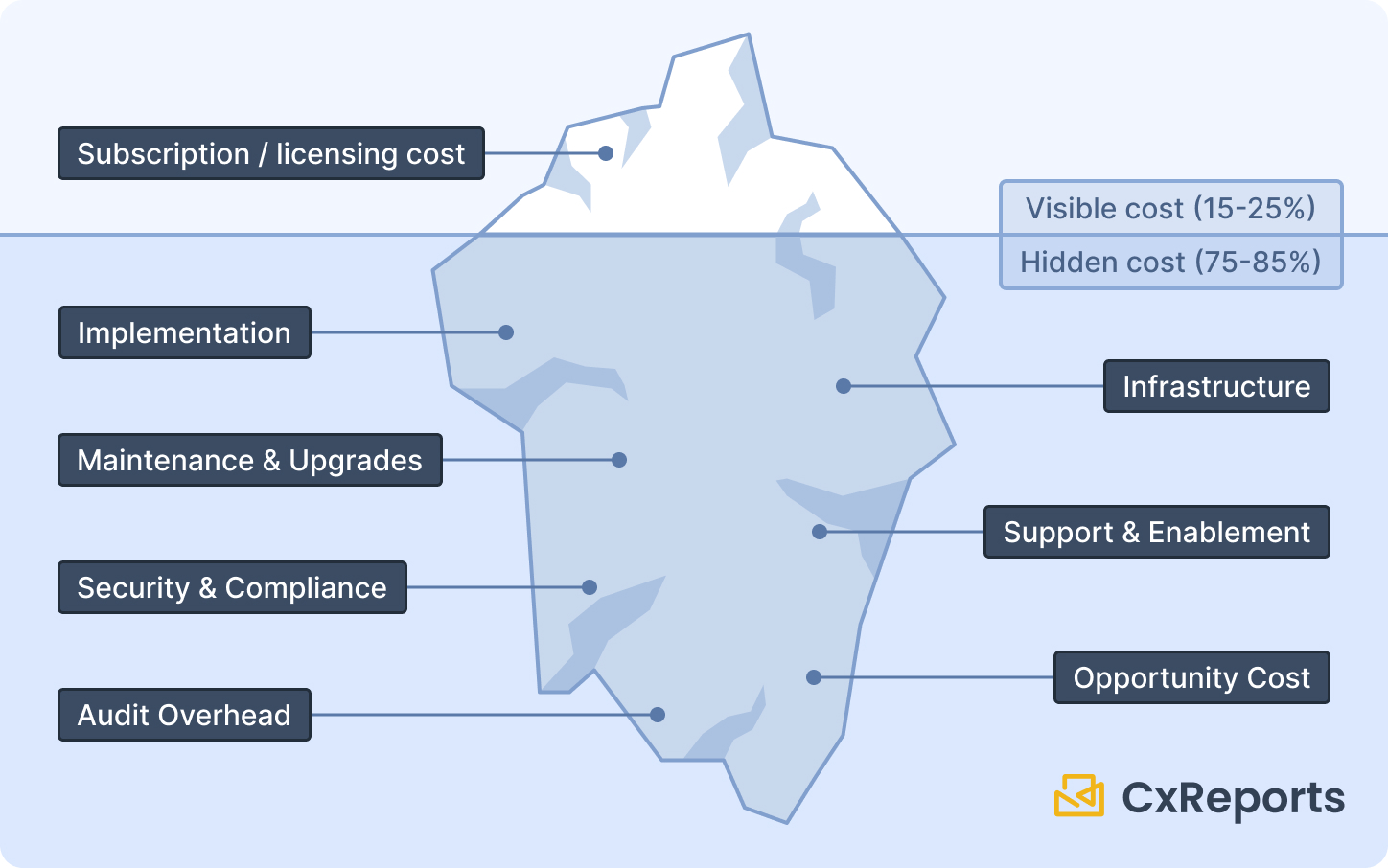
A rigorous TCO model covers seven categories over a three-to-five year horizon. The first is what most evaluations stop at. The remaining six are where the surprises live.
1. Implementation. Initial setup and integration, template build and QA, data model mapping and parameterisation, migration from legacy reports. For a custom build, this is a full engineering project. For a bought solution, it's primarily configuration and template authoring - a different profile.
2. Licensing and subscriptions. The visible line item. Don't stop here.
3. Infrastructure. Compute for rendering and PDF export - often the actual cost driver at volume, not the subscription. Storage for report artifacts and retention policies. Queue and worker infrastructure for scheduled generation. Observability tooling to detect and debug failures.
4. Maintenance and upgrades. This is the "reporting tax" that appears on engineering roadmaps every quarter: export format edge cases, runtime and dependency upgrades, broken templates after data model changes, security patches. For a custom build, this is owned entirely internally. For a bought solution, the vendor absorbs most of it - but you still own the templates and integration layer.
5. Support and enablement. Internal training and onboarding for report authors. Support tickets from end users reporting data correctness issues, permissions failures, or delivery problems. Runbooks and incident response procedures when scheduled reports don't arrive.
6. Security and compliance. If you handle regulated data or serve enterprise clients, this is a line item in its own right: access control reviews, audit log production, retention policy enforcement, and security assessments. If evidence generation is manual - pulling logs, reconstructing what ran and when - this cost recurs every audit cycle.
7. Opportunity cost. Every engineering month spent on reporting infrastructure is a month not spent on core product features, customer-requested improvements, or reliability work. This is a strategic cost, not an operational one, and it compounds over time. It's why build-vs-buy decisions belong at the CTO level, not the procurement level.
Hidden cost multipliers
Even when teams do a full cost model, certain factors consistently get underestimated.
Export edge cases. PDF generation at low volume is straightforward. At enterprise volume - thousands of documents per month - you encounter pagination edge cases, font rendering inconsistencies, image and chart quirks, and "works in preview, fails in export" bugs. These are not one-time debugging tasks; they recur as templates change and data changes.
Peak loads. Reporting traffic is highly spiky. Quarter-end, month-end, and regulatory deadlines drive bursts that can be 5× to 10× normal volume. Custom infrastructure must be provisioned for peak, not average - which means paying for idle capacity most of the year, or building complex autoscaling with its own maintenance overhead.
Multi-tenancy and access boundaries. Customer-facing reporting requires tenant isolation, per-user role controls, and audit trails for sensitive report access. Built from scratch, these aren't a one-time feature - they're a permanent operating responsibility that grows with your customer base.
Compliance evidence work. If your organisation is audited, the reporting system becomes part of the control environment. Auditors want to know: who changed this template, when was this report generated, what data did it use, who received it? If those answers require manually reconstructing evidence, that's a recurring cost every audit cycle.
Comparison: build vs. buy vs. BI
The key dimensions to evaluate against your actual requirements:
| Dimension | Build in-house | Buy reporting engine | BI platform |
|---|---|---|---|
| Time to first report in production | Slowest - full engineering project | Fast - configuration and template authoring | Medium - depends on data modelling |
| Incremental cost per new report | High - requires engineering | Low - template reuse, no-code authoring | Medium - depends on semantic layer maturity |
| Document-grade PDF output | You build and own it | Core capability | Rarely the primary focus |
| Scheduled delivery and distribution | You build and own it | Typically included | Varies significantly by vendor |
| Compliance evidence and audit logs | You design and maintain | Supported; operating model still yours | Strong for metrics; variable for documents |
| Best fit | Reporting is a core differentiator | Reporting is expected infrastructure | Exploration and analysis dominates |
The most important column is "best fit." A BI platform used as a document generator, or a custom build used where templates would suffice, both produce avoidable costs.
Scenario guidance
SaaS product with customer-facing reporting. Your primary cost drivers are multi-tenancy, safe embedding, and predictable scaling for burst periods. The make-or-buy question hinges on whether reporting is your differentiator - if it's table-stakes infrastructure your customers expect, building it internally has a high opportunity cost.
Regulated environment producing audit packs or statements. Optimise for repeatability (templates that don't drift), controlled change management, and the ability to produce evidence quickly. You cannot "dashboard your way out" of document requirements - a screenshot of a BI tool is not an audit pack.
Primarily analytical with occasional document needs. A BI-first approach works for the core use case, but budget for the document layer when PDFs, scheduled delivery, and client-grade formatting become requirements. This is a common procurement gap - BI is bought for exploration, and the document need is discovered later.
Where CxReports addresses these cost drivers
CxReports is positioned as a managed reporting engine - the "buy" option in the comparison above. The cost profile maps directly to the seven buckets:
Implementation: Template authoring uses a visual drag-and-drop editor - no custom rendering pipeline to build. Data connections to SQL databases, REST APIs, and JSON are configured without code. New reports are added by report authors, not engineers.
Infrastructure: Cloud deployment is a CxReports-managed service (EU, US, and AU data centres) - no rendering infrastructure to provision or scale. On-premise deployment runs on Docker Compose, Kubernetes, or AWS (ECS or EC2) for organisations with data residency requirements.
Maintenance: Platform upgrades, PDF export engine maintenance, and security patches are managed by CxReports. Template and integration maintenance stays with you - but it's scoped to templates and API connections, not a full platform stack.
Security and compliance: Workspaces provide multi-tenant isolation boundaries. Custom roles control what users can view and modify across reports, templates, and themes. Job run history records when each run started, each entry's status, the PDFs produced, and each delivery's status - the foundation for evidence packs. Who triggered a run and with which parameters is recorded by the calling system.
Scheduled delivery: Jobs handle scheduled and event-triggered generation with email delivery and Google Drive integration built in. There is no separate scheduling infrastructure to build or operate.
Opportunity cost: Report authors - not engineers - create and maintain reports using the visual editor. Engineering involvement is limited to the initial integration and API calls for on-demand generation.
Getting started with CxReports
| TCO cost driver | CxReports capability |
|---|---|
| Implementation time | Visual template editor; no-code report authoring |
| Infrastructure provisioning | Cloud: CxReports-managed service; On-premise: Docker / Windows service |
| PDF rendering maintenance | Managed by CxReports - not your infrastructure |
| Multi-tenant isolation | Workspaces as isolation boundaries |
| Role-based access controls | Custom roles per workspace (reports, templates, themes) |
| Scheduled delivery | Jobs with scheduling, email, and Google Drive delivery |
| Generation evidence / audit logs | Job run history (entry status, PDFs, delivery status); direct exports recorded by the caller |
| New reports without engineering | Visual editor accessible to report authors and analysts |
Documentation: docs.cx-reports.com
Deployment options: docs.cx-reports.com/getting-started/install
Roles and workspaces: docs.cx-reports.com/administration/workspace/roles
Jobs and scheduling: docs.cx-reports.com/reports/jobs/google-drive
To model CxReports against your specific volume, report types, and compliance requirements, request a demo.