

Every tool in the modern software workflow has been transformed by AI - except one.
Code editors have AI copilots that complete functions, explain error messages, and refactor entire modules on request. Design tools generate layouts from prompts. Spreadsheet applications write formulas from plain-language descriptions. Document editors suggest, rewrite, and restructure content in real time.
The report template editor - the tool where designers spend hours building financial statements, operational dashboards, and client-facing PDFs - has remained largely untouched by this shift. You open the editor, you drag elements, you configure data bindings, you write CSS. The editor waits for every instruction. It does not understand what you are trying to achieve; it only executes the individual actions you perform.
That is changing. When a report template editor understands plain English - not just to suggest, but to act - the fundamental workflow of report design changes with it. This post explains what that change looks like, where it applies, and where human judgment remains irreplaceable.
The Gap Between Describing and Building
There is a structural friction in every report design process: the gap between what someone can describe in words and what it takes to build in an editor.
A stakeholder can say, "I need a monthly performance report - a cover page with the client name and period, a summary table showing portfolio value and returns, a breakdown by asset class, and a disclosure page at the back." That description is complete, specific, and understandable. Any experienced report designer could produce a reasonable first draft from it.
But producing that draft requires opening the editor, adding pages, placing elements, sizing and positioning them, styling each component to match the brand, configuring data bindings, setting up parameters for the client name and date range, and checking the output across multiple data scenarios. The designer knows exactly what the report should look like. They still have to build it, one action at a time.
This gap - between describing a report and building it - is where most of the time in report design is spent. Not in thinking about the design. In executing it.
It is also the reason that report design has remained a specialist skill. Not because designing a report is intellectually difficult, but because operating a report editor requires learning a specific tool and spending significant time in it to build even a medium-complexity document.
What "Understands Plain English" Actually Means
Before examining what changes, it is worth being precise about what "the editor understands plain English" means - because not all AI assistance in reporting tools is the same thing.
Some tools offer AI assistance at the data layer: you ask a question about your data in natural language, and the tool generates a chart or insight. That is useful, but it is not report design. It does not help you build a multi-page branded document with a specific layout, consistent styling, and data configurations tied to specific parameters.
Other tools offer suggestions: the editor proposes the next element you might want to add, similar to autocomplete. This reduces friction at the margin but does not change the construction workflow in any fundamental way.
What changes the workflow is something different: interpret and execute. You describe what you want the report or element to look like, what it should do, what data it should show - and the AI interprets that intent and acts in the editor. It does not stop at suggestions. It can answer questions about the report when you ask, but its main job is to make the change in the editor.
This is the distinction that matters. Autocomplete reduces individual actions. An AI that interprets and acts replaces the construction phase.
How the Workflow Changes
The traditional report design workflow follows a fixed sequence: someone describes what is needed (a brief, a meeting, a mockup), a designer opens the editor and builds it, the output is reviewed, corrections are described, the designer makes changes, and this cycle continues until the report is approved.
In this workflow, the designer's primary activity is construction. The brief is the input; the built report is the output. Every iteration requires re-entering the editor.
When the editor understands plain English, the workflow reorganises around a different activity: review and refinement.
Instead of beginning with an empty canvas, the designer begins with a populated one. The AI generates a working starting point from the description - pages, elements, layout structure, initial styling. The designer's first task is evaluation: does this match the intent? Where does it need adjustment? What is missing, misaligned, or wrong?
Corrections happen the same way the initial build did: by description. "Move the summary table above the chart." "Make the header background the brand's primary colour." "Add a page visibility condition so the disclosure page only appears when the account type is taxable." The AI interprets each instruction and acts on it. The designer validates the result.
This is not a small change to the workflow. The ratio of construction time to review time - which in traditional design heavily favours construction - inverts. A first draft that previously took a day to build from scratch takes minutes to generate. The remaining time is spent on validation and refinement, which is the part of report design that actually requires human judgment.
What This Means for Who Can Design Reports
The current model of report design has a high entry threshold. To produce a professional report using a template editor, you need to learn the tool, understand how data binding works, know how to configure parameters, be comfortable with CSS for styling, and develop an intuition for layout logic. This is a genuine specialist skill - not extraordinarily difficult, but meaningful enough to create a clear boundary between people who can design reports and people who cannot.
When the editor understands plain English, that threshold drops significantly. For a plain account of which report-building steps business users can now do themselves and which still need IT, see No-Code Reporting in 2025. A business analyst who knows exactly what information a report should contain, and how it should be laid out, can describe it and get a working starting point - without learning the editor's specific mechanics first. A finance team member who has been submitting report requests to a design team for years can produce a first draft that the designer refines and approves, rather than waiting in a queue.
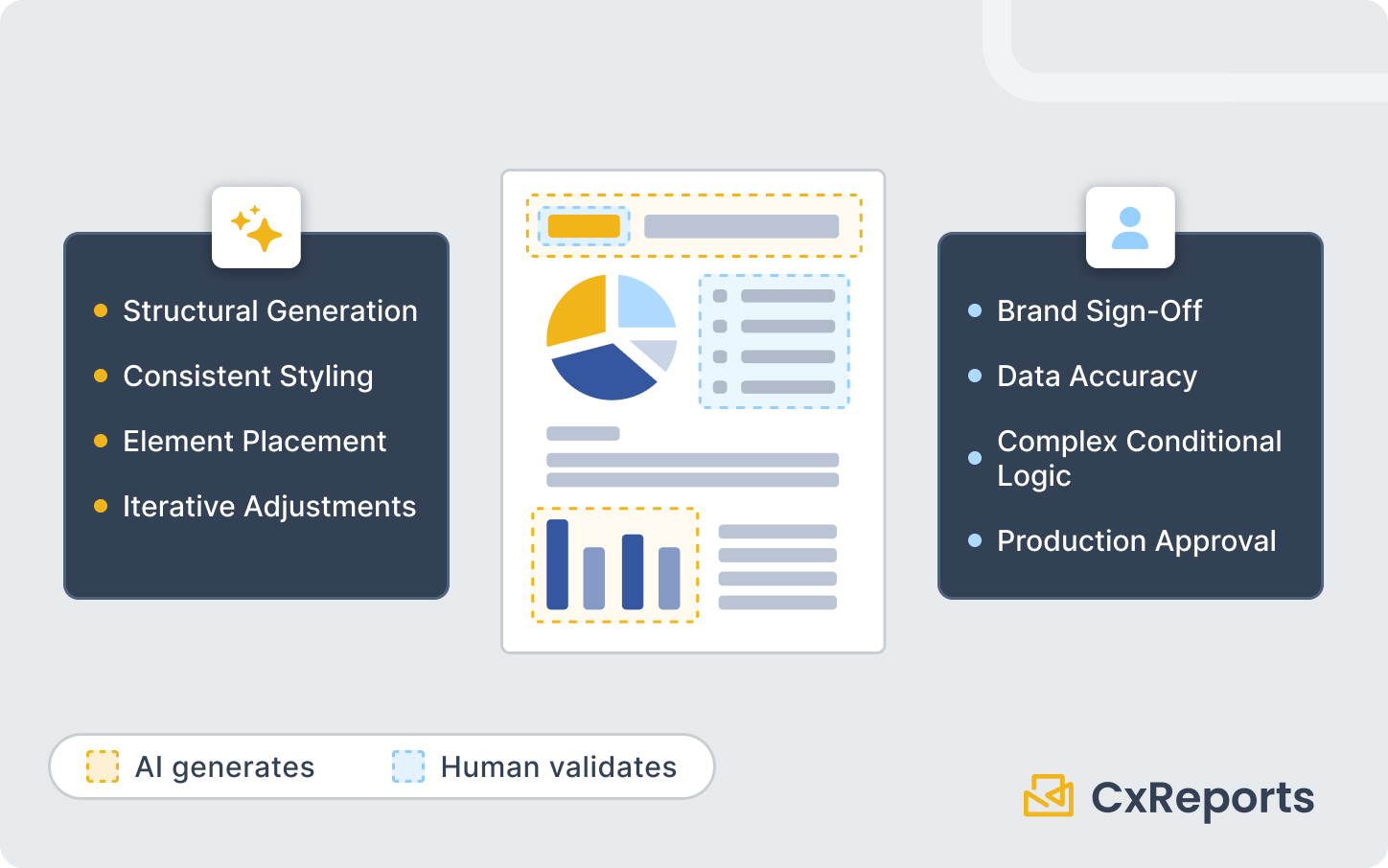
This does not make the report designer's role redundant. It changes what that role focuses on. Brand consistency, edge-case handling, data correctness, and production approval still require someone with deep knowledge of the tool and the business context. The AI generates drafts; the designer governs quality. What changes is where their time goes - less construction, more validation and curation.
What AI Handles Well - and What Stays with the Human
Being honest about this boundary is important for getting value from AI-assisted design without being surprised by its limits.
AI handles well:
Structural generation. Creating a multi-page report with a logical section structure - cover, executive summary, data sections, appendix or disclosure - from a description. The AI understands common report patterns and can produce a reasonable structural starting point quickly.
Consistent styling. Applying a visual style coherently across all elements in a report - matching header colours, consistent typography, uniform table formatting. Describing a style change once lets the assistant apply it to the elements you name, which you then check in the preview.
Element creation and placement. Adding tables, charts, text blocks, images, and other components at a described position with described behaviour. "Add a bar chart below the holdings table showing allocation by asset class" is understood and executed.
Iteration on specific elements. "Make the chart title smaller and move it inside the chart area" or "add a border to the top of every section header row" - discrete, describable adjustments.
What stays with the human:
Data accuracy. The AI builds the template structure; it does not verify that the data binding is correct. Checking that the right fields are connected to the right elements, that parameter filtering produces the expected results, and that edge cases (missing data, zero values, unusually long strings) are handled correctly is still a review task.
Brand sign-off. An AI-generated first draft is a starting point, not a final deliverable. Whether the colours are actually the right brand colours, whether the logo placement meets brand guidelines, whether the typography matches the corporate standard - these judgements require a human with access to the brand specification.
Complex conditional logic. Visibility conditions, multi-variable parameter dependencies, and logic-heavy calculated fields that depend on business rules are areas where precise description is important and where the AI's interpretation may need correction.
Production approval. Before a report template goes live and is used to generate documents for clients, regulators, or internal stakeholders, a qualified person should review and approve it. This governance step exists regardless of how the template was produced.
How This Works in CxReports
CxReports includes an AI assistant that operates directly inside the report editor. You write a prompt describing what you want - a new section, a styled element, a layout change - and the assistant interprets the intent and executes the corresponding actions in the editor. It runs on an AI integration configured in the workspace with your own API key (OpenAI, Anthropic, Google, or DeepSeek), and users need the AI role permission to use it.
Within the report you have open, the assistant can add pages, add, configure, style, and remove elements, and create or change data sources, parameters, and dictionaries. It can also browse connected databases, read the data the report currently returns, and read the report's theme. Template (header and footer) editing, theme assignment, previews, job configuration, scheduling, and export stay with you in the normal editor and admin screens. You can attach a screenshot or a PDF of an existing report and ask the assistant to rebuild it, or attach CSV or JSON to turn into a data source. It does not work as a separate tool or a side panel that generates a separate output to be imported; it acts within the report you are building.
This means the workflow is genuinely interactive. You describe, review, refine, describe again. The report develops through conversation with the editor, rather than through accumulated manual actions. For teams building a new report type, this compresses the time from brief to reviewable first draft. For teams modifying existing templates, it makes iteration faster and less dependent on editor proficiency.
CxReports remains the platform for all the downstream operations - generating PDFs, scheduling delivery, managing parameters, connecting data sources - and the AI assistant accelerates the template-building phase that precedes all of that. For teams scaling to hundreds of templates, the same AI approach applies - see Scaling Your Report Library with AI.
Getting Started
| What you want to do | How AI-assisted design helps |
|---|---|
| Build a new report from a brief | Describe the report structure; AI generates a working starting point |
| Iterate on an existing template | Describe the specific change; AI applies it directly |
| Apply consistent styling | Describe the style; AI applies it across relevant elements |
| Add a new section or page type | Describe the section purpose and content; AI creates and configures it |
| Modify element layout or position | Describe the adjustment in plain language |
The AI assistant is available within the CxReports report editor. To see it in action on a report type relevant to your organisation, book a demo with the CxReports team.
Further reading: