

If you are a report designer, AI is going to change your job. The honest version of that statement is not reassuring or alarming - it is specific: the parts of the work that are repetitive will get faster, the parts that require judgment will become more important, and the question of who controls quality will become more explicit than it has ever been.
The unhelpful version of the conversation - "AI will replace designers" versus "AI is just a tool, nothing changes" - misses the actual shift. Something real is changing. This post is about what that change looks like for a working report designer, what it means for brand control in practice, and what governance needs to look like when AI-generated templates enter your production environment.
What AI Actually Compresses
Report design work is not uniform. Some of it is genuinely creative and judgment-intensive - deciding how a data set should be presented, choosing a visual hierarchy that communicates clearly, refining a layout until it feels right. Some of it is execution: building out a structure you have already designed in your head, applying a style consistently across 40 elements, creating the fifth table this week that follows the same pattern as the previous four.
AI-assisted design compresses the execution portion. When you can describe a table and have it appear, styled consistently with the rest of the report, you have removed the manual assembly step. When you can say "apply the section header style to all group headers on this page" and it happens, you have removed what used to be a series of repetitive property adjustments.
This is not a marginal improvement to a few specific tasks. Construction - building out what you have already decided to build - is a large proportion of report design time. In a complex report template, the ratio of time spent deciding what to build versus time spent building it can easily be 20/80. AI compresses the 80.
The 20 - the judgment portion - does not compress. It may actually expand, because more templates can be produced in the same amount of time, which means more decisions to review, more brand applications to evaluate, more edge cases to catch.
What Actually Makes a Designer Valuable
This is the part of the AI conversation that gets skipped most often, because it requires honesty about what the role has really been.
Report design has two distinct layers. The visible layer is construction: opening the editor, placing elements, writing CSS, building pages. This is what occupies most of the working hours and what AI is now capable of accelerating. It is also, frankly, the layer that was always the means, not the end.
The less visible layer is judgment: knowing why a particular layout works for this report and this audience, catching the inconsistency that a non-designer would not notice, understanding the brand deeply enough to know when "close enough" is not close enough, being the person who can look at a first draft and say exactly what is wrong and why.
This layer does not compress. It intensifies.
Consider what remains entirely yours when AI generates a first-draft template:
Brand nuance. AI generates something that looks consistent because it applies the theme's defined colours and fonts. But it does not know that your organisation's brand navy must have specific contrast against white, that your logo has a minimum clear space requirement, or that the CEO once rejected a report because the header font weight felt wrong. That institutional knowledge lives with the designer.
Data correctness. A template can look perfect and still have the wrong data in the wrong place. Is the "total portfolio value" field actually bound to the total, or to an account-level subtotal? Is the date range label showing the correct parameter? AI builds the structure; it does not audit the data binding. That audit is the designer's.
Edge case resilience. A template that looks excellent with typical data can break under real conditions. What happens when a client name is 55 characters long and wraps into the next line? When the holdings table has 180 rows and needs to paginate correctly? When a column of numbers is all zeros because the account was opened this quarter? Testing these scenarios requires knowing they exist - which requires experience with the system.
Accessibility. Colour contrast ratios, font sizes that remain legible when printed on certain paper stocks, reading order for clients who use screen readers - these are not things an AI considers by default. A designer who has thought about accessibility checks for them deliberately.
Context. The most important question about any report is not "does it look right?" but "does it serve its purpose?" A designer who understands why a report exists and who reads it can catch a first draft that technically meets the brief but misses the point.
The New Workflow in Practice
The practical workflow changes look like this:
Old workflow: Designer receives a brief → opens editor → builds from blank canvas → reviews with stakeholder → makes corrections in editor → approves.
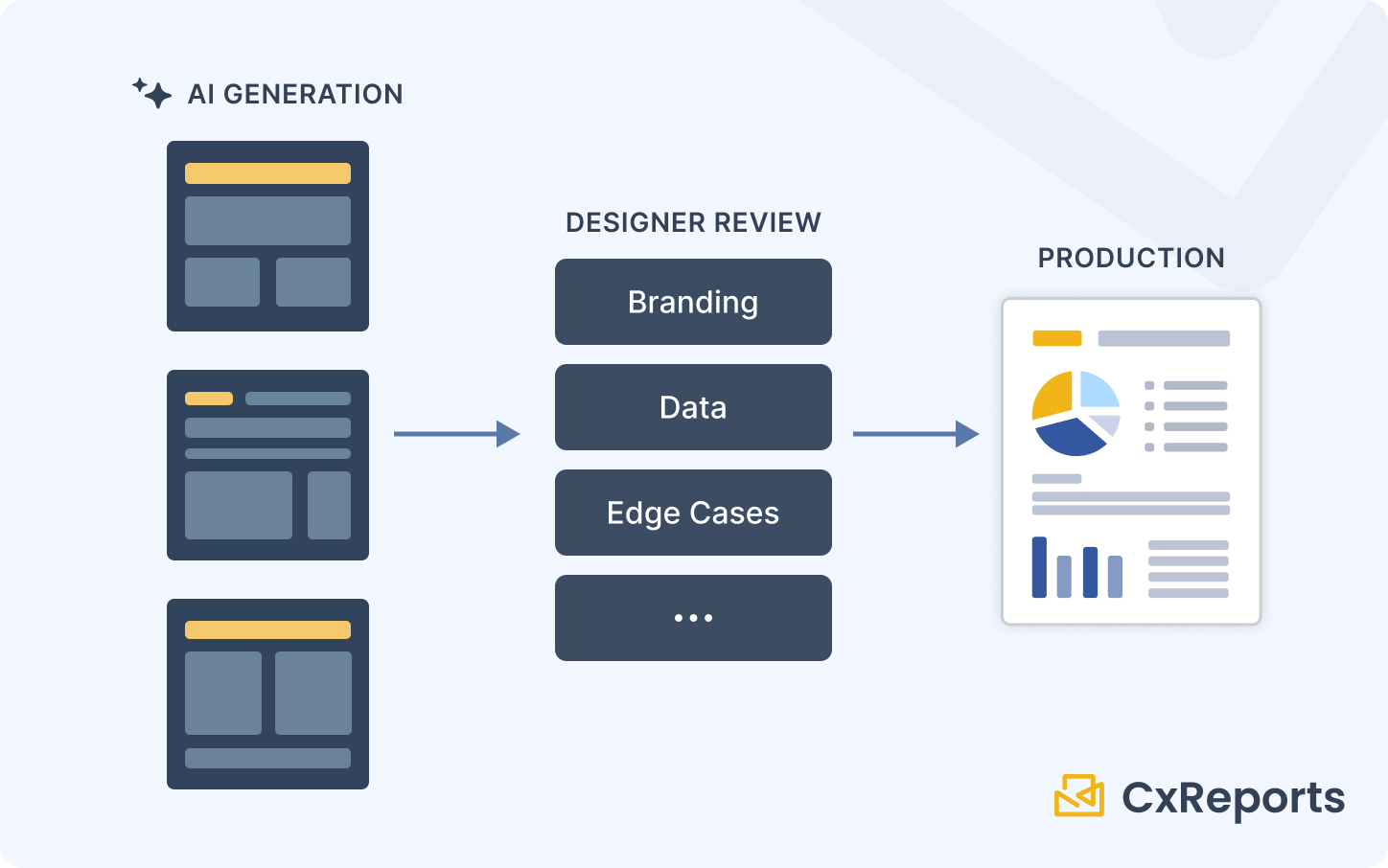
New workflow: Designer receives a brief → describes the report to the AI assistant → reviews the generated starting point → describes refinements → iterates → conducts brand and data review → approves for production.
The difference is not that the designer is removed from the process. The difference is where the designer's energy goes. In the old workflow, a significant portion of the early work is mechanical construction. In the new workflow, the first thing the designer does is evaluate a populated canvas.
This changes the pace substantially. A first draft that previously took a full day to build reaches the review stage in an hour. The remainder of the time - which was always the valuable part - is spent making it right.
There is a secondary benefit that matters for team capacity. When construction takes less time, a designer can service more requests in the same period. A team that was the bottleneck on report requests may no longer be. This is useful for the organisation and useful for the designer, whose work is no longer dominated by backlog pressure.
Governance: Who Approves What, and Why It Has to Be You
This is the piece of the AI design workflow that breaks most often when organisations adopt it without thinking it through.
AI-generated templates are fast to produce. This creates pressure to skip the review step - the template looks fine, the brief was clear, the stakeholder is waiting. The pressure is real and the risk is underestimated.
The risk is not that the template will obviously fail. It is that the template will nearly succeed. A colour that is close to the brand colour but slightly wrong. A table that formats correctly with typical data but wraps badly at 50 rows. A disclosure paragraph that uses the right words but is missing the version that compliance approved last quarter. These are the failures that survive a visual inspection and surface in production.
The person best equipped to catch these failures is the designer - and this needs to be formalised, not left to professional conscientiousness.
Practically, this means: no AI-generated template goes to production without designer sign-off. For a framework to measure how much time this governance gate actually takes versus the time AI saves, see Measuring the Impact of AI-Assisted Report Design. Not stakeholder sign-off. Not manager sign-off. Designer sign-off. The designer is the person who owns the quality standard, understands the brand specification, and knows what to look for in a template review.
This is a governance decision that needs to be made explicitly. The default in many organisations, when a new capability like this arrives, is to let the most interested parties self-serve - stakeholders generating their own templates and publishing them without a design review. This will produce inconsistent results and, eventually, a brand or compliance incident that requires cleaning up. For a plain account of which report-building steps business users can now do themselves and which still need IT, see No-Code Reporting in 2025.
The correct model is: anyone can initiate a template using the AI assistant, but designer review is required before production promotion. The AI lowers the cost of the first draft; the designer raises the quality bar before the last step.
Keeping Templates Consistent Across AI-Authored and Manual Work
Once AI-generated templates exist alongside manually-built templates in production, consistency becomes an active management concern. The risk is template drift: AI-generated work that looks slightly different from the established standard because it made reasonable but non-standard choices.
The most effective defence against this is the same one that works for consistency in manually-built templates: themes.
When CxReports Themes are correctly configured - brand colours defined, typography set, table styles specified, custom CSS for any organisation-specific patterns - reports that use the theme inherit those standards, including the elements the AI assistant adds. The designer assigns the theme in each report's Report Settings; the assistant can read the theme when it styles elements, so it does not need your brand guidelines repeated in every prompt. The theme enforces them at the element level.
This means the quality of the theme configuration is now more important than it was before. If the theme is partially defined or contains defaults rather than brand-accurate values, AI-generated templates will consistently produce those defaults. Auditing and completing the theme configuration before rolling out AI-assisted design is the highest-leverage preparation step a designer can take.
For templates where the theme does not cover everything - specific section patterns, non-standard element configurations - a template review checklist is a practical supplement. The review catches what the theme does not enforce, and over time, patterns that appear repeatedly in corrections become candidates for theme additions.
What the Role Becomes
The clearest summary of the change is this: the report designer's role moves from producing reports to governing report quality.
The production side - building structures, applying styles, creating element layouts - becomes faster and less central to the workday. The governance side - reviewing, approving, maintaining standards, catching failures before they reach clients - becomes more central and more visible.
This is, by any measure, a better use of a skilled designer's time. The work that required design expertise was always the judgment portion. AI makes it possible to spend a greater proportion of working hours there.
Getting Started
| What changes with AI | What stays with the designer |
|---|---|
| Template construction time reduces significantly | Brand accuracy review before every production promotion |
| First drafts generated from a description | Data binding correctness verification |
| Styling applied consistently via prompts | Edge case and pagination testing |
| Iteration via description rather than manual edits | Accessibility and compliance sign-off |
| More templates serviceable per designer | Theme and style guide ownership |
Documentation:
To see the AI-assisted design workflow in context of your organisation's templates, book a session with the CxReports team.