

AI for Loan and Credit Document Templates: Speed and Accuracy in Lending Documentation
Lending documents have two properties that most business documents don't share. First, they are structurally rigid - a disclosure table, an amortisation schedule, or an adverse action notice follows a layout that a compliance team has already decided on, down to which figure appears in which position. Second, they carry direct financial and legal consequence for the customer who receives them. A misplaced field on a marketing brochure is an aesthetic problem. The same mistake on a loan offer letter is a customer-facing error with a real financial obligation attached to it.
This combination is what makes lending documentation a genuinely interesting case for AI-assisted template design. The structural rigidity is exactly the kind of pattern AI reproduces reliably from a description - offer letters, disclosure tables, and notices all follow conventions that don't change from one loan to the next. The financial and legal consequence is exactly why the review step after AI generates that structure cannot be shortened, no matter how fast the construction phase becomes.
The useful way to think about this is two separate gates, the same distinction that applies to any AI-assisted design work in a regulated document category. The same two-gate distinction is set out for clinical documents in AI-Assisted Document Design for Healthcare. Gate one is structural: does the template contain the right sections, in the right order, with the right fields in the right positions? AI accelerates this gate meaningfully. Gate two is substantive: are the actual figures correct, is the disclosure content accurate for this specific loan and this specific customer, and does the document present information consistently regardless of who is receiving it? AI does not touch this gate. It is where your compliance and operations teams do the work that determines whether a document is safe to send.
The Lending Document Family and Why Each Type Is Structurally Different
Before looking at where AI helps, it's worth being specific about what "lending documents" actually covers, because the design requirements differ meaningfully across the family.
Loan offer letters. These present the terms being offered - amount, rate, term, fees - in a format the customer needs to be able to read and compare. The structural challenge is less about complex tables and more about clarity: the customer-facing terms need to be presented prominently, unambiguously, and in a hierarchy that matches how a person actually evaluates a loan offer.
Disclosure documents. These follow the most rigid structure of any document type in the lending family. A disclosure table - the kind used for consumer lending disclosures such as those required under the US Truth in Lending Act (TILA) - presents figures like the annual percentage rate, the finance charge, the total of payments, and the amount financed in a defined arrangement, because the format itself is part of what makes the disclosure meaningful to the reader. The design task is not inventing a layout; it's reproducing a known structure precisely.
Credit assessment summaries. Internal or broker-facing documents summarising an applicant's credit position for underwriting purposes. These are typically table-heavy - score bands, ratios, prior payment history - and structured around the categories a credit policy defines, rather than around regulatory disclosure requirements.
Loan agreements. Longer-form documents combining defined terms, schedules (payment schedule, amortisation table), and legal provisions. The structural challenge here is less about a single table and more about maintaining consistent section numbering, cross-references, and formatting across a document that can run to many pages.
Adverse action notices. Sent when an application is denied or offered on less favourable terms than requested. These carry required elements - the reasons for the decision, and information the applicant needs to act on it - presented in a format that needs to be consistent every time it's generated, precisely because inconsistency between one applicant's notice and another's is itself a fair lending concern.
Each of these document types has an established structural convention. That's the property that makes them good candidates for AI-assisted construction - and it's also exactly why getting the structure "roughly right" isn't good enough. A disclosure table that's 90% correct in its layout is not a minor design gap; it changes what the document communicates.
Where AI Adds Speed: Structural Generation from a Description
AI-assisted design in this category works the same way it works for any structurally predictable document type: describe the layout, get a working starting point, then review and refine.
Disclosure tables from a field description. A loan disclosure table has a known set of fields - APR, finance charge, amount financed, total of payments, payment schedule - in a known arrangement. Describing that arrangement to the AI produces a table with the correct field order, labels, and number formatting as a starting point. The AI is reproducing a known structure; it is not sourcing or verifying which fields apply to a specific loan product or jurisdiction. That determination is your compliance team's, made before the prompt is written.
Amortisation and payment schedules. A payment schedule is a repeating table - payment number, due date, payment amount, principal portion, interest portion, remaining balance - that follows the same column structure regardless of the loan's specific terms. AI generates this table structure reliably from a description of the columns required; the actual schedule values come from your loan calculation system at generation time, not from the AI.
Consistent field layout across offer letter variants. A lender typically has several offer letter variants - by product type, by risk tier, by channel - that need to present the same categories of information in the same visual hierarchy so that the reading experience is consistent. Describing the base structure once and generating variants from it is a faster path to consistency than building each variant independently and hoping they stay aligned.
Boilerplate legal language placement. Standard legal provisions, required notices, and signature blocks that appear across a family of loan agreements are, from a design perspective, a placement and formatting task - positioning the block correctly, applying consistent typography, ensuring it appears on the correct page type. The legal text itself is written and approved by your legal team; AI places and formats it once that text exists.
Adverse action notice structure. The layout of an adverse action notice - the applicant and application identification block, the decision statement, the reasons section, the information the applicant needs to act on the decision - follows a structure that, once defined, should not vary between one generation and the next. AI generates this structural scaffold from a description; the actual reason codes and their wording for a specific application are a data binding and compliance-content decision.
The Accuracy Imperative: Why Data Binding Is the Critical Step
Lending documents directly affect a customer's financial obligations, which makes the step after AI generates the structure the most consequential part of the workflow, not an afterthought.
The figures are not the AI's to get right. An APR, a finance charge, a monthly payment amount - these come from your loan origination or servicing system's calculation engine. AI-assisted design produces a table with a cell correctly positioned and formatted to display "APR" as a percentage; it does not calculate what that percentage is. Verifying that the template's data binding points to the correct field, and that the field contains the figure your calculation engine actually produced, is a deliberate check that has to happen for every disclosure template before it reaches production - and again whenever the template changes.
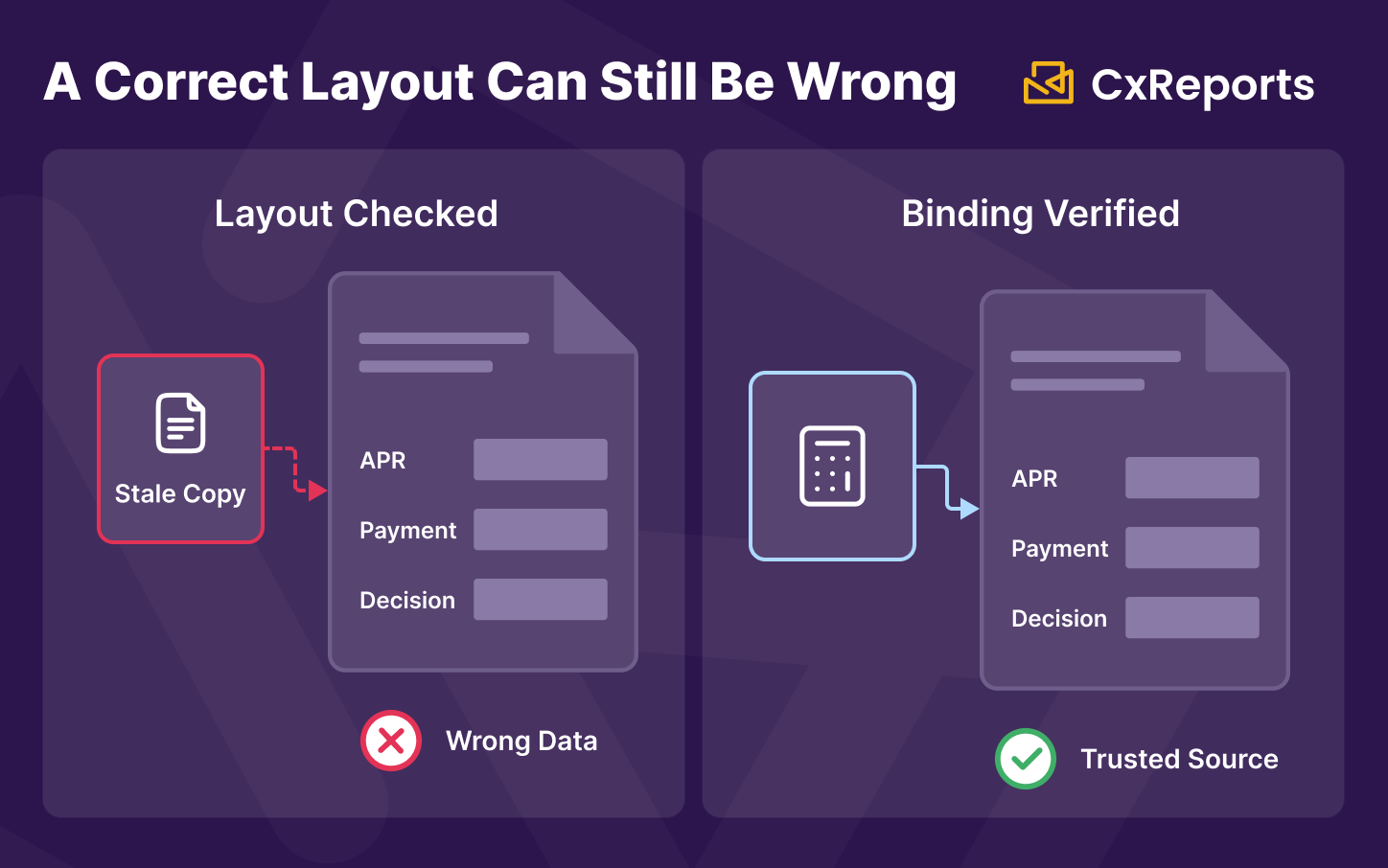
A visually correct template can still bind to the wrong field. This is the same risk that applies to any AI-generated template, and it is worth restating specifically for lending documents because the consequence of getting it wrong is a customer receiving incorrect financial terms in writing. A table that looks exactly right - correct labels, correct formatting, correct position - with a data binding pointing to last month's rate table instead of the current one produces a document that appears authoritative and is wrong. Structural review catches layout problems. Only data binding review catches this one.
Which disclosure fields apply is a compliance determination, made before the prompt. AI does not know which specific disclosures your product, jurisdiction, or customer segment requires. That determination - which fields, which wording, which format - is made by your compliance team based on the applicable requirements for that specific document, and it's the input to the design process, not an output of it.
Fair Lending Consistency: A Review Question, Not a Design Feature
One of the specific risks in lending documentation that doesn't apply in most other document categories is presentation consistency across customer segments. If your credit assessment summary or your adverse action notice presents information differently - different level of detail, different framing, different completeness - depending on which customer segment it was generated for, that inconsistency is itself a fair lending concern, independent of whether the underlying credit decision was sound.
AI-assisted design can help here in a specific, limited way: generating a single base template that all variants inherit from makes it structurally harder to accidentally introduce presentation differences between segments, because the variants share a common construction rather than being built independently by different people at different times. But whether the templates actually are presented consistently across segments is a review question, not something the design tool verifies on your behalf. Confirming that requires generating representative documents across your actual segments and comparing them directly - a step your compliance or fair lending review process owns, run after templates are built, regardless of how they were built.
Change Control for Lending Templates
Lending document templates change when regulatory requirements change, and the change needs to be traceable: which version of a disclosure template was active when a specific document was generated, and who approved the change.
AI-assisted revision makes it faster to update a template when a required field or format changes - describe the required change, review the AI's edit, and the structural update is done. What AI-assisted revision does not do on its own is give you a version record. A regulatory update that changes a disclosure format is still a change that needs to be captured: what changed, when, and which generated documents used the old version versus the new one.
The practical approach is to treat template changes with the same discipline as any other change to a regulated document: snapshot the template configuration before making the change, apply the change, verify the output against representative data, and record the change alongside your compliance documentation. This is a process your team runs around the design tool - not a feature the design tool needs to provide natively for the discipline to hold.
How This Works in CxReports
CxReports' AI assistant works inside the report editor, interpreting a natural language description and producing the corresponding structure and formatting in the template. For lending documents, the workflow is: describe the disclosure table, schedule, or notice structure; review what the AI produces; connect the data; and route the result through your compliance review before it goes anywhere near production.
Disclosure tables and schedules from a described structure. Describing the field order, labels, and formatting requirements for a disclosure table or an amortisation schedule produces a working table in the editor - correctly positioned rows and columns, with the number formats specified. CxReports' text format system covers the formatting a disclosure table needs: percentage formatting for the APR (p;2), currency formatting for the finance charge and payment amounts (currency;USD;2), and standard numeric formatting for payment counts and terms.
Repeating rows for payment schedules. An amortisation table is a repeating element bound to a data array - one row per payment period. The AI can generate the row structure and column formatting; the actual schedule data comes from your loan servicing system's calculation output, connected as the data source the repeating element is bound to.
Conditional sections for product and jurisdiction variants. Different loan products or jurisdictions require different disclosure sections on what is otherwise the same base document. A component's Visible Expression, tied to a report parameter describing the loan product type or jurisdiction, shows or hides the relevant section - one template serving multiple variants rather than a separate template per product that drifts out of sync over time.
Consistent boilerplate through templates and themes. Standard legal language, signature blocks, and required notices that repeat across a document family are placed once in the page template so they appear identically wherever that template is used. Visual consistency - typography, colour, table styling - is defined once in a theme and applied across the document family, so an offer letter and a disclosure document from the same lender look like they came from the same institution.
Change tracking through Data Export snapshots. CxReports does not version templates natively. The practical equivalent is exporting a JSON snapshot of your report and template configuration before making a change, using CxReports' Data Export function, and storing that snapshot alongside your change record. This gives you a retrievable copy of exactly what the template looked like before the update - the evidence a compliance review or a regulatory inquiry into a specific document version will ask for.
What the AI assistant sends to your AI provider. The assistant runs on an AI integration that uses your own API key with a provider you choose (OpenAI, Anthropic, Google, or DeepSeek). With each message, it sends the provider an overview of the open report: pages, elements, data sources, parameters, and dictionaries. It can also read the data the report currently returns, and an attached PDF is uploaded to the provider and kept there for a provider-dependent period. For lending templates, design against synthetic applicant and loan data rather than live customer records, grant the AI role permission only to the designers who need it, and use a provider covered by your data processing agreement.
What stays entirely outside CxReports: the APR and payment calculations, the determination of which disclosures apply to a given product and jurisdiction, the fair lending consistency review across customer segments, and the approval that a specific template revision is compliant. CxReports renders what your systems and your compliance process tell it to render, precisely and consistently - it does not make any of those determinations itself.
Getting Started with CxReports
| Lending document requirement | CxReports mechanism | What stays with your team |
|---|---|---|
| Disclosure table structure (APR, finance charge, payment schedule) | Report editor table, described via AI prompt | Which fields apply, and the correct figures from your calculation engine |
| Percentage and currency formatting | Text formats (p;2, currency;USD;2, n;0) |
Confirming the required precision and currency for each disclosure |
| Repeating amortisation schedule rows | Repeating element bound to a data array | Your loan servicing system's schedule calculation output |
| Product- or jurisdiction-specific disclosure variants | Report parameters + component Visible Expression | Determining which disclosures apply to which product/jurisdiction |
| Consistent boilerplate and signature blocks | Page templates | Legal team's approved language |
| Visual consistency across the document family | Themes | Brand and layout standard sign-off |
| Fair lending presentation consistency across segments | Not verified natively | Comparative review across representative documents by segment |
| Template change record for regulatory updates | Data Export (JSON configuration snapshot) | Change log entry alongside each snapshot: what changed, when, and why |
For documentation on the report editor, text formats, report parameters, and Data Export, see the CxReports documentation. To discuss AI-assisted template design for your lending document family, get in touch.