

The investor document personalisation problem in financial services is usually described as a product decision: show the right content to the right investor for a better experience. This framing is comfortable but incomplete.
The more precise framing is legal: show the wrong content to the wrong investor, and the document is non-compliant. Under MiFID II, retail investors must receive disclosures that professional investors do not. Under PRIIPS, the Key Information Document format required for retail investors is different from the disclosures applicable to eligible counterparties. Under most jurisdictions' suitability and appropriateness regimes, a product-specific risk warning must appear in the document if and only if the product is of the type that triggers the warning. A mortgage document in Germany carries different mandatory sections than the same mortgage in the Netherlands. For how AI-assisted design helps lenders build loan offers, disclosure tables, and adverse action notices, see AI for Loan and Credit Document Templates.
These are not design choices. They are legal requirements. The conditional section - the document section that appears for this investor category, for this product type, in this jurisdiction - is not a personalisation feature. It is a compliance control.
The consequence of treating it as a design choice is that its correctness is treated as optional. And optional correctness in a regulatory document is a breach waiting to surface.
The Regulatory Personalisation Requirement
The structure of investor-facing financial documents is determined by the intersection of three variables: investor category, product type, and jurisdiction. Each combination creates a specific set of required and prohibited content. For a healthcare payer example of content that varies by plan type, state, and claim outcome, see Explanation of Benefits and Claims Statements.
Investor category is the most fundamental variable. Under MiFID II, firms must classify clients as retail, professional, or eligible counterparty. The disclosure requirements for each category are materially different:
Retail investors must receive the full suite of disclosures: costs and charges in detailed breakdown, best execution policy notice, conflicts of interest disclosure, order execution policy, and the appropriate risk warnings for each product class. The language must meet appropriateness standards - clear, fair, and not misleading for a non-professional audience.
Professional investors may receive abbreviated disclosures in certain areas because they are assumed to have the knowledge and experience to evaluate risk themselves. Showing a professional investor a retail-format disclosure is not just unnecessary - it can be contractually and regulatorily incorrect if the client relationship is governed by professional terms.
Eligible counterparties have even more limited disclosure requirements. A document designed for retail investors sent to an eligible counterparty contains obligations that were not intended to apply to that relationship.
Product type creates a second layer of conditional content. A discretionary portfolio management report carries different sections than an advisory service summary. A structured product carries product-specific risk warnings that a standard equity fund does not. A leveraged product triggers an explicit maximum loss warning. An illiquid investment triggers a specific notification about redemption constraints. Each of these is mandated when the product type triggers the condition, and absent otherwise.
Jurisdiction creates the third layer. The specific wording of certain required disclosures, the format of the costs and charges presentation, the required regulatory body registration statement in the footer, and the applicable law clause all vary by jurisdiction. A document distributed to UK clients must reference FCA regulation; the same document distributed to German clients references BaFin; distributed to Swedish clients, Finansinspektionen.
The cross-product of these three variables - investor category × product type × jurisdiction - defines a condition matrix. For each cell in that matrix, the correct document structure is determined by the applicable regulatory requirements. Any cell that produces the wrong structure is a compliance error.
Why Multiple Template Variants Is the Wrong Answer
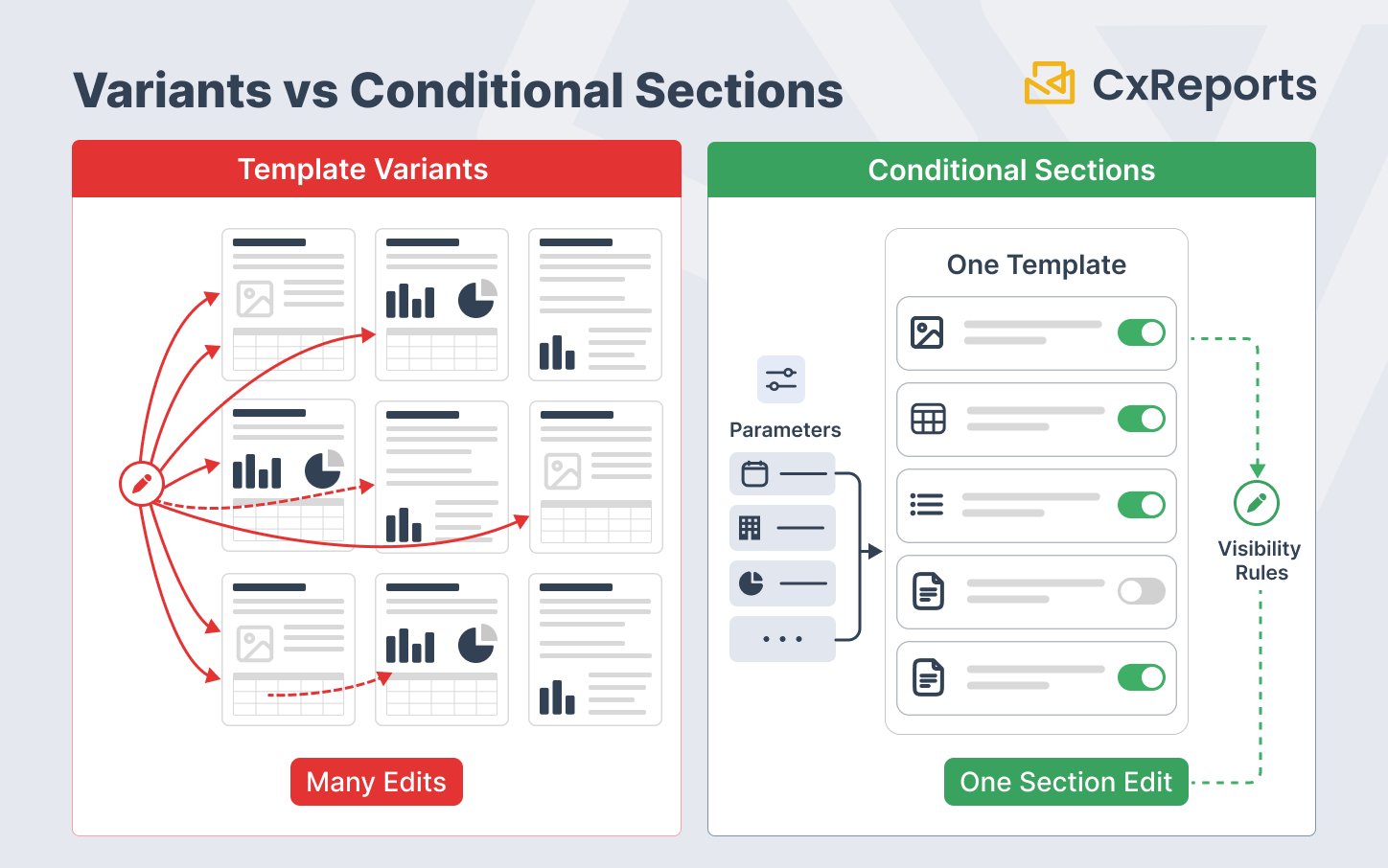
The instinctive architectural response to the condition matrix is to create a separate template for each significant combination: a retail equity fund template, a professional equity fund template, a retail structured product template, and so on. This approach works at small scale and breaks visibly at scale.
A financial firm with three investor categories, six product types, and four jurisdictions has seventy-two possible document combinations. Creating and maintaining seventy-two separate templates means:
- A regulatory update that changes the costs and charges disclosure format requires seventy-two template edits, not one
- A brand update requires seventy-two visual changes
- An error in the disclosure wording must be hunted and corrected across every template where it appears
- An audit trail for which template version was used for which document requires tracking seventy-two template versions rather than one
The correct architectural answer is one template with conditional sections: a single template definition that contains all the possible sections for all combinations, with each section carrying a visibility expression that determines whether it appears in the generated document based on the current values of the investor category, product type, and jurisdiction parameters. When the template generates a document for a retail UK investor holding a structured product, the correct sections appear and the sections that do not apply are absent - not because a different template was selected, but because the conditions evaluated at generation time produced the correct structure.
This architecture has the inverse maintenance properties: a regulatory update to the costs and charges format is a change to one section in one template. A brand update is a theme change that propagates to all documents. A disclosure error is fixed once, and the fix propagates to every document that includes that section.
How Conditional Sections Work in Practice
A conditional section is a document section or page that carries a visibility expression - a logical condition evaluated at generation time against the report's parameter values and data. If the condition evaluates to true, the section appears in the generated document. If it evaluates to false, the section is absent and does not affect page numbering, table of contents, or document flow.
The visibility expression references the parameters that encode the generation context:
$params.investorCategory == 'retail'- show this section for retail investors only$params.productType == 'structured' || $params.productType == 'leveraged'- show this section for structured or leveraged products$params.jurisdiction == 'DE'- show the German regulatory footer for German-jurisdiction documents$params.investorCategory == 'retail' && $params.productType == 'leveraged'- show the maximum loss warning only for retail investors holding leveraged products
These expressions can be as simple or as complex as the regulatory requirement demands. A section that must appear for retail investors in Germany holding leveraged products uses a three-variable condition. A section that must appear for every investor regardless of category uses a constant-true expression (or no expression - it is always present).
The parameters that drive the conditions are passed to the report at generation time by the upstream system. For a client portal that generates a document on demand, the investor's category and the product's type are known from the client record and the product master. For a batch run that generates quarterly statements, these values come from the account data that drives the batch. The template is the same in every case; the parameter values determine the structure.
The Compliance Risk of Getting Conditional Logic Wrong
The failure modes of conditional section logic in regulated financial documents are specific and serious. For the audit trail and evidence requirements that document whether sections were correctly present or absent, see Compliance-Ready Reporting.
Showing a section that should not appear. If the condition expression for a professional investor disclosure evaluates to true for a retail investor - because the condition was written incorrectly, or because the parameter was not passed, or because a default value was applied that triggered the wrong condition - a retail investor's document contains a professional investor disclaimer. This document is incorrect for the investor's classification. In a regulatory inspection, a document that carries the wrong disclosure for the investor's classification is evidence of a control failure.
Omitting a section that must appear. If the condition expression for a mandatory retail disclosure evaluates to false when it should evaluate to true - because the investor category parameter was null, or because the expression logic had an error - a retail investor's document is missing a required disclosure. This is a direct regulatory breach.
Silent failure. The most dangerous failure mode is when the wrong output looks like the right output. A retail investor document that is missing one of several required disclosures, but is otherwise correctly formatted and populated with correct data, will pass a visual review. Only a systematic check of the output against the requirement matrix will catch it. This is why testing conditional outputs is not a review step - it is a systematic validation exercise.
Testing Conditional Outputs at Scale
Before a batch run that will generate documents for thousands of investors, every combination of conditions that will appear in that batch must have been tested to produce the correct document structure. This is not a visual review of sample documents. It is a systematic enumeration of the condition combinations in the batch and a verification that each combination produces the expected section structure.
The testing process has three components:
Enumerate the condition combinations. Before the batch run, identify every unique combination of investor category, product type, and jurisdiction that will appear in the batch. For a batch of 50,000 documents, there may be only a dozen distinct combinations - the number of combinations is bounded by the number of discrete values each variable can take, not by the number of documents.
Generate a test document for each combination. For each combination, generate a test document using representative parameters and verify the section structure: which sections are present, which are absent, and whether each present section is correct for that combination. This can be done using synthetic parameters - you do not need real investor data to test whether the structure is correct.
Create a condition-to-section mapping record. Document which combinations produce which sections, and retain this mapping as part of the batch's audit record. If a regulatory inspection later asks why a specific section was or was not present in a document, the answer is in the mapping: the document was generated for an investor of category X, with product type Y, in jurisdiction Z, and the mapping for that combination specifies sections A, B, and C.
This record is part of the evidence package for the batch - alongside the template version, the generation timestamp, and the delivery confirmation. It proves that the conditional logic was reviewed and approved before the batch ran, not just that documents were generated.
How This Works in CxReports
CxReports implements conditional section visibility through the Page Visibility Expression in the report editor. Each page in a report can be assigned a visibility expression - a logical expression evaluated against the report's parameters at generation time. If the expression evaluates to true, the page is included in the generated document; if false, the page is excluded and does not appear in the output, the page count, or the table of contents.
For the regulatory condition matrix, the implementation pattern is: one page per conditional section, each carrying the appropriate visibility expression. A retail disclosure page carries $params.investorCategory == 'retail'. A structured product warning page carries $params.productType == 'structured'. A jurisdiction-specific footer page carries $params.jurisdiction == 'UK'. Pages that must always appear carry no visibility expression, or an unconditional one.
The parameters driving the expressions - investorCategory, productType, jurisdiction - are defined as report parameters and passed at generation time by the calling system. For API-driven batch generation, the upstream system passes the investor's classification and the product's type as parameters with each generation request. For scheduled jobs, the parameters are mapped from the data source that provides the investor and product records.
The single-template architecture maps directly to CxReports' report model: one report definition with all conditional pages, each with its visibility expression, generates the correct document structure for every parameter combination without requiring separate template variants.
For testing, each condition combination can be verified by running the report with the corresponding parameter values and inspecting the page structure of the output. CxReports' "Show Available Data" feature in the report editor allows the current parameter values to be inspected during design and testing, confirming that the visibility expressions will receive the expected inputs.
Getting Started with CxReports
| Conditional section requirement | CxReports mechanism | Implementation approach |
|---|---|---|
| Show/hide document sections based on investor category | Page Visibility Expression ($params.investorCategory == 'retail') |
One page per conditional section; assign visibility expression to each page |
| Multi-variable conditions (investor × product × jurisdiction) | Compound expressions ($params.investorCategory == 'retail' && $params.productType == 'leveraged') |
Combine conditions using logical operators; test each combination explicitly before production |
| Pass investor and product context at generation time | Report parameters (investorCategory, productType, jurisdiction) |
Define parameters in the report; pass values from upstream system or batch data source at generation time |
| Verify parameter values during design and testing | Show Available Data (Report tab in report editor) | Use during design to confirm parameter values are available to visibility expressions |
| Conditional pages excluded from page count and ToC | Page Visibility Expression + Count this Page setting | When a conditional page is hidden by its expression, it does not contribute to page count or table of contents |
| Maintain one template for all investor/product/jurisdiction combinations | Single report definition with conditional pages | All section variants live in one report; no separate template per combination |
For documentation on page visibility expressions, report parameters, and data configuration, see the CxReports documentation. To discuss conditional section architecture for your document types, get in touch.