

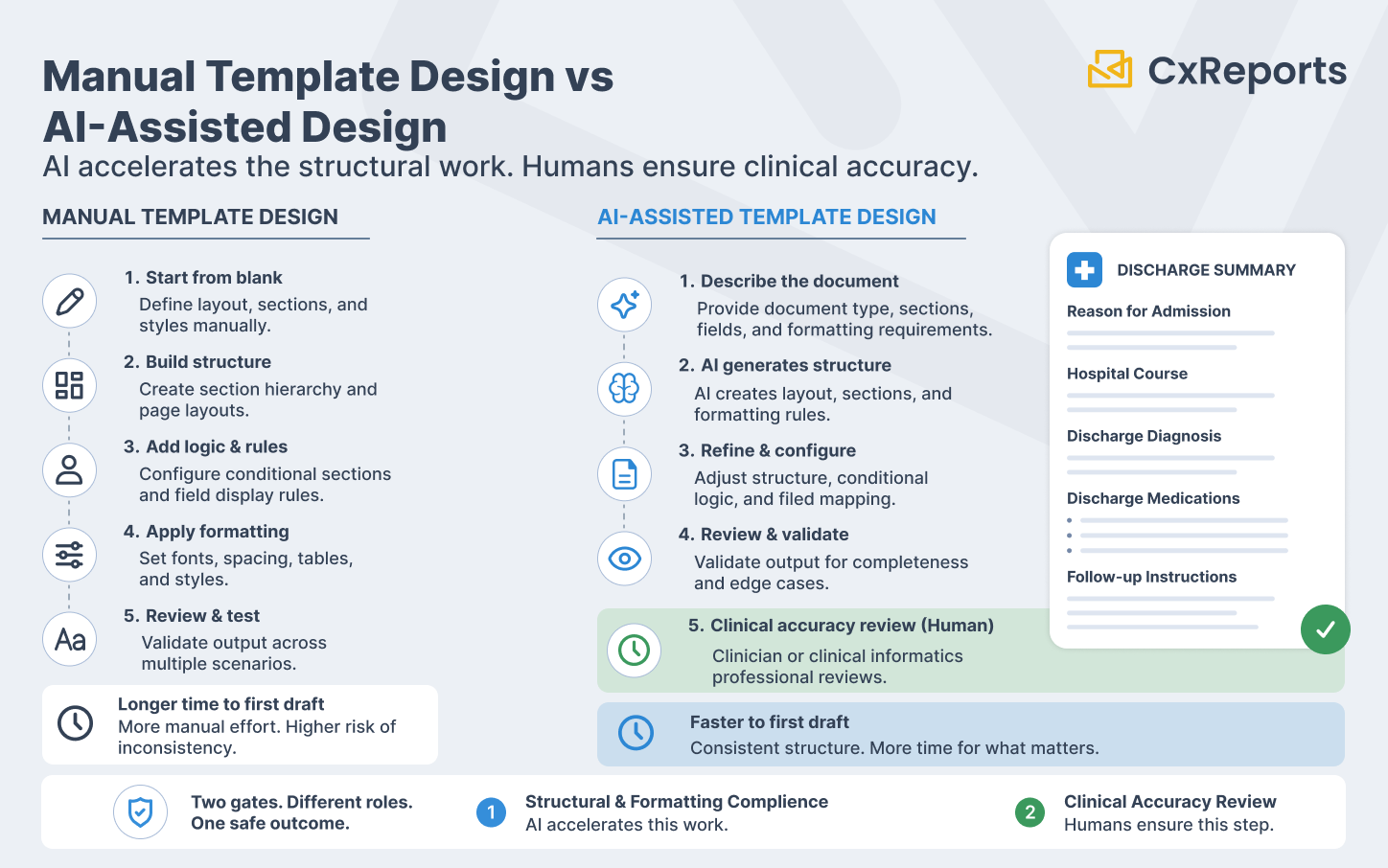
Healthcare document design has two quality gates, and they are not interchangeable.
The first gate is formatting and structural compliance: does the document follow the required layout, include the mandated sections, present patient data in the format that clinical systems and regulatory requirements specify, and handle PHI fields according to HIPAA rules? This gate is about form - whether the document is correctly structured and consistently presented.
The second gate is clinical accuracy: is the information presented correctly, is the clinical content appropriate for the patient's situation, and has a qualified clinician or clinical informatics professional reviewed the document before it reaches a patient, a payer, or a regulatory body? This gate is about substance - whether the document is safe to act on.
AI assistance in healthcare document design operates entirely within the first gate. It compresses the structural and formatting work that dominates the early stages of template development - the layout construction, the section hierarchy, the conditional display logic, the consistent styling across document families. It does not touch the second gate. Clinical accuracy review is not accelerated by AI template generation; it is the step that happens after AI generates the structure.
Healthcare IT teams that understand this distinction get significant value from AI-assisted design: faster template development, consistent document structure across clinical document families, and more time for the clinical review that actually determines whether a document is safe for use. Teams that conflate the two gates - assuming that a well-structured template is also a clinically reviewed one - introduce the same risk that exists in any compliance-regulated domain when the human review step is treated as optional. The same two-gate approach for lending documents such as loan offers and adverse action notices is covered in AI for Loan and Credit Document Templates.
What Makes Healthcare Document Design Structurally Demanding
Before examining where AI helps, it is worth being specific about what makes healthcare document templates more complex to design than typical business documents.
PHI field handling and display rules. Patient-facing and clinical documents carry Protected Health Information: patient name, date of birth, medical record number, diagnosis codes, medication lists, provider identifiers. How these fields are displayed - their position in the document, their format, which fields are shown in which document contexts, and what happens when a field is absent - requires deliberate design decisions. A lab report that shows a patient's full date of birth in a context where only the year is needed, or a discharge summary that omits the patient identifier, creates both a clinical and a compliance problem.
Section structure requirements for specific document types. Clinical document types have established structural conventions. A discharge summary follows a recognised section order: reason for admission, hospital course, discharge diagnosis, discharge medications, follow-up instructions. A lab report has a defined layout: test name, result value, reference range, flag (if abnormal), collection timestamp, laboratory identifier. Deviating from these conventions creates friction for clinical readers and may fail interoperability or regulatory requirements.
Conditional sections and patient-specific content. Clinical documents frequently contain sections that appear only for certain patient populations or clinical scenarios: a paediatric dosing note that appears only for patients under 18; a pregnancy warning that appears only when relevant; an abnormal result flag that appears only when a lab value is outside the reference range. These conditional display rules are part of the document logic, not optional styling.
Reference range presentation and clinical formatting. Lab results and clinical measurements require formatting that conveys clinical meaning, not just numeric values. A haemoglobin value of 7.2 g/dL means something different without the reference range (12.0–16.0 g/dL for adult females) and the abnormal flag. Consistent presentation of reference ranges, units, and flags across all lab result panels is a design requirement, not a presentation preference.
Accessibility and plain language requirements. Patient-facing documents - statements, care summaries, discharge instructions - are increasingly subject to plain language and accessibility requirements. The reading level of instructional text, the contrast ratio of printed colour, and the font size for clinical values in patient-facing outputs are design constraints that affect the template structure.
Where AI Adds Speed: Document Types That Benefit Most
AI template generation is most effective for document types where the structural pattern is well-established and the primary design challenge is execution rather than invention. Healthcare has several of these.
Patient statements and billing summaries. The structure of a patient financial statement is predictable: account information, service dates and descriptions, charges, adjustments, insurance payments, patient balance due, and payment instructions. This pattern is consistent enough that a well-described prompt generates a working starting layout - column structure, section hierarchy, summary totals, and footer instructions - in a fraction of the time it takes to build manually.
Lab result reports. Lab report layouts follow a consistent pattern per test panel: the panel name as a section header, individual test rows with result value, unit, reference range, and flag column, followed by any interpretive notes. AI can generate this structure accurately from a description of the test panel and the required columns, producing a starting point that the clinical informatics team validates and refines. For multi-panel reports (a comprehensive metabolic panel alongside a complete blood count), the section structure and consistent column formatting across panels are exactly the kind of repetitive structural work AI executes reliably.
Clinical summaries and care coordination documents. After-visit summaries, care transition documents, and care coordination reports follow a defined section structure that varies by organisation but is internally consistent. Describing the required sections - medications reconciled, active problems, pending results, follow-up appointments, patient instructions - to the AI produces a working section outline that the clinical team reviews against their specific requirements.
Discharge documentation. Discharge summaries have well-established section requirements across most healthcare systems. The structural layout - section headers, sub-item formatting, signature blocks, the placement of the discharge medication list - follows conventions that AI reproduces accurately from a description. The clinical content within each section requires clinical review; the structural scaffold does not.
Referral letters and clinical correspondence. Clinical correspondence has a standard structure: patient identification block, referring provider, reason for referral, relevant clinical history, current medications, and a formal closing block. AI generates this structure quickly and consistently. The clinical content of the history section requires clinician input; the structural template does not.
Practical Prompt Patterns for Clinical Document Types
As with financial report design, the quality of AI output in healthcare template work depends on the precision of the description. Generic prompts produce generic layouts. Structured prompts that describe the document type, the required sections, the field-level requirements, and the conditional logic produce output that is genuinely close to the intended design.
For a lab result report panel:
"Create a lab result panel section for a Comprehensive Metabolic Panel. Section header: 'Comprehensive Metabolic Panel' in bold with a light grey background row. Each test on a separate row with these columns: Test Name (left-aligned, 35% width), Result (right-aligned, 15% width), Units (left-aligned, 10% width), Reference Range (centre-aligned, 20% width), Flag (centre-aligned, 10% width - show 'H' in red for high, 'L' in blue for low, blank if normal, 10% width). Add a subtle alternating row background for readability. Include 14 rows for the standard CMP analytes: Glucose, BUN, Creatinine, eGFR, BUN/Creatinine Ratio, Sodium, Potassium, Chloride, Carbon Dioxide, Calcium, Total Protein, Albumin, Total Bilirubin, ALT. Footer below the panel: collection timestamp field (right-aligned, italic, 9pt)."
For a patient after-visit summary:
"Design an after-visit summary template. Header section: patient name, date of birth, visit date, provider name, and facility name in a two-column layout. Section 1: 'Reason for Visit' - single text block, full width. Section 2: 'Diagnoses' - bulleted list, full width. Section 3: 'Medications' - three-column table (Medication Name, Dose/Frequency, Instructions), with a note row below the table for any medication changes. Section 4: 'Follow-Up Instructions' - text block with a highlighted border box. Section 5: 'Next Appointment' - date, provider, and location in a summary box. Footer: patient portal URL, practice contact number, and a one-line HIPAA privacy notice in 8pt text."
For a referral letter:
"Create a clinical referral letter template. Header: referring practice letterhead area (logo placeholder top left, practice name and address top right). Patient block: Name, DOB, MRN, Insurance ID in a two-column grid. Referral details block: Referring Provider, Date of Referral, Referred To, Reason for Referral - each as a labelled field. Clinical Information section: text block for relevant history, a medications table (Name, Dose, Frequency), and an active problems list. Closing block: provider signature line, credentials, NPI number, and date. All field labels in bold, fields left-aligned, 1-inch margins throughout."
These prompts share the property that makes AI output useful: they describe the structural intent completely enough that the AI's interpretation leaves little room for guesswork. The resulting template is a working starting point for clinical review, not a draft that needs reconstruction.
The Compliance Review Process for AI-Generated Healthcare Templates
AI-generated healthcare templates require a structured review process before they are used in production. The process is not different in character from the review of any template - but the stakes of a missed step are higher in healthcare than in most other domains.
Step 1: PHI field placement and format review. Every field that carries PHI - name, date of birth, MRN, diagnosis code, provider identifier - must be reviewed for correct placement, correct format, and correct display behaviour when the field is absent or incomplete. A template that shows a patient's full social security number in a context where only the last four digits are appropriate, or that fails silently when a field is missing, requires correction before production.
Step 2: Conditional logic verification. Every conditional section - content that appears only under certain circumstances - must be tested with representative data that exercises both the display and non-display conditions. A conditional medication warning that never triggers because its condition logic is inverted is a clinical safety issue, not a layout error.
Step 3: Clinical content review. The section structure, label text, and instructional content within clinical document templates must be reviewed by a qualified clinical informatics professional or a clinician with document design authority. This is not a formatting review. It is a review of whether the document, as designed, correctly represents clinical information to its intended reader. No AI-generated template should reach a patient or a clinical workflow without this review completed.
Step 4: HIPAA compliance verification. The final template must be reviewed against the organisation's HIPAA compliance requirements: which PHI fields are present, in which contexts, accessible to which roles, and retained for which period. For the broader compliance logging and audit trail requirements, see Compliance-Ready Reporting. This review belongs to the compliance team, not the design team - and it must happen after the template is finalised, not during the design phase.
Step 5: Test generation against representative patient data. Before deployment, generate a sample output using representative (de-identified or synthetic) patient data. Verify that values display correctly, that conditional sections behave as expected, that reference ranges and flags appear correctly for both normal and abnormal values, and that the document renders consistently across the output formats it will be used in.
How This Works in CxReports
CxReports' AI assistant operates inside the report editor, interpreting natural language descriptions and executing the corresponding structural and styling changes in the template. For healthcare document design, the workflow is: describe the document structure, review the AI's output, refine via additional prompts, then hand off to the clinical review process described above.
Structured clinical layouts from prompts. The report editor supports the full range of structural elements that clinical documents require: tables with conditional row formatting, section headers with configurable hierarchy, multi-column layouts for patient demographic blocks, conditional visibility on individual components, and footer areas for regulatory and privacy notices. Describing a lab result panel, a medication table, or a care summary section in a prompt produces a working starting layout that the clinical informatics team reviews and refines.
Conditional display logic for patient-specific content. Conditional visibility in CxReports allows document sections to appear or be hidden based on parameter values or data conditions. A paediatric dosing section that appears only when the patient age parameter is below 18, or an abnormal result flag that appears only when a value falls outside the configured reference range, is a template-level design decision. AI can be instructed to add conditional visibility logic to a component; the clinical team verifies that the condition is correctly specified and clinically appropriate.
PHI handling through parameters and data sources. Patient identifiers, clinical values, and other PHI fields are passed to reports as parameters or fetched from connected data sources at generation time - not stored in the template itself. The template defines where PHI fields appear and how they are formatted; the values are injected at generation time. This separation means the template can be designed and reviewed without actual patient data, using representative test values, before production deployment.
What the AI assistant sends to your AI provider. The assistant runs on an AI integration that uses your organisation's own API key with a provider you choose (OpenAI, Anthropic, Google, or DeepSeek). With each message, it sends the provider an overview of the open report: pages, elements, data sources, parameters, and dictionaries. It can also read the data the report currently returns, and any PDF you attach is uploaded to the provider and kept there for a provider-dependent period. For healthcare work, the safe practice is to design against synthetic or de-identified data, grant the AI role permission only to the designers who need it, and use a provider covered by your data processing agreement (and a BAA where PHI could be involved).
Workspace isolation for clinical departments. Healthcare organisations typically have multiple clinical document families - inpatient, outpatient, lab, pharmacy, billing - each with different design ownership and different user access requirements. CxReports workspaces provide the isolation boundary: each clinical department's templates, data sources, and users are contained within their workspace. A billing team designer does not have access to clinical summary templates; a lab informatics team does not have access to financial statement templates.
Deployment options for PHI control. For healthcare organisations with strict data residency or PHI control requirements, CxReports can be deployed on-premise, keeping the application, its database, and its encryption keys within the organisation's own infrastructure. Report generation and the generated clinical documents stay within the organisation's perimeter. The on-premise deployment model is specifically the right fit for organisations where PHI cannot reach third-party managed infrastructure. Use of the AI assistant is the exception: it calls an external AI provider, so the guidance above on synthetic data and provider choice applies to on-premise installations too.
Getting Started with CxReports
| Healthcare design requirement | CxReports mechanism | Design approach |
|---|---|---|
| Lab result panel layouts | Report editor - tables with configurable columns, conditional row formatting | Describe panel name, column structure, reference range format, and flag display rules in prompt; AI generates the panel structure |
| Patient-specific conditional sections | Component-level conditional visibility | Describe the condition (patient age, abnormal flag, document type) in the prompt; verify condition logic in clinical review |
| PHI field placement and format | Report parameters + data source field binding | Define PHI fields as parameters; template displays formatted values without storing PHI |
| Consistent section structure across document family | Templates (shared layout definitions) | Design the shared header and footer layout for each family in the Template Editor; AI builds consistent report pages on top of it |
| Department-level access control | Workspace isolation + custom roles | One workspace per clinical department; designer roles limited to their department's workspace |
| PHI data residency control | On-premise deployment option | Deploy CxReports on-premise; PHI remains within organisational infrastructure; encryption keys held by the organisation |
For documentation on the AI assistant, conditional visibility, report parameters, and deployment options, see the CxReports documentation. To discuss clinical document design requirements for your organisation, get in touch.