

A common approach to multilingual reporting in banking is also the most expensive one to maintain: separate templates per language.
An English template. A French template. If the bank operates in Iceland, an Icelandic template. Each built from the original, each modified manually, each drifting from the others every time a regulatory disclosure is updated, a data column is renamed, or a layout change is made.
The English template gets updated first - the compliance team drafted the new risk disclosure in English, the designer applied it. The French template gets updated three weeks later when someone remembers it exists. The Icelandic template gets updated after a client service team notices a discrepancy on a delivered statement.
This is not an edge case. It is a pattern that many banks follow when building multilingual reporting, and it is the predictable consequence of treating language as a design-time choice rather than a generation-time option.
The correct model is one template that generates documents in any configured language at generation time, with the language selected at the point of generation rather than baked into separate copies. One template to maintain. One change applied everywhere. Language as a generation option, not a copy.
Why Separate Templates Feel Safe (and Why They Are Not)
Separate templates per language feel like the safer choice at the point of creation. The designer builds one template, then duplicates it and replaces the text for each additional language. The output is identical in structure, and each language version can be reviewed independently. It feels controlled.
The problem is maintenance. Every change to the report's structure or content - a new regulatory disclosure, a layout adjustment, a renamed data field, a branding update - must be applied to every language copy separately. The copies are not linked. They diverge.
For banking reports where regulatory text must be accurate, the divergence is not just an inconvenience. A French-language risk disclosure that has not been updated to reflect a regulatory change is a compliance gap. An English template with an updated capital allocation table and a German template without the update sends inconsistent information to different customer populations for the same reporting period.
The more languages the bank serves, the worse this problem compounds. Banks may need multilingual reporting because of jurisdictional requirements, contractual commitments, or cross-border client operations - and each language they add as a separate template copy multiplies the maintenance surface. Each additional copy multiplies the risk of divergence.
Separate templates are not safer. They are a maintenance problem that defers risk until an inconsistency surfaces in a live report.
What a Single Multilingual Template Actually Means
A single template that generates documents in multiple languages works through two mechanisms that operate independently at runtime:
Locale-aware formatting. Every report operates under a language setting that governs how dates, numbers, and currencies are displayed. For example, when rendered with the relevant locale and number/date format, a date value may appear as 04/19/2025 under en-US conventions and as 19/04/2025 under fr-FR conventions. A number may appear as 1,234,567.89 under en-US and as 1.234.567,89 under de-DE. These are not text substitutions - they are the rendering engine applying locale-specific formatting conventions, in combination with the report's configured format specifiers, to the underlying data values.
Dictionary-based text translation. Place reusable and customer-facing static text in dictionaries rather than hardcoding it in the template - column headers, section labels, footnotes, regulatory disclosures, instructional boilerplate. The template does not contain "Portfolio Value" as a string. It contains $dict.portfolioValue. When the report is generated in English, the dictionary resolves portfolioValue to "Portfolio Value." When generated in French, it resolves to "Valeur du portefeuille." When generated in a further configured language, it resolves to that language's equivalent.
At generation time, the integration passes the lang option alongside the report parameters. One template with shared data bindings, one generation request - and the output is a correctly formatted, fully translated document for the specified language.
The Language Setting: IETF Tags and Formatting Conventions
Every language configured in CxReports is defined by an IETF language tag - a standardised code that specifies both the language and the regional variant. en-US specifies American English conventions. fr-FR specifies French conventions for France, which differ in number formatting from fr-CH (Swiss French). is-IS specifies Icelandic conventions.
The IETF tag does two things. First, it governs how date and number values are rendered - decimal separators, thousands separators, date order, time formatting. Second, it specifies the locale used for locale-aware format specifiers in the template's data binding expressions.
For banking reports where number formatting errors directly affect how clients interpret their financial positions, this matters. For example, when rendered with the relevant locale and number format, a balance may appear as 1,234.56 in an English-language statement and 1.234,56 in the German-language equivalent - the same underlying value, but presenting it without the correct locale produces a statement that looks wrong and may be read incorrectly.
At generation time, the integration selects the report language through the API's lang option, alongside report parameters such as account scope and period. The reporting system applies the corresponding IETF tag to all formatting operations, and the output is a document formatted to the conventions of the specified language region.
The Dictionary Model: How Text Translation Works
Dictionaries in CxReports are key-value stores for translated text. Each entry has a key and a value for each configured language. The template references the key; the generation engine resolves the key to the value for the requested language at runtime.
Public dictionaries are shared across multiple reports. Common terms used throughout a report library - "Account Number", "Date", "Total", "Page" - are defined once in a public dictionary and attached to any report that needs them. When the compliance team updates a standard phrase, they update it in the dictionary. Every report that attaches the dictionary and references that key resolves the updated translation on its next generation.
Private dictionaries are tied to a specific report. Report-specific disclosure text, section titles unique to one report type, or footnotes that only appear in one context live in the private dictionary. The report designer controls what is in the private dictionary without affecting other reports.
The template references dictionary entries using $dict.key notation. A template with a named dictionary ($dict.risks.warningText) makes it explicit which dictionary and which key is being referenced, which matters when multiple dictionaries are attached to the same complex report.
The key distinction is that the report does not contain language-specific text. It contains references to translation keys. The translation layer is maintained separately from the report structure. Updating a translation - changing how "Net Asset Value" is rendered in German from one legally accepted phrasing to the required updated phrasing - is a dictionary change, not a report change. It resolves in every report that attaches the dictionary and references that key, in every language it has a translation for.
AI Translation: Reducing the Initial Translation Effort
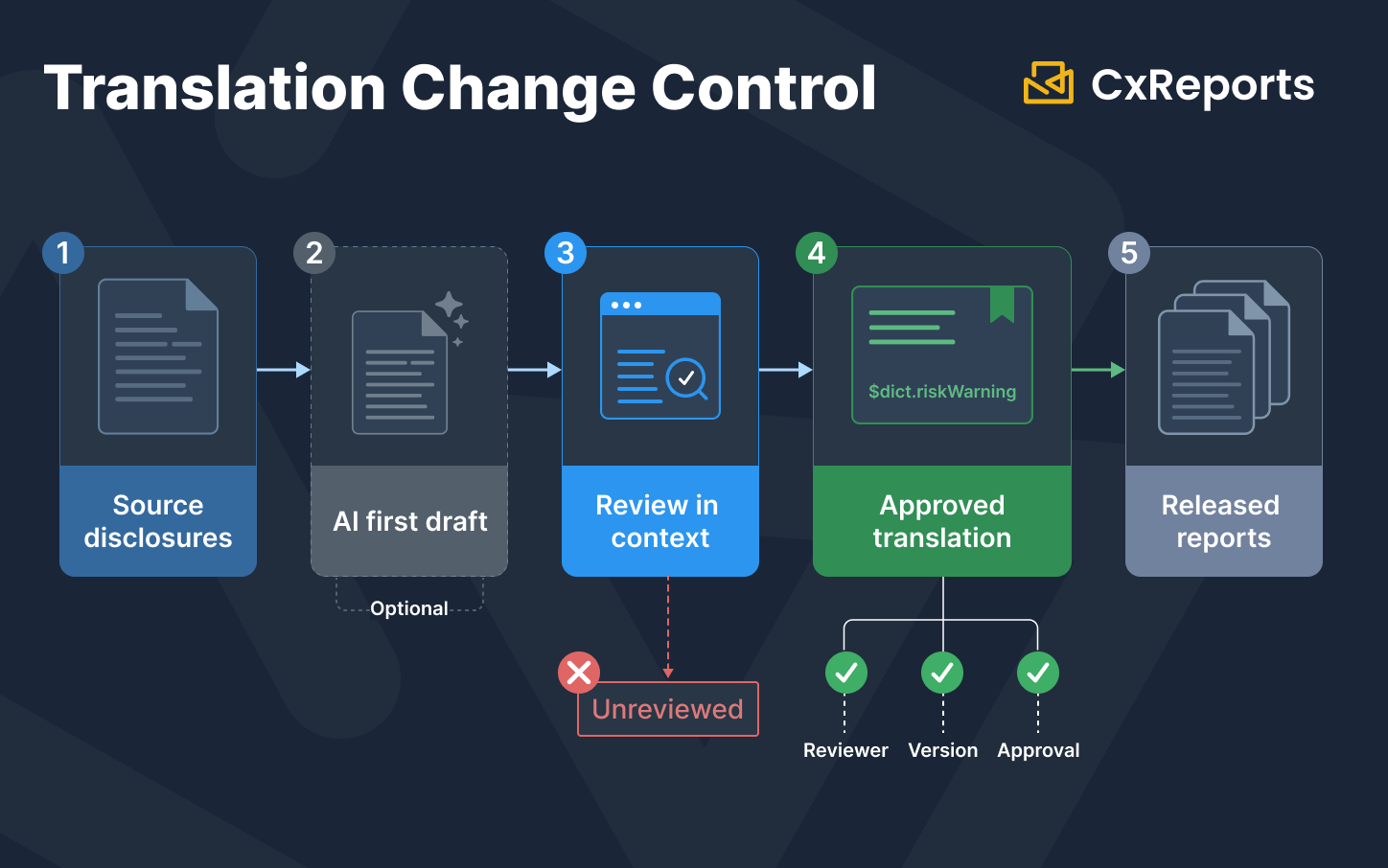
Once the source language version of a dictionary is finalised, CxReports can automatically translate the full dictionary to all configured languages using an AI translation integration. The AI generates a first-pass translation of every key into every configured target language.
This changes the economics of adding a new language. Instead of sending hundreds of text strings to a human translator for each new language, AI can produce a first draft for review, especially reducing initial setup effort. The human reviewer then checks and corrects. For regulatory disclosure text - where the wording is legally significant - human review is not optional.
AI translation reduces initial setup time substantially. It does not replace the review step for any text that carries compliance implications.
Governance: Who Owns Translation Changes for Regulatory Text
The risk in multilingual banking reports is not that the translation system fails. It is that the translation system works perfectly and the wrong text is in the dictionary.
A regulatory disclosure that has been machine-translated but not reviewed by legal holds the bank to the translated text if the report is delivered. A translation of a risk warning that softens or changes the meaning of the original - through a mistranslation or a phrasing choice that does not carry the legal weight of the source - is a compliance problem, not a technical one.
Banks operating multilingual reporting need a governance process for translation changes that mirrors the governance process for template changes:
Translation changes to regulatory text must be reviewed by legal or compliance before deployment. The reviewer must be reviewing the translated text in context - seeing the surrounding document structure and the full paragraph, not an isolated string. A word that is correctly translated in isolation may be wrong in regulatory context.
Translation changes must be tracked. The dictionary is a governed asset. Who changed which key, when, and from what previous value must be auditable. When a regulator asks why a specific disclosure in a French-language statement from Q3 uses a particular phrasing, the organisation should retain review, approval, and release evidence in CxReports or its surrounding content-governance process to be able to answer that question. For the wider audit trail, retention, and evidence delivery requirements around report generation, see Compliance-Ready Reporting.
Testing must include language-specific output review. Test every configured target language for text expansion, wrapping, font coverage, locale formatting, and output layout. Include RTL only where it is in scope and verified for the implementation. Language-specific output testing is a separate test gate, not a subset of the default-language test.
The governance process for multilingual templates is not more complex than the governance process for any regulated template - but it has additional reviewers, additional testing surfaces, and additional audit requirements for each language added.
What This Looks Like in Practice
A bank generating quarterly portfolio statements for clients in English, French, and Icelandic configures three languages in CxReports: en-US, fr-FR, and is-IS. It maintains one public dictionary with the shared financial terminology translated to all three languages, and a private dictionary per template type containing the specific disclosures for each report.
At generation time, the statement request includes the client's preferred language. The integration passes the lang option alongside report parameters such as account scope and period. The report resolves all dictionary references against the selected language, formats all dates and numbers using the IETF conventions for that language, and produces a PDF that is a correct, locale-appropriate document - from a single report design, without a separate copy per language.
When the compliance team issues an update to the standard risk disclosure, they update the dictionary entry in all three languages, pass it through the legal review process, and deploy the dictionary change. The next generation run for any report that attaches the dictionary and references that key resolves the updated text, in all three languages.
Getting Started with Multilingual Financial Reports in CxReports
| Step | What it involves | Who does it |
|---|---|---|
| Configure languages | Add IETF language tags for each required locale in workspace settings | Admin |
| Build public dictionary | Extract shared financial terms, have them translated and reviewed, create public dictionary entries | Report designer + translator/legal review |
| Build private dictionaries per template | Extract report-specific disclosures, translate and review, attach to each template | Report designer + compliance review |
| Use AI translation for first-pass | Run AI translation on finalised source-language dictionaries | Admin/designer |
| Human review for regulatory text | Legal or compliance reviews all regulatory disclosure translations in context | Compliance/legal |
| Generate with lang option | Pass the lang option in the API generation request at runtime |
Developer/integration |
| Test language-specific output | Run output verification tests for each configured language | QA/report designer |
For documentation, see: Languages, Dictionaries, AI Integrations, and API reference. To discuss your bank's multilingual reporting requirements, book a demo.