

Quarter-end arrives on the same date every three months. It is the most predictable deadline in wealth management - and it still overwhelms most firms.
The pattern is familiar: data feeds arrive late from custodians, a handful of corporate actions need manual intervention, compliance wants one more disclosure added, and suddenly the operation that runs once a quarter has consumed more human hours than anyone budgeted. The statements that should be a routine output become a high-stakes project.
This is not a technology problem, at least not primarily. Most firms that struggle with quarterly statements have the technology available to automate. The problem is structural: they are applying ad-hoc, manual processes to a workflow that is inherently repetitive - and they keep tolerating it because quarter-end is "only four times a year."
Four crunch periods a year, multiplied by the operational cost of each, over five years, is a significant number. This article explains why quarterly client statements resist automation, what a scalable architecture looks like, and how to implement it without losing the accuracy and compliance control that makes statements trustworthy in the first place.
Why Quarterly Statements Resist Automation
Three structural problems make quarterly client statements harder than they look.
First: data arrives late and messy. Custodian feeds don't close at midnight on the last day of the quarter. Corporate actions take days to confirm. Performance calculations depend on final prices that may not be available until D+1 or D+2. A reporting workflow that starts before data is clean produces statements that need restatement - which is worse than producing them late. The data-ready flag pattern that solves this is covered in Event-Driven Report Scheduling.
Second: every client is different. A retail client with two accounts and a balanced allocation needs a different statement from a high-net-worth household with twelve accounts across multiple strategies, tax-managed sleeves, and an allocation to alternative investments. When a household's wealth sits across several legal entities and currencies, see Consolidated Reporting for Family Offices. The disclosures are different. The benchmarks are different. Some advisors want their own logo and contact details on every page. Some clients need statements in a language other than English. A solution that cannot handle this variation without forking into dozens of separate templates will collapse under its own maintenance burden within a few years.
Third: the compliance stakes are high. A quarterly client statement is a regulated communication. The performance calculation methodology must be disclosed. Benchmarks must be appropriate. If a client challenges a return figure, the firm needs to be able to explain exactly where the number came from and reproduce the original document. "We can't find the original file" is not a defensible answer to a regulator.
These three problems interact. The data problem creates time pressure. The variation problem creates template complexity. The compliance requirement means you can't cut corners on either. The solution has to handle all three simultaneously.
The Four-Layer Architecture
Firms that automate quarterly statements successfully tend to organise the workflow into four distinct layers. Understanding why each layer exists - not just what it does - is what makes the architecture durable.
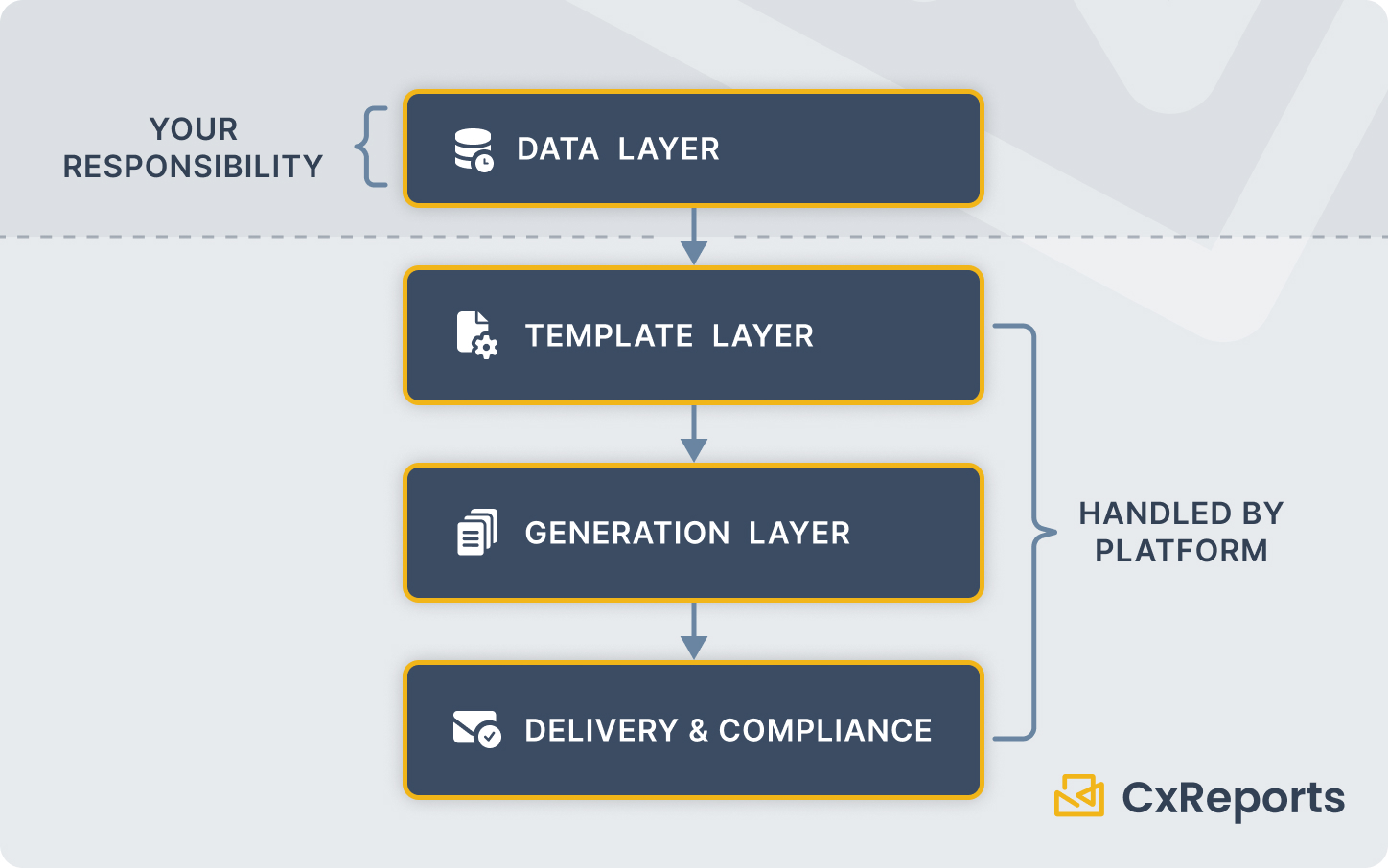 The data layer is entirely your responsibility, and this is the right boundary. The reporting system should receive clean, reconciled data with a defined "as-of" date - not raw custodian feeds. Applying data normalisation and business logic inside a report template is a common mistake that creates fragility exactly where you need stability. Clean data in, reliable statements out. Dirty data in, debugging at quarter-end.
The central discipline here is the point-in-time snapshot: before triggering generation, freeze a data snapshot representing exactly what positions, performance, and fees looked like as of the close of the quarter. For the data retention implications of these snapshots, see Data Retention for Reports and Exports. Reports generated against this snapshot today should produce bit-for-bit identical output if run again three years from now, because the underlying data cannot drift. This re-generability is not just a nice property - it is your defence if a client or regulator asks for the original document.
The template layer is where most firms make avoidable architectural mistakes. The instinct is to build one template per client type or advisor, which results in dozens of templates that all look similar and must all be updated every time compliance wants to change a disclosure. The scalable pattern is the opposite: a small number of base templates, parameterised for variation.
Client name, account list, period start/end date, benchmark, advisor details - these are parameters, not template variations. A high-net-worth client and a mass-affluent client may use the same base template with different sections enabled, not two separate templates. Advisor branding belongs outside the template logic: colour palette and typography in a theme, and the advisor's logo and contact details in the data that feeds each statement. One template with a set of themes and data-driven advisor details gives you many branded variants with a single maintenance burden.
Modular sections compound this advantage further. The cover page, the holdings table, the performance section, the disclosure pages - these are natural candidates to be independent, reusable components that assemble into a full statement. When compliance updates the performance methodology disclosure, the change propagates to every statement that includes that component, automatically.
The generation layer is where scale becomes visible. Generating 2,000 statements sequentially, one at a time, will take hours. Generating them in parallel, with proper queue management and failure isolation, can compress that window significantly. The architecture needs to handle individual report failures without blocking the rest of the batch - if 12 households have data exceptions, those 12 reports fail, the other 1,988 succeed, and you fix and rerun only the failures.
The delivery and compliance layer is not an afterthought. Where do the PDFs go? How does the client receive them? How do you prove a specific client received a specific document on a specific date? The answers to these questions are operational, but they need to be built into the workflow from the start, not bolted on afterwards.
What This Looks Like in CxReports
CxReports provides the generation and delivery infrastructure for this architecture. The data layer remains your responsibility; everything downstream from a clean, parameterised data handoff is handled by the platform.
Parameterised statements. Report parameters in CxReports accept typed values - client identifier, period start and end dates, account group, advisor code, client tier. These parameters drive both data queries (filtering holdings to a specific household and date range) and presentation logic (showing or hiding sections based on client type). A single quarterly statement template can serve the full client base with appropriate personalisation for each household.
Modular sections via Subreports. The holdings table, performance section, and disclosure pages are natural subreports - independent, self-contained units with their own data sources and parameters, embedded into the parent statement template. Updating the performance disclosure is a change to one subreport, not a change to every template that includes it.
Advisor branding without template forks. Colours and font choices live in a CxReports theme, and the advisor's logo and contact details can come from the data, since an Image component's URL can be built from a data field. A theme is set on the report, or passed per call when exporting directly through the API; a scheduled job uses the report's theme for every entry in the run. Within a single run, per-advisor logos and details therefore come from the data, and different colour schemes come from separate reports or direct API exports with a different theme. Firms managing multiple advisor offices or running a white-label service can maintain a single master template applied across many brands. Asset managers face the same challenge with fund fact sheets distributed through several partners, covered in Model Portfolio and Fund Fact Sheet Automation.
Scheduled batch delivery. CxReports email jobs accept parameter mappings, which means the quarterly run can be triggered once against your full client list, with each recipient receiving their own correctly-parameterised statement as an attachment. For the pre-distribution review that sits between generation completing and email delivery, see Pre-Distribution Consolidated Review. The schedule can be set to a specific date after quarter-end, once the data layer has confirmed the snapshot is ready.
Workspace isolation. For multi-tenant platforms - RIA aggregators, turnkey asset management programmes (TAMPs), or enterprise firms with distinct business units - CxReports workspaces provide clean isolation. Templates, data sources, themes, and users in one workspace are not visible to another. This separation matters for compliance: it prevents cross-contamination of client data between advisor firms.
Job run history. Each job run records its start time, per-entry status (including review outcome), the PDFs produced, and the delivery status of each email. This provides the baseline of the audit trail. Who triggered the run and with which parameters, the data snapshot reference, and formal approval records live in your operational processes, with the run history as one component.
Getting Started
| Quarterly statement requirement | CxReports primitive |
|---|---|
| Client-specific filtering (ID, period, account group) | Report parameters (Date, Lookup, Text types) |
| Holdings table, performance section, disclosures | Subreports - independent, reusable, embedded into parent |
| Advisor colours and typography | Theme set on the report, or passed per direct API export |
| Advisor logo and contact details | Data-driven Image URL and text fields |
| Scheduled generation and email delivery | Email jobs with parameter mapping and schedule |
| Multi-advisor or multi-tenant isolation | Workspaces - independent configuration per tenant |
| Audit trail for generation | Job run history (start time, entry status, PDFs, delivery) |
Documentation:
If you are evaluating CxReports for quarterly statement automation, book a demo to see the parameterised template and batch delivery workflow in action.
This article covers reporting automation and operational workflow. It does not constitute investment, tax, or legal advice.