

When vendors describe SSO support, they almost always position it as a convenience feature. Single sign-on so your users don't have to remember another password. SSO for a better login experience. SSO to reduce helpdesk calls.
This framing is accurate for consumer applications. It is entirely wrong for banking.
In a regulated financial institution, centralised identity management is not a user experience improvement. It is a security control, a governance requirement, and an audit dependency. A reporting tool that maintains its own credential store - separate from the bank's authoritative identity system - is not a minor inconvenience. It is a control gap that will surface in vendor security assessments, create provisioning and deprovisioning risk, and produce audit trails that cannot be linked to authoritative identity records.
This article explains why SSO integration is a hard requirement for reporting platforms in banking, what that requirement means in practice for both human access and system-to-system connections, and how the organisational and audit consequences of a separate credential store are more serious than they appear at first evaluation.
The Core Problem: A Separate Credential Store Is a Control Gap
Banks operate identity governance programs. Every system that handles sensitive data - trading platforms, core banking systems, regulatory reporting tools, document management systems - must be enrolled in the bank's identity lifecycle. That lifecycle covers:
- Provisioning: When a new employee joins, their access to systems is granted through a defined process, linked to their role and business justification.
- Changes: When a person changes role - from operations analyst to team lead, from one business unit to another - access permissions in downstream systems are adjusted, revoked, or elevated according to the new role's entitlements.
- Deprovisioning: When a person leaves, their access to every system is revoked. Not most systems. Every system.
Identity governance programs work because they are complete. A system that maintains its own credential store, outside the bank's identity provider, breaks that completeness. When an employee leaves, their Active Directory account is disabled - but their reporting tool account remains active until someone manually removes it, if that removal process exists at all.
This is not a theoretical risk. Access reviews - periodic e-xaminations of who has access to which systems - consistently find orphaned accounts in applications that manage their own credentials. The reporting tool that the operations analyst used before she transferred to another division eighteen months ago still has her account. The contractor who finished his engagement still has his. Neither of these accounts is visible to the bank's identity governance process because neither was ever connected to it.
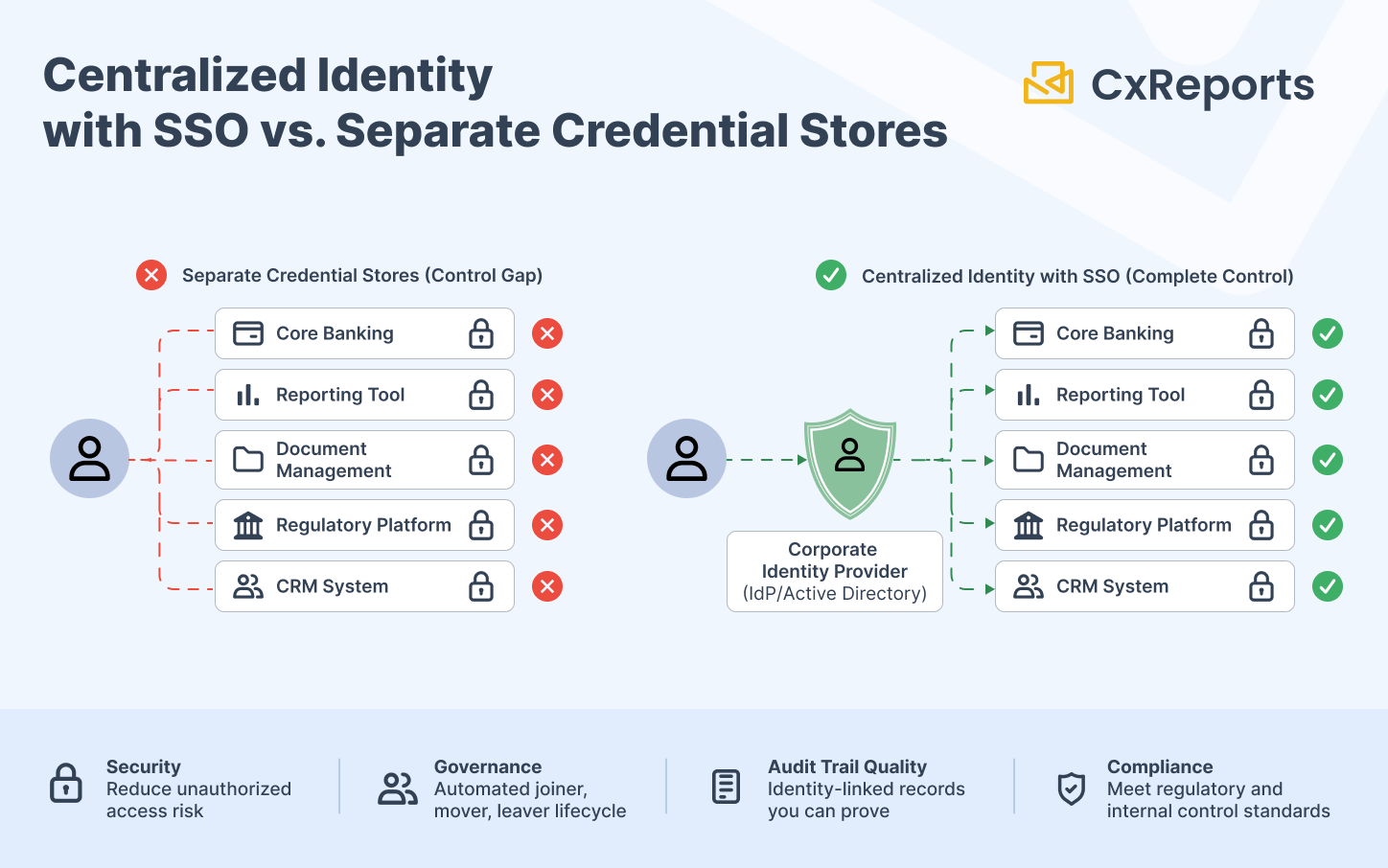
The consequence is not just an access control failure. It is an audit finding. Banking regulators and internal audit functions evaluate access governance as a standard control. A reporting platform with its own credential store will generate a finding along the lines of: "System X is not enrolled in the bank's identity lifecycle management process. User accounts exist in the system that are not reflected in the bank's authoritative directory and cannot be managed centrally."
The Audit Trail Dependency
The relationship between SSO and audit trail quality is rarely discussed but is fundamental for compliance purposes.
When a report is generated, the generation log must record who generated it. For that record to have evidentiary value, "who" must mean a specific, identifiable individual, traceable to the bank's authoritative identity record.
If the reporting system manages its own credentials, the user identity in the generation log is a local account: an email address or username that exists only within the reporting tool. It cannot be verified against the bank's directory. There is no authoritative link between the log entry and a specific employee record. If the account was a shared account, the log entry proves nothing about which individual was responsible. If the account was created informally - without proper provisioning - it may not map to any current employee.
When the reporting system authenticates through the bank's identity provider, the user identity in the generation log is the bank's authoritative identity: the same identifier used in Active Directory, in access reviews, in joiner/mover/leaver records. The link is direct and verifiable.
For the full compliance audit trail that depends on these identity-linked records, see Compliance-Ready Reporting.
This matters most at the moment of regulatory inquiry. An examiner asking "who generated the Q3 investor statements?" needs an answer that can be verified. An answer that traces to an authenticated session in the bank's identity provider is verifiable. An answer that traces to a local account in the reporting tool's own database is not.
The audit trail quality argument for SSO is the same as the audit trail quality argument for individual user accounts - but stronger. Individual accounts are necessary; SSO-backed individual accounts are necessary and sufficient.
What SSO Integration Actually Covers in a Reporting Context
The SSO discussion for reporting platforms typically focuses on human user authentication: employees logging into the reporting application. This is the obvious surface. There are two surfaces that matter in practice.
Human user access. Operations staff, compliance officers, report designers, workspace administrators - any person who logs into the reporting platform. This is the primary SSO integration point. When the bank's identity provider issues a session for a user, the reporting platform accepts that session and maps the user to the appropriate workspace roles. The user never creates a separate password for the reporting tool.
For banking deployments, the critical requirement is that password-based login to the reporting tool can be disabled entirely. SSO as an option alongside local passwords is not an equivalent control - it means local passwords still exist, still create orphaned account risk, and still fall outside the bank's identity lifecycle. The integration must support enforcing SSO as the exclusive authentication path.
API and automation access. Reporting platforms in banking are rarely used in isolation. Batch runs are triggered by upstream systems. Reports are generated as part of workflow automation. Integrations pull data from core systems and push outputs to downstream platforms. These system-to-system connections require their own authentication model - typically long-lived service credentials rather than interactive SSO sessions.
For this layer, the security requirements are different: service credentials should be scoped to the minimum necessary permissions, stored in the bank's secrets management infrastructure, rotated on a defined schedule, and revoked immediately when the integration is decommissioned. The link between a service credential and its owning system should be documented and part of the bank's service account governance process.
For the full API authentication and access control design for banking integrations, see API-Driven Report Generation in Banking.
The Domain Restriction Control
Banking organisations need more than SSO enablement. They need the guarantee that only accounts from authorised domains can authenticate to the reporting platform.
An unrestricted SSO integration means that anyone with, say, a valid Google Workspace account can attempt to authenticate. That is obviously not acceptable in a banking context. The practical requirement is domain-locked SSO: authentication is accepted only for accounts belonging to the bank's own domains. A personal Google account, an account from a former subsidiary with a different domain, or an account from a contractor's organisation should be rejected at the authentication layer, not handled as an access control problem after login.
Domain restriction is a configuration-level control that must be verified during procurement evaluation. The ability to restrict authentication to specific domains is a required characteristic of any SSO integration, not an optional enhancement.
The Procurement Gate
Bank IT security assessments for third-party tools typically include a vendor questionnaire covering identity and access management. The relevant questions are not subtle:
- Does the system support integration with enterprise identity providers?
- Can local password authentication be disabled?
- Can authentication be restricted to specific organisational domains?
- How are service accounts managed for automated integrations?
- How is user deprovisioning handled when a user's identity provider account is disabled?
A reporting tool that answers "no" to the first three questions - or that answers "yes" but only as an optional add-on that leaves local authentication active - will not pass this review in most banking environments. The review is not looking for best-in-class features; it is checking minimum controls. SSO integration with the ability to disable local authentication is in that minimum set.
The practical implication for technology evaluations: SSO capability needs to be verified before a proof of concept, not discovered during security review after a business case has been built around a particular tool. A tool that fails the SSO gate fails the procurement regardless of its feature set.
How This Maps to CxReports
CxReports supports external authentication through Google, Microsoft, and OpenID Connect identity providers (such as Keycloak, Okta, and other OIDC-compliant providers), configured at the application level. When configured, users authenticate through their organisational account rather than a CxReports-managed credential. Because sign-in happens at the identity provider, the MFA and sign-in policies the bank configures there apply at that step. Confirm during evaluation how your provider's session lifetime and conditional access rules interact with CxReports sessions.
Password-based login can be disabled entirely using the PasswordLogin: { "Enabled": false } configuration, enforcing SSO as the exclusive authentication path. When this is set, a user who navigates to the CxReports login screen cannot authenticate with a local password - authentication goes through the identity provider only.
Domain restriction is enforced through the SupportedDomains configuration per identity provider. CxReports accepts sign-ins only from accounts with email addresses in the listed domains, so a user from an unauthorised domain cannot get in even if the identity provider authenticates them.
For API and automation access, CxReports uses Personal Access Tokens (PATs). PATs authenticate as a specific user and inherit that user's workspace permissions. PATs belong in your organisation's secrets management infrastructure - environment variables, a vaulted secrets store, or a deployment configuration service - not in application code or client-side environments. They should be scoped to the minimum-permission user account the automation requires and rotated on a schedule aligned with the bank's service account governance policy.
For the broader security architecture these credentials sit within, see Enterprise Reporting Security.
For iframe embedding and report preview in client applications, CxReports uses nonce tokens: single-use, server-side generated tokens that convert to a session on first use. The browser never holds a long-lived credential, and a nonce cannot be reused if intercepted.
Provisioning starts at the identity provider: a CxReports user is created on first SSO sign-in, and roles are then assigned in CxReports. When a user's identity provider account is disabled and password login is off, they can no longer sign in to CxReports. Their CxReports user record, workspace roles, and any Personal Access Tokens they created remain, so the offboarding process should also remove the user from their CxReports workspaces and revoke their tokens.
Getting Started with CxReports
| Requirement | CxReports primitive | Your configuration |
|---|---|---|
| SSO via organisational identity provider | Google Login / Microsoft Login / OpenID Connect (appsettings) | Identity provider application registration; SupportedDomains configured to bank domains |
| Disable local password authentication | PasswordLogin: { "Enabled": false } |
Set before initial user provisioning; verify no local accounts remain active |
| Domain-restricted authentication | SupportedDomains: ["bank.com"] per identity provider |
List all authorised domains; confirm contractor/subsidiary domain policy |
| MFA enforcement | Enforced at the identity provider sign-in | Configure MFA policy in your identity provider; verify session behaviour during evaluation |
| API access for automation | Personal Access Tokens (PATs) | Store in secrets manager; scope to minimum-permission user; rotate per service account governance policy |
| Iframe / browser embedding | Nonce tokens (server-side generated) | Generate nonce server-side per session; never expose PATs client-side |
| Deprovisioning | Identity provider disable blocks sign-in | Also remove the user from CxReports workspaces and revoke their PATs; verify with a test account |
For configuration details on Google, Microsoft, and OpenID Connect login integration, see the CxReports documentation. To discuss identity integration requirements for your specific banking environment, get in touch.