

SSRS migrations in banking don't fail because the new platform lacks features. They fail because nobody verified that the reports did.
The standard pitch for replacing SSRS focuses on what the new platform offers: a modern visual editor, cloud deployment, API-driven generation, better scheduling. These are real advantages. But the reason banking SSRS migrations routinely stall - or get reversed after a rushed cutover - is something different: the complex, battle-tested reports that have been running in production for five to fifteen years have never been tested for output equivalence on the new platform.
The migration team moves the simple reports first, finds they work, declares the platform validated, and schedules cutover. Then someone runs the quarterly regulatory filing report. It produces different figures. The tablix grouping logic that took three months to get right in 2017 does not translate the same way. The parameter-driven subreport that populates the client-specific section of a portfolio statement breaks silently and produces an empty section instead of an error. The locale-aware number formatting that was in SSRS is now displaying decimal separators in the wrong format for non-English clients.
The cutover is reversed. The SSRS migration is paused. The new platform is blamed. For a wider view of SSRS deprecation context and migration rationale, see SSRS Deprecation: What It Means for Your Stack.
The root cause was not the platform. It was the absence of a systematic output parity verification process before the cutover decision was made.
This article covers what that process requires.
The Output Parity Test: The Only Go/No-Go Criterion That Matters
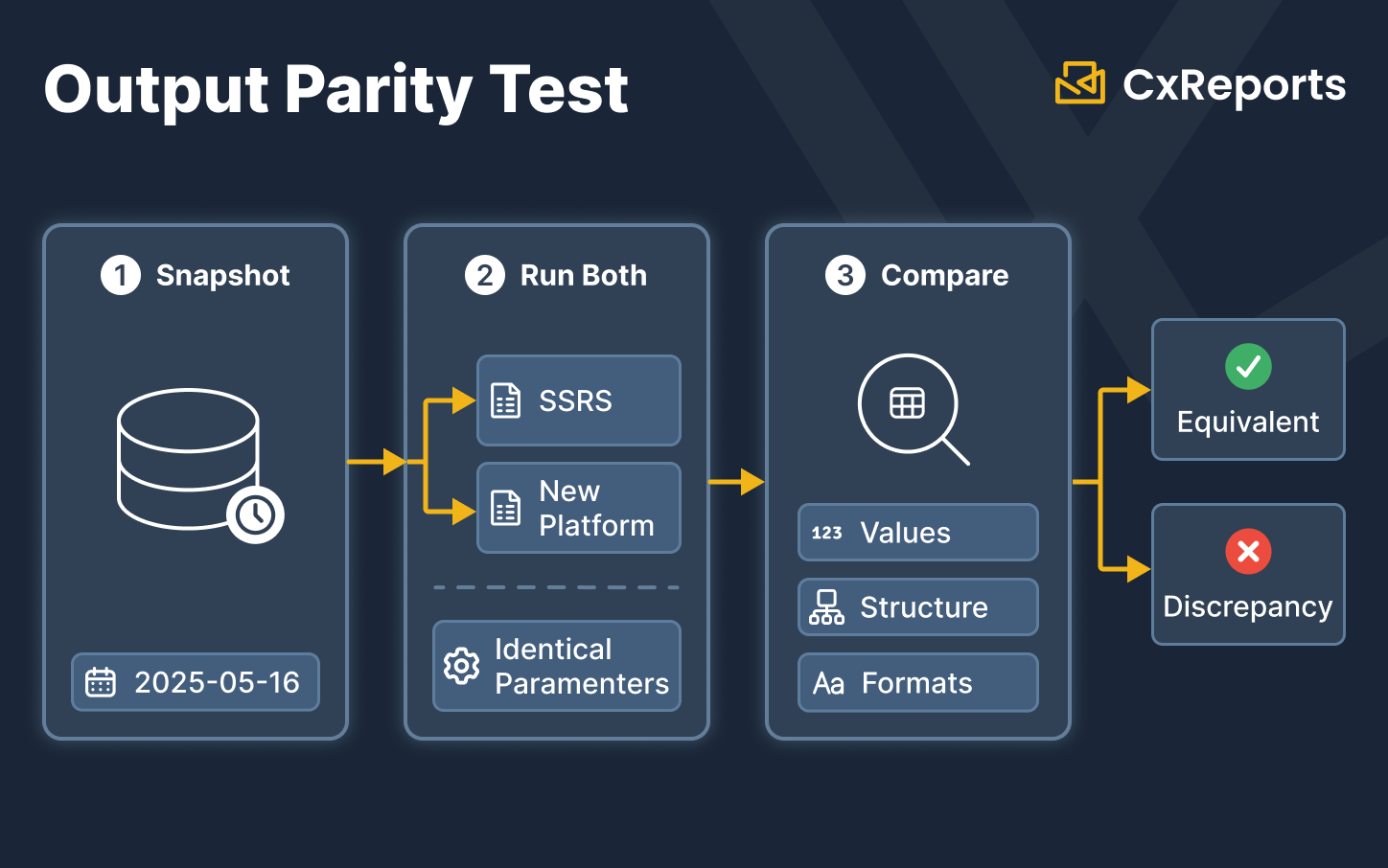
The go/no-go criterion for a banking SSRS migration is simple to state and demanding to execute: every report that will be migrated must produce output on the new platform that is numerically and structurally equivalent to the output it produces on SSRS, tested against the same data.
This is not a feature check. It is not a visual comparison. It is a data check: run the same report against the same data snapshot on both platforms, extract the values from the output, and verify that they match.
Why a data snapshot, not live data? Because live data changes between runs, making comparison unreliable. A date-stamped data snapshot used for both the SSRS run and the new-platform run removes that variable. Any difference in output is a platform difference, not a data timing difference.
What equivalence means in practice:
Numerical equivalence. Every calculated value - subtotals, aggregations, percentage calculations, period-over-period comparisons - must match to the same precision. A figure that rounds to the same two decimal places in most cases but differs at the fourth decimal in edge cases is not equivalent. Banking reports are challenged by auditors and regulators on exact figures; approximate equivalence is not a migration success criterion.
Structural equivalence. The grouping logic, the sort order, the section hierarchy, and the conditional display logic must produce the same document structure for the same input. A report that groups holdings by asset class in a different order than SSRS does, or that excludes a section that SSRS includes under specific parameter conditions, is not an equivalent report even if all the numbers are correct.
Format equivalence. Date formats, number separators, currency symbols, and locale-specific display conventions must match. A report migrated from an SSRS instance configured for Swiss French locale must produce the same number and date formatting on the new platform for the same locale parameter.
Technical Blockers Specific to Banking SSRS Reports
Banking SSRS environments accumulate complexity over time in specific ways. The reports that are most likely to fail the output parity test are exactly the ones that are most operationally critical. Understanding where the blockers concentrate helps prioritise the verification effort.
Stored procedures and temporary table logic
Many SSRS reports in banking call stored procedures rather than inline SQL. The stored procedure may use temporary tables, cursors, complex multi-step logic, or business rules that are encoded in the database layer rather than the report layer. A new reporting platform that supports SQL queries will execute the stored procedure via a standard EXEC call - but the result depends on whether the stored procedure's output is compatible with how the new platform expects to receive and bind data. Reports that call stored procedures with result sets should be explicitly included in the pilot verification phase, not assumed to work because SQL is supported.
Complex aggregation and grouping logic
SSRS tablix components handle multi-level grouping, nested aggregations, running totals, and cross-tab calculations through a visual grouping model. Reports that use nested group hierarchies - for example, a portfolio report that groups holdings by asset class, then by sub-asset-class, then by individual security, with a different aggregation function at each level - implement logic that is specific to the SSRS tablix model. Rebuilding this report on a new platform requires understanding that logic and re-implementing it correctly, not just copying the visual structure.
The verification test for these reports is particularly important: run the rebuilt report against a data set where you know the expected output at every aggregation level, and verify each level individually, not just the final totals.
Subreport composition
SSRS supports embedded subreports - reports that pull a separately defined report into a parent document, typically to modularise repeating sections or to allow different data sources per section. Banking environments commonly use subreports for the per-client data section of a statement template: the main report defines the layout; a subreport populates the client-specific data table. Verifying that subreport composition works on the new platform requires testing the complete document - not just the parent and subreport individually, but their integration, including parameter passing from parent to subreport and layout rendering when the subreport content varies in length.
Parameter-driven generation and cascading lookups
Banking SSRS reports frequently use cascading parameter dependencies: selecting a business unit filters the available accounts; selecting an account filters the available reporting periods. This cascading dependency is implemented differently in different platforms. Verify that the parameter chain that an operations team has been using for years works identically on the new platform - including the edge cases where a parameter combination returns no results.
Output format dependencies
SSRS produced both PDF and Excel outputs for many report types. For banking operations teams, Excel output is often the format used for further data manipulation - feeding figures into reconciliation spreadsheets, producing regulatory submission files, or distributing data to downstream systems. Before migrating a report that currently has Excel consumers, verify whether the migration target's output format capabilities meet those consumers' needs, and agree on a format transition plan if PDF is the primary output of the new platform.
The Pre-Cutover Verification Checklist
Before a go/no-go decision on any report or report family, verify each of the following. This checklist should be completed per-report for every report in the migration scope - not sampled, not approximated.
Data source connectivity
- [ ] The new platform can connect to every data source the report queries, using the same connection security model
- [ ] Stored procedures called by the report execute successfully and return the expected result set structure
- [ ] Complex queries with multiple joins, subqueries, or CTEs produce the correct result set
- [ ] Parameter values are correctly passed to the SQL query and filter the data as expected
Report logic
- [ ] Multi-level grouping and aggregation produces the same values at every level as the SSRS version
- [ ] Subreports receive the correct parameters from the parent and render correctly at every expected content length
- [ ] Conditional sections display and suppress correctly for the full range of parameter inputs
- [ ] Calculated fields produce equivalent values, verified to the required decimal precision
Output and formatting
- [ ] Date formatting matches the SSRS output for every locale in use
- [ ] Number and currency formatting matches, including thousands separators and decimal formats per locale
- [ ] PDF output layout is equivalent: page breaks occur in the correct positions, headers and footers are present on every page, the document does not exceed or undershoot the expected page count
- [ ] Any downstream systems that consume this report's output (Excel-based reconciliation, data extraction processes) are compatible with the new output format
Operational requirements
- [ ] Scheduled generation (if applicable) fires correctly and produces the same output as manual on-demand generation
- [ ] The report generates within acceptable time bounds for the production data volume (not just the test data volume)
- [ ] Error handling is verified: the report fails gracefully and produces a meaningful error when required parameters are absent or the data source is unavailable
The Phased Cutover Strategy
For banking environments, a direct cutover - switch off SSRS, switch on the new platform - is the strategy most likely to produce a crisis. The safe approach is a parallel running period during which the new platform generates reports alongside SSRS, the outputs are compared, discrepancies are resolved, and only then is SSRS decommissioned.
Phase 1: Inventory and classification. Catalogue every SSRS report in scope. Classify each by complexity (simple, moderate, complex), criticality (regulatory, client-facing, internal), and format dependency (PDF only, Excel required, dual format). This classification determines the validation effort required per report and the risk of a missed discrepancy.
Phase 2: Pilot - high-criticality reports first. Begin the migration with your most critical reports, not your simplest ones. Migrating simple reports first creates false confidence. The quarterly regulatory filing, the client statement, and the period-end reconciliation report are the ones that must be proven on the new platform before cutover is considered. Run these in parallel with SSRS for a full reporting cycle, comparing output parity on every run.
Phase 3: Parallel running period. For each migrated report family, run a defined parallel period - at least one full reporting cycle for periodic reports, or a minimum of 30 production runs for on-demand reports - comparing output against SSRS. Any discrepancy discovered during this period is a blocker: investigate, root-cause, resolve, and restart the parallel counter.
Phase 4: Stakeholder sign-off. Before any SSRS report is decommissioned, obtain explicit sign-off from the business owner of that report that the new platform's output is equivalent and acceptable. This is not an IT decision alone. The operations team that relies on the report, the compliance team that submits it to regulators, or the client team that distributes it to investors - whoever is accountable for the report's accuracy - must confirm the migration before SSRS is turned off for that report.
Phase 5: Decommission incrementally. Decommission SSRS report by report, not as a bulk cutover. Keep SSRS available for a defined period after each report is decommissioned - typically one additional reporting cycle - to allow rollback if a discrepancy surfaces in the first production run on the new platform. Full SSRS decommission happens only after every report has completed at least one successful production run on the new platform without discrepancy.
How This Maps to CxReports
CxReports provides the capabilities required by the verification checklist above. The mapping below covers how each critical verification item is addressed by the platform.
SQL data sources for complex query migration. CxReports connects directly to SQL databases and executes the SQL queries that drive SSRS reports. Complex queries - multi-join, subquery, CTE-based - execute as written. For reports that call stored procedures, the procedure is invoked via a standard SQL execute statement within the CxReports data source query. The pilot phase for any stored-procedure-driven report should include an explicit test run against a data snapshot to verify result set compatibility.
Parameters and cascading lookups. CxReports parameters support text, number, date, month range, and lookup types. Lookup parameters can be dynamically linked - selecting one parameter filters the available values in a dependent parameter - replicating the cascading dependency chains that SSRS operations teams use. Global parameters and reusable parameters allow common filters (business unit, reporting period, jurisdiction) to be defined once and shared across all reports in the workspace.
Subreports for modular document composition. CxReports supports subreports: separately defined report units that are embedded within a parent report, with parameters passed from the parent to the subreport at generation time. The subreport composition model allows the same modular architecture that banking SSRS environments commonly use for per-client data sections and repeating document blocks.
Locale-aware number and date formatting. Date and number formats in CxReports are driven by the language setting for the report, using IETF language tags that determine locale conventions - decimal separators, date format order, currency symbol placement. Reports migrated from locale-configured SSRS environments can be matched in formatting behaviour by configuring the equivalent language in CxReports.
On-premise deployment for data proximity. Banks running SSRS on-premise, with reports querying databases that are not exposed to external networks, can deploy CxReports on-premise in the same network environment. Alternatively, for banks evaluating the CxReports cloud service against on-premise databases, the Data Agent provides outbound-only connectivity from the on-premise database to the cloud service without requiring inbound firewall rules.
Parallel running using workspace separation. A dedicated migration workspace in CxReports is the natural environment for the parallel running phase: rebuilt reports live in the migration workspace, are run against the same data snapshots used for SSRS validation, and their output is compared before the reports are promoted to the production workspace. For the compliance and audit trail requirements your new reports must satisfy post-migration, see Compliance-Ready Reporting. The SSRS environment remains untouched during this phase; no changes are made to production until the parallel validation is complete.
Getting Started with CxReports
| Verification requirement | CxReports mechanism | Migration action |
|---|---|---|
| SQL query execution (complex queries, stored procedures) | SQL data sources with full query support | Test each SSRS report's SQL in a CxReports data source against a data snapshot; verify result set matches |
| Parameter chains and cascading lookups | Lookup parameters with dynamic dependency linking | Rebuild parameter chains; test all parameter combinations including edge cases |
| Subreport composition | Subreports with parent-to-subreport parameter passing | Rebuild subreports independently; test embedded composition with variable-length subreport content |
| Locale-aware number and date formatting | Languages (IETF tags) per workspace | Configure equivalent language for each locale; verify format output against SSRS side-by-side |
| On-premise data access | On-premise deployment or Data Agent (outbound SQL) | Match deployment model to SSRS data access architecture; test query latency at production data volume |
| Parallel running environment | Separate migration workspace | Use migration workspace for rebuilt reports during parallel phase; promote to production workspace after sign-off |
For documentation on data sources, parameters, subreports, languages, and deployment options, see the CxReports documentation. To discuss your SSRS migration scope and plan a structured verification approach, get in touch.