

Watermarks as Document State Control: Draft, Final, Confidential
A "DRAFT" stamp on a financial document is more than decoration. It's an important visual safeguard, one that tells whoever is looking at the page what they're holding before they act on it.
Consider a common failure mode: a compliance officer reviews a draft investor statement, annotates a correction, and forwards the PDF internally for a second opinion. Somewhere in that chain, the file is renamed, saved to a shared folder, or attached to the wrong email, and it reaches a client or a regulator before the correction is made. A watermark doesn't stop any of those handling mistakes from happening. What it does is give the recipient a fighting chance to notice, at a glance, that the document in front of them was never meant to leave internal review. Without it, the draft looks exactly like a final statement, because visually, it is one.
That's the actual job a watermark does in a regulated document workflow: a visible signal of where a document sits in its lifecycle, carried on the face of the document itself. It's not a substitute for the controls that actually prevent an unreviewed document from reaching a client, things like approval gates, access permissions, and a controlled delivery process. Those are the real barriers. The watermark is what tells a human reader, after the document has already left those controls, what they're looking at.
Most reporting tools treat watermarking as a static design choice: pick a label, place it on the template, done. That works for a logo or a page number. It doesn't work for a state label, because a document's state changes as it moves through review and approval, and a label fixed at template design time can't track that. Getting this right means treating the watermark as a rendering decision driven by state at the moment of generation, not a permanent fixture of the layout.
Why a Static Watermark Solves the Wrong Problem
A template with "DRAFT" hardcoded into a text box has one purpose: remind whoever is looking at that specific version of the template that it isn't final yet. It can't represent a document whose state changes over time. Once the same template also needs to produce the final, approved version, an organisation is left with two bad options: manually remove the watermark before every final run, a step someone has to remember every single time, or maintain two near-identical templates, one with the watermark and one without, that drift apart the first time someone updates one and forgets the other.
Both approaches fail the same way. The watermark on the document in front of you reflects what someone intended when they built the template, not what state that specific document was actually generated in.
The alternative is to treat the watermark's content as data, not layout. The label that appears, whether that's "DRAFT," "FINAL," "CONFIDENTIAL," or nothing at all, is determined by a status value supplied at the moment the document is generated, the same way the recipient's name or account balance is. One template, one watermark element, and the text that appears reflects the state the calling system reported at that specific generation. It's worth being precise about that last point: the watermark shows the state supplied when that particular PDF was produced. If the underlying workflow later moves the document from Draft to Approved, the PDF already generated doesn't update. A new watermark only appears on a newly generated document.
What a State-Aware Watermark Actually Requires
A workflow-state watermark needs four things working together, and it's worth being precise about which system owns each one.
A state authority. Something upstream of the document, a review tool, an approval system, a case management platform, or a person selecting an option before triggering generation, has to know and communicate what state the document is in. The reporting platform doesn't know on its own whether a report has been reviewed or approved. It knows what value it was told to render.
A rendering mechanism. The reporting platform takes that status value and produces a document where the correct label is visibly present, styled distinctly enough that it can't be mistaken for regular content, typically large, semi-transparent, and diagonal across the page.
A review or release gate. Rendering the correct watermark doesn't, by itself, stop an unreviewed document from being sent. Somewhere between generation and delivery, there needs to be a checkpoint, an approval step, a hold in a queue, a permission check, that actually controls whether the document goes out. This is the piece that does the preventing; the watermark only does the labelling.
An evidence record. If the distinction between a draft and a final version matters later, and in a regulated context it will, someone needs to be able to establish which state was present on a specific generated document, and that the release gate was actually satisfied before delivery. This tends to be the piece that gets overlooked, because it doesn't show up as a gap until an inquiry happens.
CxReports' main role in this chain is specific: given a status value, render it correctly, every time. The state authority and most of the evidence record are workflow and governance responsibilities that sit around the reporting platform. The release gate can sit outside it too, or inside CxReports when a Job holds its deliveries for review (covered below).
Two Separate Values, Not One Combined Field
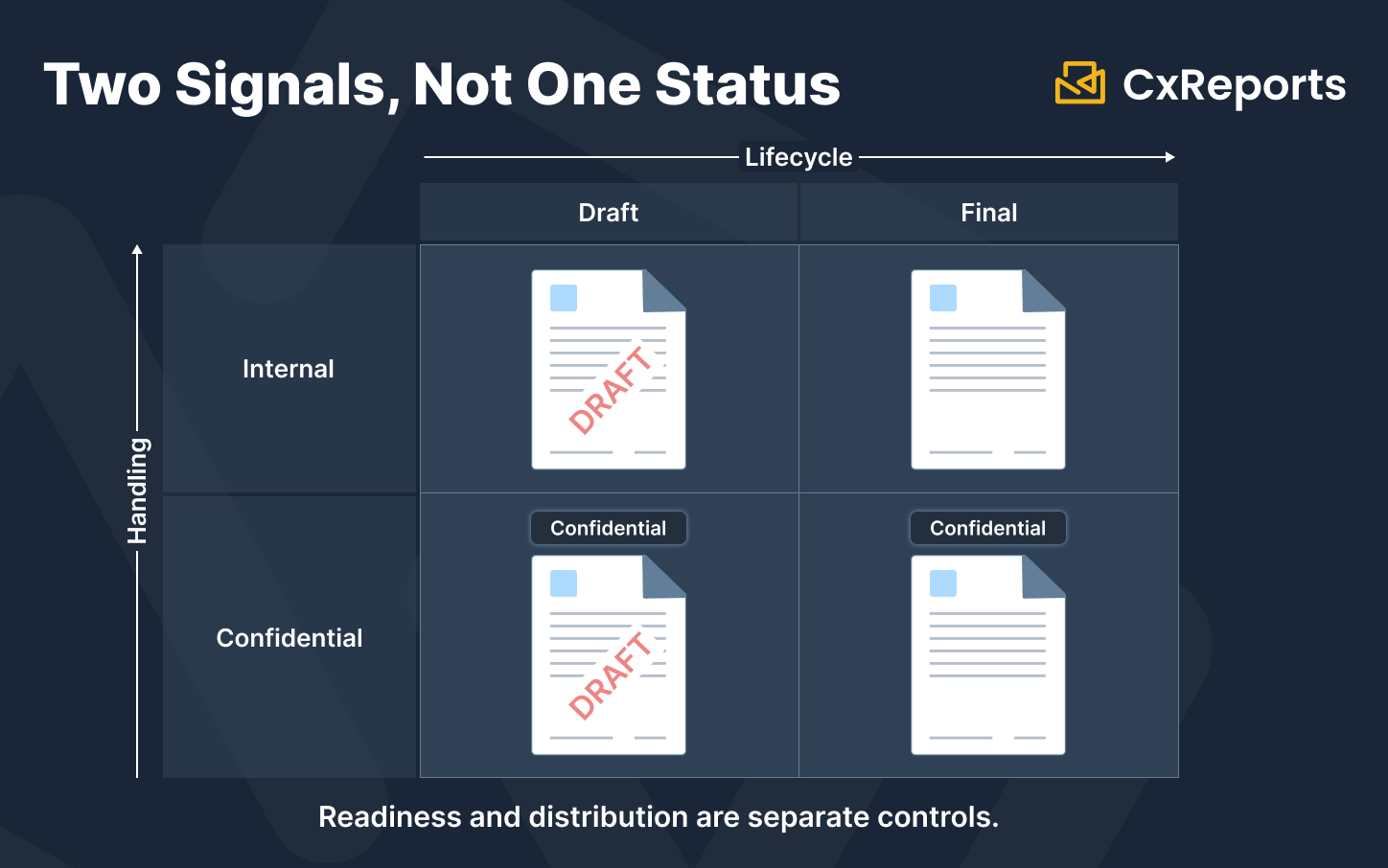
A document's position in its review lifecycle and its distribution sensitivity are two different questions, and treating them as one status field produces awkward, easily-mismanaged states.
Lifecycle describes how far a document has progressed through review: Draft, Under Review, Approved, and whatever intermediate stages a specific organisation's process requires. Handling describes who's allowed to see it, independent of where it sits in review: Public, Internal, Confidential, Restricted.
A document can be both Draft and Confidential at the same time, and a document can be Approved and still Confidential. Collapsing these into a single field forces combined values like "ConfidentialDraft" that don't compose cleanly as the number of lifecycle stages or handling classes grows. Keeping them as two separate parameters, each independently rendered on the document if needed, avoids that combinatorial mess and makes each value easier to reason about on its own.
Mapping States to a Document Lifecycle
Draft, Under Review, and Approved is a common model for how a financial document moves through review, but it's one model among several, not a universal sequence every organisation follows. Some processes add a legal review stage, a separate compliance sign-off, or states like Withdrawn, Superseded, or Rejected that don't fit neatly into a linear progression. The specific set of states is a business decision your review process makes; what matters for the document is that whichever state applies at generation time is what gets rendered.
A few of the more common stages are worth calling out specifically. Draft means the document has been generated for internal review and figures may still change; anyone receiving it needs to know immediately that it isn't authoritative. Under Review applies when a specific person or committee has been asked to sign off, and organisations with more than one review gate (a first-pass analyst check, then a formal compliance sign-off) sometimes track this as a distinct state from Draft. Approved or Final means the document has cleared whatever review process applies and is ready for distribution.
Some organisations choose to leave approved documents unmarked, on the reasoning that the absence of a watermark signals nothing further is expected to change. That's a legitimate convention, but it's worth being clear-eyed about its limits: an unmarked document isn't proof that it was approved. A missing watermark can just as easily come from a bad parameter, a template error, or a document generated outside the normal controlled process. Absence of a label is not evidence of anything on its own; it only carries meaning if the rest of the pipeline, the state authority and the release gate, is actually working correctly.
The state transitions themselves, who can move a document from Draft to Under Review, and from there to Approved, are governed by whatever review process the organisation runs, and that process's own record of who approved what and when lives in the systems that manage it, not in the PDF.
A Question an Auditor or Incident Reviewer May Ask
Audit objectives vary, but a question that comes up often enough to plan for: "This document reached a client. Can you show it was generated as an approved document, not an unreleased draft that escaped review?"
Answering that requires two things to align: the watermark visible on the document, and an independent record, kept outside the document, of what status was requested when that specific document was generated and whether the release gate was satisfied. The watermark tells a human reader what they're looking at. The independent record is what lets the organisation reconstruct, after the fact, that the correct status was actually used and that delivery was properly authorised, rather than relying on the document's own claim about itself.
A watermark that reads "FINAL" reflects the state passed at generation time. On its own, it isn't proof that the generation was authorised or that delivery went through the required gate. That proof needs to live somewhere the document itself can't alter, which in practice means a log or database entry maintained by the workflow system, independent of the PDF.
How This Maps to CxReports
The visual watermark is a Text component placed on the report template, with its font, size, and colour set in the component's styling options, and rotation and reduced opacity added through the component's custom CSS, so it reads as an overlay without obscuring the content beneath it.
The lifecycle and handling values are two separate report parameters. Because a document can be in one of several named lifecycle stages (Draft, Under Review, Approved) or, separately, one of several handling classes (Public, Internal, Confidential, Restricted), a Lookup or Text parameter is the right fit for each, not a Switch. A Switch parameter is a binary toggle, well suited to a true/false flag like isConfidential on its own, but it can't represent four or five named states. The calling application passes the current lifecycle value and the current handling value as these parameters when it triggers generation, and the watermark's Text component references whichever value (or combination) needs to appear.
Conditional display uses the component's Visible Expression, so the watermark only renders for the states an organisation wants labelled, for example showing it for Draft, Under Review, and Confidential, while an Approved-and-Public document renders with no watermark, if that matches the organisation's convention.
Where CxReports does support a review step before delivery: the approval workflow that decides what state a document should carry can live entirely in an external system, which then passes that state to CxReports through the API at generation time. But CxReports Report Generation Jobs also support a pattern closer to built-in review: a job can hold its generated output for review before delivery, with entries approved or rejected as part of the job's flow, and can assemble a consolidated review document across a batch of generated reports rather than requiring each one to be reviewed individually. Which pattern fits depends on whether the approval decision needs to be made by people already working inside CxReports or by a system elsewhere in the organisation's stack. See the Jobs documentation for how this is configured.
Platform permissions are not the same thing as business authorisation. CxReports' role-based access controls decide who can work with Jobs at all, and that's a genuine access-control layer worth using. Jobs access is either No Access or Full Access, so anyone with access can approve entries and trigger delivery; there is no separate approve permission. What CxReports can't do is infer whether a specific release was actually authorised by an external committee, a case-management workflow, or a sign-off process that lives outside the platform. If that kind of authorisation record matters for your compliance process, it needs to be captured by whichever system owns that decision, whether that's the calling application logging its own approval step or the reviewer's action inside a CxReports Job.
Consistent visual styling across every watermark, its typography, colour, and opacity, is handled through Themes, so a "DRAFT" label looks the same whether it's on a client statement or a regulatory filing. Where the watermark actually sits on the page, and whether it appears consistently across every page of a given page type, is a Report Template concern: templates define the fixed header, footer, and placeholder layout for each page type, and a watermark meant to appear on every page of a multi-page document is placed as part of that template's shared layout, not repeated by hand per page.
A watermark is not an access control. "CONFIDENTIAL" printed on a page tells a reader how the document should be handled; it doesn't stop the PDF from being copied, forwarded, or read by someone without authorisation. Treating a watermark as if it restricted access, rather than labelled intent, is a mistake worth guarding against explicitly when rolling this out.
On unknown or missing state values. If the calling application fails to pass a recognised lifecycle or handling value, the safer failure mode is to fail the generation or render a clearly visible default (an "UNSPECIFIED" label, for instance) rather than let the report silently proceed as if it were Final. Silently treating a missing or invalid parameter as the least-restrictive state is exactly the kind of failure that defeats the point of having a watermark at all.
On the audit question: a Job's run history shows the status of each entry (including whether it was pending review, approved, or rejected), the PDFs produced, and the result of each delivery. It does not record the parameter values used for a given document, including which lifecycle or handling state was passed in, and a direct API export keeps no run record at all. If your organisation needs to reconstruct, after the fact, which state produced a specific document and whether it cleared the required gate, that record needs to be kept by the calling system or by your own log of Job approval actions, alongside the generation request.
Getting Started with CxReports
| Watermark requirement | CxReports mechanism | Your layer |
|---|---|---|
| Visible "DRAFT" / "FINAL" / "CONFIDENTIAL" overlay | Text component, with rotation and opacity set through custom CSS | Define the states your organisation uses and their exact wording |
| Watermark reflects the state at generation time | Lookup or Text parameter for lifecycle, referenced by the text component | Your workflow system passes the current lifecycle value at generation time; note the PDF won't update if the state changes afterward |
| Separate handling classification (Public/Internal/Confidential/Restricted) | Second Lookup or Text parameter, independent of lifecycle | Determine handling classification separately from review stage |
| Watermark shown only for certain states | Component Visible Expression | Define which states should render a watermark and which should not |
| Review before delivery | External approval system passing state via API, or CxReports Report Generation Jobs with approve/reject and consolidated review | Decide which review pattern fits your process |
| Consistent watermark colour and typography | Themes | Approve one visual standard |
| Consistent watermark placement across pages | Report Templates (fixed layout per page type) | Add the watermark component to the shared template, not per page |
| Record of which state was rendered and whether the gate was satisfied | Partly: Job run history keeps entry status, review outcome, PDFs, and delivery result, but not the parameter values | Log the state parameter and approval outcome alongside your own generation request record |
| Restricting who can access Jobs | CxReports role-based permissions (Jobs: No Access or Full Access) | Business authorisation from an external committee or case-management process still needs its own record |
Documentation:
To discuss how a state-aware watermark and review pattern fits your document workflow, get in touch.